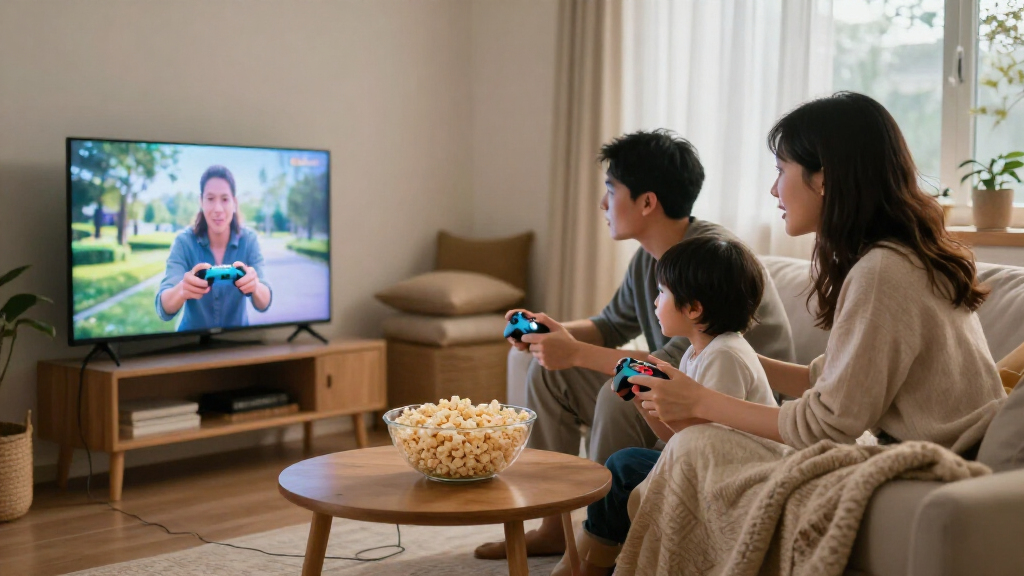

The best family gaming consoles depend on whether your household wants active movement, tabletop play, or classic games on the TV. I rank the Nex Playground as the best overall fit for families seeking motion-based play, while the Board.Fun Interactive Tabletop Game Console stands out for hands-on group sessions and the Nintendo Wii bundle for familiar motion-controlled games. The main tradeoff is between purpose-built family experiences and retro sticks that promise broad game libraries but can be less clear about game selection and setup. I also weigh shared play, ease of use, and whether each format fits different ages and play spaces. Read on for the full comparison and my recommendations by household type.

Turn the school run and nap time into listening time
- Thousands of audiobooks, podcasts and originals
- Listen on your phone, tablet or Echo — also offline
- Cancel anytime
Complete the kit


Key Takeaways
- Nex Playground leads for active family play: it is the clearest fit in this lineup for households that want movement-based games as the main attraction.
- Different play styles matter more than headline game counts: Board.Fun focuses on tabletop interaction, while retro sticks center on classic games displayed on a TV.
- The Wii bundle has a distinct legacy role: its two remotes and two Nunchuks make shared motion play a natural fit, but buyers should be comfortable choosing older hardware.
- Retro sticks are not interchangeable: the JSAIGams U36 and X10 Pro list 128GB storage, while the other retro options differ in stated storage, game counts, and emulator claims.
- Several motion-console listings target similar needs: AR Motion, HAPHOM, FWFX, and Blackview PlayPop 8 all point toward active play, so buyers should compare setup, included games, and household fit rather than choosing by name alone.
| AR Motion Gaming Console for Kids – Plug & Play Active TV Video Game (Cyan) |  | Best for Simple, Subscription-Free Active Play | Players: 1–2 | Included games: 34 preloaded interactive games | Display technology: Augmented reality | VIEW LATEST PRICE | See Our Full Breakdown |
| HAPHOM AR Motion Gaming Console |  | Best for Wireless-Controller Variety | Players: 1–2 | Game types: Motion and controller-based games | Genres: Sports, puzzle, adventure, and education | VIEW LATEST PRICE | See Our Full Breakdown |
| Nex Playground – Active Play System for Kids & Families | 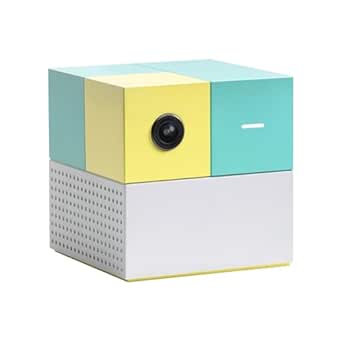 | Best for Whole-Family Active Play | Players: Up to 4 | Included games: 5 | Control method: Built-in camera; no controller required | VIEW LATEST PRICE | See Our Full Breakdown |
| Board.Fun The Board Interactive Tabletop Game Console |  | Best for Shared Tabletop Play | Players: 1–8 | Screen: 24-inch LCD touchscreen | Storage: 64 GB | VIEW LATEST PRICE | See Our Full Breakdown |
| Nintendo Wii Console Bundle with 2 Remotes and 2 Nunchuks (RVL-001) – White |  | Best for Classic Motion-Control Multiplayer | Model: RVL-001 | Platform: Nintendo Wii | Color: White | VIEW LATEST PRICE | See Our Full Breakdown |
| JSAIGams U36 Retro Game Console Stick – 128GB Storage, 4K HDMI Plug & Play, Dual Wireless Controllers, Orange |  | Best for Families with Their Own Retro Game Library | Processor: Quad-core S905X4 | GPU: ARM Mali-450, up to 750 MHz | Storage: 128GB microSD | VIEW LATEST PRICE | See Our Full Breakdown |
| Blackview PlayPop 8 AI Active Play System – Motion Gaming Console with 30 Games |  | Best for Controller-Free Group Movement | Players: Up to 4 | Controller type: Controller-free, camera-based motion tracking | Processor: Octa-core Rockchip RK3576 | VIEW LATEST PRICE | See Our Full Breakdown |
| X10 Pro Retro Game Console Stick 128GB – Plug & Play HDMI 1080p with Two Wireless Controllers |  | Best for Simple 1080p Retro Setups | Storage: 128GB | Memory type: microSD (TF card slot) | Resolution: 1080p | VIEW LATEST PRICE | See Our Full Breakdown |
| FWFX AR Motion Gaming Console for Kids and Families – Plug & Play |  | Best for Active Play Without a Subscription | Players: 1–2 | Games: More than 30 preloaded games | Controls: Motion sensing and optional wireless button controllers | VIEW LATEST PRICE | See Our Full Breakdown |
| Retro Game Console with 30,000+ Games, 4K HDMI Plug-and-Play Stick, 64GB Storage, Dual 2.4GHz Wireless Controllers |  | Best for Families Who Want a Ready-Made Retro Catalog | Included games: 30,000+ | Supported emulators: 30+ | Storage: 64GB | VIEW LATEST PRICE | See Our Full Breakdown |
| 2026 Retro Gaming Console with 40000+ Games, 23 Emulators, 128GB TF Card, 4K HDMI Output, Dual 2.4G Wireless Controllers, Plug and Play |  | Best for a Large Preloaded Retro Library | Platform: PlayStation Vita | Preloaded library: More than 40,000 games | Emulators: 23 built-in emulators | VIEW LATEST PRICE | See Our Full Breakdown |
| family gaming console | Storage | Players | Dimensions | Weight |
|---|---|---|---|---|
| AR Motion Gaming Console for K | 3 GB | 1–2 | 4.55 × 1.56 × 5.91 inches | 16 ounces |
| HAPHOM AR Motion Gaming Consol | — | 1–2 | — | — |
| Nex Playground | 64 GB | Up to 4 | 3 × 3 × 3 inches | 13.76 ounces |
| Board.Fun The Board Interactiv | 64 GB | 1–8 | 25.7 × 13.9 × 1.5 inches | — |
| Nintendo Wii Console Bundle wi | — | — | — | About 5 pounds |
| JSAIGams U36 Retro Game Consol | 128GB microSD | — | — | — |
| Blackview PlayPop 8 AI Active | 128GB | Up to 4 | 3 x 3 x 3 inches (76mm cube) | 13.76 ounces |
| X10 Pro Retro Game Console Sti | 128GB | — | 16 x 12 x 11.4cm | 0.46kg |
| FWFX AR Motion Gaming Console | — | 1–2 | 5.91 x 4.72 x 1.57 inches | 1.6 pounds |
| Retro Game Console with 30,000 | 64GB | — | — | — |
| 2026 Retro Gaming Console with | 128GB microSD card | — | — | — |
More Details on Our Top Picks
AR Motion Gaming Console for Kids – Plug & Play Active TV Video Game (Cyan)
For families who want movement-based games without adding another ongoing fee, this compact console is a straightforward pick. Its 34 preloaded titles use a built-in camera to track movement, and HDMI setup lets you play on a compatible TV, monitor, or projector without an internet connection. That makes it easier to bring into a family game night or classroom break than the Nex Playground, which supports four players but offers only five games without its optional Play Pass. This AR console is limited to one or two players, though, so it is less suited to larger family groups. The fixed game library also means less variety over time, and battery operation requires four AA batteries when the adapter is not used. I’d choose it for uncomplicated active play, not as a broad, expandable console library.
Pros:- Includes 34 preloaded motion games with no subscription required
- HDMI setup works with a TV, monitor, or projector
- Camera-based play encourages movement and coordination
- Compact, lightweight body is easy to carry
Cons:- Limited to one or two players, unlike the four-player Nex Playground
- Game selection is restricted to pre-installed titles
- Requires four AA batteries when not connected to the AC adapter
Best for: Families with young children who want quick, active two-player games without internet access or subscription fees.
Not ideal for: Families seeking four-player play, a large evolving game library, or games designed for traditional game controllers.
- Players:1–2
- Included games:34 preloaded interactive games
- Display technology:Augmented reality
- Connection:HDMI
- Power:AC adapter or 4 AA batteries
- Storage:3 GB
- Dimensions:4.55 × 1.56 × 5.91 inches
- Weight:16 ounces
Our verdict“Choose this console for convenient, subscription-free active games for one or two children, but skip it if your family needs a larger player count or expandable library.”
HAPHOM AR Motion Gaming Console
The HAPHOM is a better fit for families who want a mix of motion and controller-based games rather than a single style of active play. Its preloaded sports, puzzle, adventure, and educational titles give different ages and interests a reason to take turns, while included wireless controllers avoid the extra hardware needed for a wired setup. Like the AR Motion Gaming Console for Kids, it supports only one or two players; the Nex Playground is the stronger match for families who want four people moving together without controllers. HAPHOM requires no subscription, but the product details do not specify its game count, display connection, power requirements, or how long software updates will be supported. That makes its long-term variety less clear than the 34-title AR console. I’d pick it for controller flexibility, not for a documented, expansive library.
Pros:- Combines motion-based and controller-based games
- Includes wireless controllers
- Offers sports, puzzle, adventure, and educational genres
- No subscription is required
Cons:- Supports only one or two players
- Game count and technical connection details are not specified
- Software update support timeline is unknown
Best for: Households with one or two children who want both motion play and wireless-controller games across several genres.
Not ideal for: Larger families needing four-player sessions or buyers who want clearly stated game counts, connection details, and update support.
- Players:1–2
- Game types:Motion and controller-based games
- Genres:Sports, puzzle, adventure, and education
- Controllers:Wireless
- Setup:Plug and play
- Subscription:None required
Our verdict“Choose HAPHOM if wireless controllers and mixed game styles matter more than a documented game count or larger-group play.”
Nex Playground – Active Play System for Kids & Families
The Nex Playground stands out for families who want a shared movement game rather than a console that keeps players seated. Its camera-based system tracks bodies without separate controllers or trackers, and support for up to four players gives it a clear advantage over the two-player AR Motion Gaming Console for Kids and HAPHOM. The tradeoff is the small out-of-box selection: just five built-in games. Families who want a broader library need the optional Play Pass, so the no-controller design does not mean a subscription-free experience for ongoing variety. It also needs an HDMI-connected TV or projector and enough clear room for everyone to move. I’d rank it above the smaller active consoles for group participation, but below a conventional console for families who value a large included library or seated play.
Pros:- Supports up to four simultaneous players
- Built-in camera tracks movement without controllers or trackers
- Active gameplay encourages shared physical activity
- Described as kid-safe, with no ads, in-app purchases, or mature material
Cons:- Only five games are included
- Expanding the library requires an optional Play Pass subscription
- Needs an HDMI-connected display and adequate play space
Best for: Families with several children or adults who want controller-free, movement-based group games in a room with open floor space.
Not ideal for: Buyers who want a large game selection included upfront, dislike subscriptions, or lack room for active play near a TV.
- Players:Up to 4
- Included games:5
- Control method:Built-in camera; no controller required
- Power:Corded electric
- Storage:64 GB
- Display connection:HDMI to TV or projector
- Dimensions:3 × 3 × 3 inches
- Weight:13.76 ounces
Our verdict“Choose Nex Playground for controller-free family movement games with up to four players, provided you are comfortable with a small starter library and optional subscription.”
Board.Fun The Board Interactive Tabletop Game Console
The Board takes family gaming away from the TV and onto a 24-inch touchscreen tabletop, where physical pieces interact with digital games through PieceSense technology. That format suits families who enjoy gathering around a table for cooperative or competitive play, and its stated range of one to eight players exceeds the Nex Playground’s four-player limit. The preloaded collection includes Chop Chop and several arcade games, with no subscription fee or batteries required for the pieces. In exchange for that group-friendly setup, the console needs substantial table space: its footprint is much larger than the compact motion consoles, and it is less convenient to put away or take on a trip. The included library is also limited compared with systems that can expand. I’d choose The Board for hands-on tabletop sessions, not for families seeking a compact living-room console.
Pros:- Supports solo, cooperative, and competitive play for 1–8 players
- PieceSense combines physical game pieces with touchscreen play
- Pieces require no batteries or pairing
- Preloaded games can be played without a subscription
Cons:- Large 25.7-inch-long body needs significant table space
- Included game library is limited compared with expandable systems
- Tabletop format does not provide the room-scale active play of Nex Playground
Best for: Families and groups who regularly play together at a table and want physical pieces, cooperative modes, and support for larger gatherings.
Not ideal for: Households short on table space or buyers who want a portable system, a broad game library, or TV-based active play.
- Players:1–8
- Screen:24-inch LCD touchscreen
- Storage:64 GB
- Platform:Android
- Recommended age:6 years and up
- Included games:Chop Chop, Board Arcade, Cosmic Crush, Snek, Astrofort, Starfire, Space Rocks
- Dimensions:25.7 × 13.9 × 1.5 inches
- Warranty:1 year
Our verdict“Choose The Board if your family wants a shared, hands-on tabletop system for larger groups and has space to leave it set up.”
Nintendo Wii Console Bundle with 2 Remotes and 2 Nunchuks (RVL-001) – White
This Wii bundle is the pick for families drawn to classic motion-controlled play and games built around individual remotes rather than camera-tracked movement. Two Wii Remotes and two Nunchuks are included, giving a household a ready-made starting point for multiplayer titles; its support for GameCube accessories and games also adds a different kind of family play from the Nex Playground’s body-tracking focus. The tradeoff is age: the Wii is an older platform, and the supplied details do not clarify current software support or the availability of newer games. It also uses handheld controllers, so it cannot match the Nex Playground’s controller-free setup. The listing specifies HDMI and up to 4K resolution, but does not explain the connection hardware or conditions behind that output claim. I’d choose it for its bundled controllers and legacy-game appeal, not as a modern expandable platform.
Pros:- Bundle includes two Wii Remotes and two Nunchuks
- Supports GameCube accessories and games
- Handheld motion controls offer a different play style from camera-based active systems
- Listed with HDMI connectivity and up to 4K resolution
Cons:- Older hardware may lack support for newer games
- Software update information is unclear
- Requires handheld controllers rather than the Nex Playground’s controller-free camera play
Best for: Families interested in classic Wii and GameCube-era play who want a bundle with two remotes and two Nunchuks included.
Not ideal for: Buyers who want a current platform with clear ongoing software support, newly released games, or camera-based controller-free play.
- Model:RVL-001
- Platform:Nintendo Wii
- Color:White
- Included controllers:2 Wii Remotes and 2 Nunchuks
- Connectivity:HDMI
- Listed resolution:Up to 4K
- Weight:About 5 pounds
- Compatibility:Supports GameCube accessories and games
Our verdict“Choose this Wii bundle for its included multiplayer controllers and legacy-game compatibility, but skip it if you want a clearly supported modern platform.”
JSAIGams U36 Retro Game Console Stick – 128GB Storage, 4K HDMI Plug & Play, Dual Wireless Controllers, Orange
The JSAIGams U36 suits families who already have legally obtained ROMs and want a small TV-connected setup for shared retro play. Its 128GB microSD card leaves room for a substantial personal library, while the two wireless controllers make couch co-op possible without extra purchases. Compared with the X10 Pro, the U36 offers 4K output rather than 1080p and gives buyers rechargeable-controller options, but neither stick includes games. That requirement makes it less straightforward for families seeking an out-of-the-box game night. The compact plug-in design is easy to move between TVs, though setup depends on supplying compatible files and, for reliable power, a suitable adapter. It makes the most sense for game-owning households, not families expecting a ready-made catalog.
Pros:- 128GB microSD storage accommodates a large personal game library.
- 4K HDMI output suits newer televisions.
- Includes two 2.4GHz wireless controllers for local multiplayer.
- Compact stick design and rechargeable-controller option support portable use.
Cons:- No games are pre-installed; users must supply legally obtained ROMs.
- Recommended power adapter is not included.
- Android-based hardware may limit compatibility with some emulators.
Best for: Families with legally owned retro game files who want a portable HDMI stick and two-player play on a 4K television.
Not ideal for: Parents seeking a console with included games and simple setup, since this model requires users to provide their own ROMs and power adapter.
- Processor:Quad-core S905X4
- GPU:ARM Mali-450, up to 750 MHz
- Storage:128GB microSD
- Video output:4K HDMI
- Controllers:Two 2.4GHz wireless gamepads
- Power:5V/2A adapter recommended; adapter not included
- Controller power:Rechargeable via USB-C or Micro-USB, or AAA batteries; batteries not included
- Color:Orange
Our verdict“Choose the U36 if your family already has compatible retro games and values 4K output and portable two-player play over an included library.”
Blackview PlayPop 8 AI Active Play System – Motion Gaming Console with 30 Games
The Blackview PlayPop 8 is the most movement-focused pick here: its camera tracks body motions so up to four family members can play without each holding a gamepad. That makes it a stronger fit for shared active sessions than the FWFX AR Motion Gaming Console, which supports up to two players and includes optional button controllers. The PlayPop 8 also has a compact build and local data processing, a useful combination for families who want a small setup and prefer not to send tracking data to cloud storage. The tradeoff is that its advertised game access is not all included at no extra cost: full catalog access requires a GamePass subscription. It also needs a separate 15W-or-higher power adapter, and its motion-based format may not suit children who prefer traditional controller games.
Pros:- Camera-based body tracking supports controller-free play for up to four players.
- Compact 3-inch cube is easy to place beside a TV or pack for travel.
- Local data processing avoids cloud storage of gameplay data.
- 128GB storage and 8GB RAM support its built-in system and game library.
Cons:- Full access to the game catalog requires a separate GamePass subscription.
- A 15W-or-higher power adapter is required and sold separately.
- Motion-only controls are less suited to families who want conventional gamepad play.
Best for: Families with several children who want controller-free active games for up to four players and value local processing.
Not ideal for: Households seeking a complete game catalog without an ongoing subscription or children who prefer standard gamepad controls.
- Players:Up to 4
- Controller type:Controller-free, camera-based motion tracking
- Processor:Octa-core Rockchip RK3576
- Memory:8GB LPDDR4X RAM
- Storage:128GB
- Camera:12MP, 176° wide-angle, 17-point AI body tracking
- Dimensions:3 x 3 x 3 inches (76mm cube)
- Weight:13.76 ounces
- Power:Corded; requires a separate 15W-or-higher adapter
Our verdict“Pick the PlayPop 8 for multi-player movement games and local processing, provided the subscription and separate power adapter fit your plans.”
X10 Pro Retro Game Console Stick 128GB – Plug & Play HDMI 1080p with Two Wireless Controllers
The X10 Pro keeps the hardware proposition simple: connect it to a TV over HDMI, pair its two wireless gamepads, and use the 128GB storage for a personal retro library. Its 1080p output is a sensible match for standard HD televisions, but it lacks the 4K output offered by the JSAIGams U36. Unlike the Blackview PlayPop 8, it also sticks to seated, controller-based play rather than group motion games. The straightforward setup may appeal to families who want a lightweight device without a console account, but “plug and play” does not mean games are included here. Buyers must provide their own legally owned ROM files, so this is a better fit for an existing collection than for a household starting from scratch.
Pros:- HDMI plug-in setup avoids a console account requirement.
- Two wireless gamepads support local multiplayer.
- 128GB storage provides room for a personal retro collection.
- Portable design and included one-year warranty.
Cons:- No games are included; users must provide legally owned ROM files.
- 1080p output is below the 4K output offered by the JSAIGams U36.
- Does not provide motion-based active play.
Best for: Families with a 1080p TV and a legally owned retro game collection who want two included wireless controllers.
Not ideal for: Buyers who want included games, 4K output, or active motion play rather than traditional gamepad sessions.
- Storage:128GB
- Memory type:microSD (TF card slot)
- Resolution:1080p
- Connectivity:HDMI and USB
- Controllers:Two wireless gamepads with USB receiver
- Dimensions:16 x 12 x 11.4cm
- Weight:0.46kg
- Warranty:1 year
Our verdict“Choose the X10 Pro for a basic 1080p retro setup with two gamepads if you already have the games to load.”
FWFX AR Motion Gaming Console for Kids and Families – Plug & Play
The FWFX AR Motion Gaming Console is the better match for families who want active play without relying on Wi-Fi or a subscription. Its more than 30 preloaded games combine motion sensing with optional wireless controllers, giving kids a choice between movement-based activities and button controls. Compared with the Blackview PlayPop 8, the FWFX has a smaller player limit of two, but its games are included rather than tied to a GamePass subscription. That makes it a more self-contained choice for a smaller household. The tradeoff is a fixed library that may feel limited once the included titles have been explored. It also works only through a TV or projector and requires four AAA batteries for the controllers, which are not supplied.
Pros:- More than 30 preloaded games provide immediate play without downloading a catalog.
- Motion sensing and optional wireless controllers support different play styles.
- HDMI setup works without internet or Wi-Fi.
- Exercise stats add a fitness angle to family game sessions.
Cons:- Supports only one or two players, fewer than the Blackview PlayPop 8.
- Game library may feel limited beyond the preloaded titles.
- Controllers require four AAA batteries, which are not included.
Best for: Families with one or two children who want preloaded active games for offline play and optional traditional controls.
Not ideal for: Larger households seeking four-player motion games, families wanting a broad expanding catalog, or anyone needing a built-in screen.
- Players:1–2
- Games:More than 30 preloaded games
- Controls:Motion sensing and optional wireless button controllers
- Display connection:HDMI to TV or projector
- Internet requirement:No internet or Wi-Fi required
- Power source:Corded electric
- Controller batteries:Four AAA batteries; not included
- Dimensions:5.91 x 4.72 x 1.57 inches
- Weight:1.6 pounds
Our verdict“Pick the FWFX for offline active play with included games and optional button controls, especially for households of one or two players.”
Retro Game Console with 30,000+ Games, 4K HDMI Plug-and-Play Stick, 64GB Storage, Dual 2.4GHz Wireless Controllers
This retro stick is the most direct choice in this group for families who want games ready to browse rather than a device that depends on their own ROM collection. It lists 30,000+ included games, supports more than 30 emulators, and includes two 2.4GHz controllers for local play. That is a different proposition from the X10 Pro and JSAIGams U36, both of which require users to supply legally owned game files. The tradeoff is less storage than either of those 128GB sticks, at 64GB, and the supplied catalog may be less appealing to families who want a carefully curated, small selection. With 4K HDMI output and plug-and-play setup, it is geared toward browsing a large retro library, not active motion gaming like the FWFX.
Pros:- Lists more than 30,000 included games and supports over 30 emulators.
- 4K HDMI output connects directly to a modern television.
- Two 2.4GHz wireless controllers support multiplayer sessions.
- Plug-and-play format avoids the need to provide a personal ROM library.
Cons:- 64GB storage is smaller than the 128GB offered by the X10 Pro and JSAIGams U36.
- The large pre-installed catalog may be harder to browse than a smaller curated selection.
- Offers seated retro play rather than the active motion gameplay of the FWFX.
Best for: Families who prefer a ready-to-browse retro catalog and want two wireless controllers for shared TV play.
Not ideal for: Buyers who want motion-based activity, a smaller curated game selection, or 128GB of storage for additions.
- Included games:30,000+
- Supported emulators:30+
- Storage:64GB
- Video output:4K HDMI
- Controllers:Two 2.4GHz wireless controllers
- Connectivity:Plug and play
Our verdict“Choose this stick if an included, extensive retro catalog matters more to your family than motion play or extra storage capacity.”
2026 Retro Gaming Console with 40000+ Games, 23 Emulators, 128GB TF Card, 4K HDMI Output, Dual 2.4G Wireless Controllers, Plug and Play
Families who want a broad selection of older-style games in one simple setup may prefer this stick to motion-focused options such as the Nex Playground. It comes with more than 40,000 preloaded games across 23 emulators, plus two wireless controllers for shared play on a TV. The plug-and-play HDMI connection also avoids a separate download or console setup process. Its 128GB microSD storage supports the included library, but the product data says adding new titles is difficult, so buyers should treat the preloaded collection as the main attraction. Compared with the X10 Pro Retro Game Console Stick, this model advertises 4K output rather than 1080p, though that does not make its games native 4K. The budget-style build and possible controller input lag make it less suited to frequent, competitive play.
Pros:- Includes more than 40,000 preloaded games across 23 emulators
- Two 2.4GHz wireless controllers support multiplayer without controller cables
- HDMI connection and plug-and-play setup keep initial setup simple
- 128GB microSD storage is included
Cons:- Controllers may have more input lag than wired options
- Inexpensive-feeling construction may not hold up to rough or frequent use
- Adding games beyond the preinstalled library may be difficult
Best for: Families seeking a plug-and-play collection of retro games for occasional, shared TV play, with two controllers included.
Not ideal for: Families who want current releases, easy access to add-on games, responsive competitive controls, or a console built for heavy daily use.
- Platform:PlayStation Vita
- Preloaded library:More than 40,000 games
- Emulators:23 built-in emulators
- Storage:128GB microSD card
- TV connectivity:HDMI
- Output resolution:4K
- Controllers:Two 2.4GHz wireless gamepads
- Color:White
Our verdict“Choose this stick if your family values a very large ready-to-play retro library over modern games, sturdy construction, or easy game expansion.”
How We Picked
I ranked these consoles by how well they serve shared family play, not by the size of a claimed game library. My main criteria were the clarity of the play format, suitability for more than one player, ease of getting started, and the usefulness of the included hardware and games for a household. I also separated active motion systems, tabletop play, older motion-controlled hardware, and retro HDMI sticks because they solve different family needs.
The Nex Playground ranks first because its stated purpose is active play for kids and families, making its role easy to understand. Board.Fun and the Wii bundle follow as distinctive options for tabletop interaction and familiar motion games. Retro sticks rank lower for family use because storage and game-count claims do not by themselves tell buyers how suitable the library is for children or how simple the experience will be. The remaining motion systems are grouped by their shared active-play focus, with their individual listings and stated features guiding their place in the lineup.
Factors to Consider When Choosing Best Family Gaming Consoles
Before choosing a console, I would start with how your family actually wants to spend time together. A system designed for movement can be a poor fit for a small room, while a large retro library may offer less value if nobody wants to browse it. These factors help separate a good match from a device that merely sounds appealing on a product page.
Match the play style to your household
Decide whether family gaming means moving around, gathering at a table, or taking turns with a controller. Motion systems suit households that want games to prompt physical activity, while tabletop formats make the screen itself a shared surface for group play. Retro consoles are a better fit when familiar arcade or console-style games are the main draw. A common mistake is choosing by a broad label such as “family” without checking what players will actually do. Ask each likely player which format sounds fun before making the choice. That small conversation can prevent a console from becoming a one-person device.
Check the room and screen setup
Active games need usable space, and that requirement can change whether a motion console works in a living room or bedroom. Measure the open area where players will stand, including space away from furniture and fragile objects. For tabletop play, think about where everyone can gather and whether the device’s play surface suits your seating arrangement. HDMI sticks are compact, but the TV still needs an available connection and a comfortable viewing setup. Do not assume that “plug and play” means every room or television is ready without adjustment. Choose around the space you have, not an idealized game room.
Look past game-count claims
Large library numbers can make a retro stick seem like the obvious family choice, but quantity does not tell you whether the games suit your players. Consider whether the titles are recognizable, easy to browse, and appropriate for the ages in your home. A smaller, clearly described selection may be easier for children to use than a menu filled with unfamiliar options. Check what is actually included and whether the listing explains how games are organized. Treat storage capacity as room for content, not proof of a better experience. The best library is one your family can navigate and enjoy together.
Plan for ages, turn-taking, and supervision
Family consoles often serve players with different reading abilities, coordination, and patience. Look for a play format that lets younger children join without making older players feel limited, and think about how the system handles group turns. Motion games may need an adult nearby to help keep play safe and orderly. Controller-based games can involve less movement but may require more help with menus or controls. If several children will share the device, decide how you will handle turns before the console arrives. A system that supports the household’s routines is more useful than one that only appeals to the most enthusiastic player.
Weigh simple setup against flexibility
Compact plug-in systems can reduce setup steps, while a console with more accessories or a broader play format may offer more ways to play. Think about whether your family values quick access or a wider range of experiences. Bundled controllers can help a group start together, but check that the included accessories match the number of players you expect. Older hardware may offer a familiar style of play, yet buyers should be comfortable with its age and condition when shopping for a used or refurbished unit. Do not pay extra for flexibility you are unlikely to use. Choose the simplest setup that still supports the games your household wants.
Consider upkeep and long-term fit
Family use can mean frequent handling, shared accessories, and repeated setup, so practical upkeep matters. Motion-based play benefits from a clear floor area and routines for putting controllers or accessories away after use. Retro sticks and tabletop systems have different physical demands, but each still needs a reliable place to live near the TV or play area. Think about whether the console will be easy to bring out for a group and store afterward. Also consider whether its central play style is likely to hold your family’s interest beyond the first few sessions. A good match should fit both your current routine and the way your household shares entertainment.
Frequently Asked Questions
Which type of console is the best fit for a family that wants active play?
I would start with a motion-based system such as the Nex Playground or one of the AR Motion options, because their stated purpose centers on movement rather than conventional controller play. Compare the setup and included game details before choosing among similar listings; the names alone do not tell you how they differ in day-to-day use. Check that your room has enough open space for the intended players. If your household prefers seated games, a retro stick or tabletop system may get more use. The right choice depends on whether movement is the main goal or just an occasional extra.
Are retro game sticks a good choice for children?
They can suit children who enjoy classic-style games, but a large advertised library does not automatically make a stick child-friendly. I would check how clearly the games are identified, how easy the menu is to use, and whether an adult can review the available content. The JSAIGams U36 and X10 Pro list 128GB storage, while other sticks in this roundup make different storage or game-count claims; those figures alone do not establish which library is best. Consider whether children can find suitable games without extensive help. If easy, guided play is the priority, a purpose-built family or active-play system may be a better fit.
Should I choose an active-play system or the Nintendo Wii bundle?
I would choose based on whether you want a current active-play-focused option or are specifically interested in the Wii’s older motion-controlled game format. The Wii bundle includes two remotes and two Nunchuks, which gives a group more bundled control hardware than many single-controller setups. The Nex Playground is positioned more directly as an active play system for kids and families. With the Wii, buyers should be comfortable with older hardware and check the condition and completeness of the particular bundle. Neither format is automatically better for every home; the preferred games and setup matter more.
How much space should I set aside for a motion gaming console?
There is no single room size that works for every motion system, because games and player movement can vary. I would clear a safe area around the screen, remove objects that could be knocked over, and leave enough room for players to move without crowding one another. Check the product’s own setup guidance for any specified distance or placement needs. If your available area is tight, tabletop play or a compact HDMI stick may be easier to accommodate. A quick room check before buying can prevent an active-play console from being used only occasionally.
What should I compare when two consoles claim large game libraries?
Compare the details behind the claim: whether the library is described clearly, how games are organized, and whether the controls suit the people who will play. Storage figures such as 64GB or 128GB describe capacity, not game quality or ease of browsing. For children and mixed-age groups, accessible menus and suitable shared games may matter more than the total number listed. I would also check which controllers come with the device and whether the format supports the way your family likes to play. A smaller, usable selection can serve a household better than a larger library that is hard to navigate.
Conclusion
For most households seeking movement-based shared play, I recommend the Nex Playground as the best overall. The best value in play style depends on what your family already enjoys: choose a retro stick for compact classic gaming, with the X10 Pro or JSAIGams U36 as options that list 128GB storage. For a best premium-style family experience, I would favor a dedicated active-play or tabletop system over a stick selected mainly for a large game-count claim. The best choice for beginners is the format your youngest players can understand and join easily; the Nex Playground is the clearest starting point for active play, while Board.Fun suits families drawn to shared tabletop sessions. For households specifically seeking familiar motion-controlled gaming, the Wii bundle has a distinct role with two remotes and two Nunchuks. Match the console to your room, players, and preferred kind of group play before deciding.