The best toddler educational laptops pair simple, child-friendly controls with activities a young learner can explore without constant adult help. My best overall pick is the LeapFrog 2-in-1 LeapTop Touch for its laptop-and-tablet play style, while the LeapFrog My First STEAM Laptop stands out for broader early-learning themes and the VTech Genio Bilingual JuniorBook for families seeking two-language activities. The main tradeoff is whether to prioritize varied learning play, a familiar character, bilingual content, or a simpler toy interface. Age fit, sound controls, and how much the child can do independently also matter. Read on for a comparison of all 13 options and guidance on matching one to your toddler.

Turn the school run and nap time into listening time
- Thousands of audiobooks, podcasts and originals
- Listen on your phone, tablet or Echo — also offline
- Cancel anytime
Complete the kit


Key Takeaways
- LeapFrog’s two options serve different goals: the LeapTop Touch adds a tablet-style mode, while My First STEAM Laptop puts more emphasis on themed early-learning activities.
- Bilingual models form a distinct group: several Lexibook choices and the VTech Genio offer language-focused play, so language content can narrow the field quickly.
- Character appeal is the main differentiator among many Lexibook picks: Spider-Man, Unicorn, Miraculous, Frozen, Paw Patrol, and Disney Princess editions share a broad laptop-toy format but vary in theme and language emphasis.
- Simple controls may suit younger or less independent toddlers better: the VTech Play Smart Preschool Laptop and Tote & Go Laptop offer straightforward toy-laptop play without the 2-in-1 format.
- There is no single best fit for every household: learning variety, language practice, child familiarity with a character, and ease of use point toward different picks.
| Lexibook, Spider-Man Educational Laptop for Kids, JC598SPi2 |  | Best for Broad Bilingual Practice | Activities: 124 | Languages: English and Spanish | Subjects: Math, typing, general knowledge, logic, music, clock reading, and games | VIEW LATEST PRICE | See Our Full Breakdown |
| VTech Play Smart Preschool Laptop, Pink |  | Best for Preschool Beginners | Age range: 3–6 years | Activities: 30 across five learning categories | Languages: English with introductory Spanish activities | VIEW LATEST PRICE | See Our Full Breakdown |
| VTech Swipe and Learn Smarties Laptop, Blue |  | Best for the Youngest Learners | Recommended age: 18 months to 4 years | Learning features: Letter recognition, phonics, counting, number recognition, animal recognition, weather, and music | Music: Piano keys and five instrument sounds | VIEW LATEST PRICE | See Our Full Breakdown |
| Lexibook Unicorn Bilingual Educational Laptop for Kids |  | Best for Spanish-English Activity Variety | Model: JC601UNIi2 | Age range: 4 years and up | Activities: 164 total: 82 in English and 82 in Spanish | VIEW LATEST PRICE | See Our Full Breakdown |
| VTech Genio Bilingual JuniorBook Learning Laptop for Kids |  | Best for Older Children Practicing Computer Skills | Age range: 5 years and up | Activities: More than 80 | Languages: English and Spanish | VIEW LATEST PRICE | See Our Full Breakdown |
| Lexibook Miraculous Bilingual Educational Laptop for Kids |  | Best for Miraculous Fans | Brand: Lexibook | Model: JC598MIi2 | Age range: 4 years and up | VIEW LATEST PRICE | See Our Full Breakdown |
| Lexibook Disney Frozen Bilingual Educational Laptop for Kids |  | Best for Activity Variety | Brand: Lexibook | Model: JC599FZi2 | Age range: 3 years and up | VIEW LATEST PRICE | See Our Full Breakdown |
| Lexibook Paw Patrol Bilingual Educational Laptop, Spanish and English |  | Best Compact Pick | Brand: Lexibook | Model: JC598PAi2 | Age range: 4 years and up | VIEW LATEST PRICE | See Our Full Breakdown |
| LeapFrog 2-in-1 LeapTop Touch |  | Best for Younger Beginners | Brand: LeapFrog | Age range: 2–5 years | Learning modes: ABCs, numbers, games, music, and messages | VIEW LATEST PRICE | See Our Full Breakdown |
| Lexibook Disney Princess Bilingual Educational Laptop for Kids |  | Best for Disney Princess Fans | Brand: Lexibook | Model: JC599DPi2 | Age range: 3 years and up | VIEW LATEST PRICE | See Our Full Breakdown |
| 2-in-1 Learning Laptop Toy for Toddlers |  | Best for Flexible Early Play | Brand: GMAOPHY | Model: LAPTOP-G6 | Age range: 12 months and up | VIEW LATEST PRICE | See Our Full Breakdown |
| LeapFrog My First STEAM Laptop | 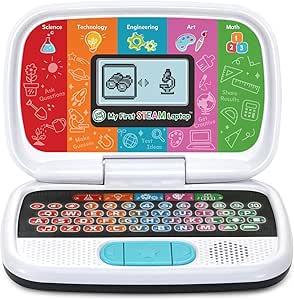 | Best for Preschool STEAM Learning | Brand: LeapFrog | Recommended age: 36 months and up | Educational objectives: Early development, logical thinking, motor skills, STEAM, shape recognition | VIEW LATEST PRICE | See Our Full Breakdown |
| VTech Tote & Go Laptop, Orange |  | Best for Progressive Preschool Practice | Brand: VTech | Model: 80-155400 | Recommended age: 3–6 years | VIEW LATEST PRICE | See Our Full Breakdown |
| toddler educational laptop | Age range | Activities | Brand | Languages |
|---|---|---|---|---|
| Lexibook | — | 124 | — | English and Spanish |
| VTech Play Smart Preschool Lap | 3–6 years | 30 across five learning categories | — | English with introductory Spanish activities |
| VTech Swipe and Learn Smarties | — | — | — | — |
| Lexibook Unicorn Bilingual Edu | 4 years and up | 164 total: 82 in English and 82 in Spanish | — | — |
| VTech Genio Bilingual JuniorBo | 5 years and up | More than 80 | — | English and Spanish |
| Lexibook Miraculous Bilingual | 4 years and up | 124 | Lexibook | English and Spanish |
| Lexibook Disney Frozen Bilingu | 3 years and up | 170 (85 in each language) | Lexibook | English and Spanish |
| Lexibook Paw Patrol Bilingual | 4 years and up | Language, math, general knowledge, logic, music, clock reading, and typing | Lexibook | English and Spanish |
| LeapFrog 2-in-1 LeapTop Touch | 2–5 years | — | LeapFrog | — |
| Lexibook Disney Princess Bilin | 3 years and up | 170 (85 in each language) | Lexibook | English and Spanish |
| 2-in-1 Learning Laptop Toy for | 12 months and up | — | GMAOPHY | — |
| LeapFrog My First STEAM Laptop | — | — | LeapFrog | — |
| VTech Tote & Go Laptop | — | — | VTech | — |
More Details on Our Top Picks
Lexibook, Spider-Man Educational Laptop for Kids, JC598SPi2
The Spider-Man Educational Laptop suits families looking for more than early letter and number games: its 124 activities span English and Spanish, math, typing, logic, general knowledge, music, and clock reading. That range gives it a broader subject mix than the VTech Swipe and Learn Smarties Laptop, which is aimed at younger children and focuses more on foundational recognition and sounds. A keyboard and mouse add a laptop-like feel, while musical activities invite children to learn notes and make melodies. The tradeoff is a small LCD screen with animations rather than a full-color display, and the character-led design may not appeal to every child. At 1.4 pounds, it is also heavier than the VTech Play Smart Preschool Laptop. I’d choose it for a Spider-Man fan ready to explore varied activities, not for a toddler who needs the simplest first learning toy.
Pros:- 124 activities cover a wide mix of subjects and play styles.
- English and Spanish activities support early exposure to both languages.
- Keyboard and mouse encourage laptop-style interaction.
- Music activities include learning notes and composing melodies.
Cons:- Small LCD screen offers less visual detail than a tablet-style display.
- At 1.4 pounds, it is heavier than the VTech Play Smart Preschool Laptop.
- Spider-Man styling may limit its appeal for children who prefer neutral designs.
Best for: Families with a Spider-Man fan who wants bilingual activities across typing, math, music, and general knowledge.
Not ideal for: Caregivers seeking a very simple first laptop for a younger toddler or a large, full-color screen.
- Activities:124
- Languages:English and Spanish
- Subjects:Math, typing, general knowledge, logic, music, clock reading, and games
- Screen:LCD with animations
- Input:Keyboard and mouse
- Batteries:2 AA batteries required
- Dimensions:9.45 × 7.09 × 1.42 inches
- Weight:1.4 pounds
- Theme:Spider-Man, red and blue
Our verdict“Choose this for a character-loving child ready for broad bilingual activities, but pick the VTech Swipe and Learn Smarties Laptop for a younger beginner.”
VTech Play Smart Preschool Laptop, Pink
The VTech Play Smart Preschool Laptop is the clearest fit for children beginning to explore letters, numbers, and simple categories. Its 30 activities are organized into five learning areas, with levels that let a child revisit familiar ideas and try more challenging ones. The All About You section adds personalization, while the penguin guide gives the activities a friendly companion. Compared with the Lexibook Spider-Man laptop, this model offers fewer activities and a narrower subject range, but its preschool focus makes the experience easier to approach. It also introduces Spanish words and a QWERTY-style keyboard without trying to mimic a more advanced computer. The main limitation is its 3–6 age range and relatively basic activity set; older children may outgrow it sooner than the broader Lexibook option. New AA batteries are recommended for regular use.
Pros:- Leveled activities make it approachable for early learners.
- Personalization lets children add a name, age, and avatar.
- Includes letter sounds, counting, shapes, animals, food categories, logic, and music.
- A 26-letter keyboard and 10 number keys introduce familiar keyboard layout.
Cons:- Only 30 activities, fewer than the Lexibook Spider-Man laptop’s 124.
- The activity range may feel basic as children move beyond preschool skills.
- Requires 2 AA batteries, and fresh batteries are recommended for regular use.
Best for: Families seeking a straightforward first learning laptop for a preschooler who is practicing letters, counting, shapes, and first Spanish words.
Not ideal for: Older children who want many subjects, extensive bilingual content, or a more advanced pretend-computer experience.
- Age range:3–6 years
- Activities:30 across five learning categories
- Languages:English with introductory Spanish activities
- Learning topics:Letters, words, numbers, shapes, animals, foods, logic, games, and music
- Keyboard:26 letter keys and 10 number keys
- Batteries:2 AA batteries; included for demo purposes
- Dimensions:9.33 × 6.22 × 2.17 inches
- Weight:1.2 pounds
- Color and character:Pink, penguin companion
Our verdict“Pick this pink VTech for a preschool beginner who benefits from structured, leveled activities rather than a larger subject library.”
VTech Swipe and Learn Smarties Laptop, Blue
For children at the younger end of the roundup, the VTech Swipe and Learn Smarties Laptop favors immediate, sensory feedback over a large bank of school-style exercises. It introduces letters and sounds, numbers and counting, animals, weather, and music, with animated lights to hold attention as children explore. The music mode is a particular point of difference: kids can play piano keys and choose among five instrument sounds. That makes it a more age-focused starting point than the VTech Play Smart Preschool Laptop, whose leveled activities and keyboard practice suit preschoolers better. Its 18-month-to-4-year range is also comparatively narrow, so a child ready for more structured typing, Spanish, or broader subject work may outgrow it. It needs three AA batteries, one more than the Play Smart. I’d favor it when simple interaction and sound-led play matter more than a long activity list.
Pros:- Targets early letter, phonics, number, and counting skills.
- Five instrument choices add variety to music play.
- Animated lights provide visual feedback during activities.
- Covers animals and weather alongside early academic topics.
Cons:- Its 18-month-to-4-year age range is narrower than the VTech Play Smart Preschool Laptop’s 3–6 range.
- Requires 3 AA batteries, with new batteries recommended for regular use.
- The listed learning topics do not include Spanish or a broad set of advanced activities.
Best for: Caregivers choosing a first educational laptop-style toy for a child around 18 months to 3 years who responds to lights, sounds, and music.
Not ideal for: Preschoolers ready for leveled learning, Spanish practice, or a broader set of structured activities.
- Recommended age:18 months to 4 years
- Learning features:Letter recognition, phonics, counting, number recognition, animal recognition, weather, and music
- Music:Piano keys and five instrument sounds
- Visual feedback:Animated lights
- Batteries:3 AA batteries; demo batteries included
- Dimensions:9.2 × 11 × 2 inches
- Color:Blue
- Material:Plastic
- Included components:Swipe and Learn Smarties Laptop and Quick Start Guide
Our verdict“Choose this for a younger child who learns through sounds and lights, and choose the VTech Play Smart when structured preschool practice is the priority.”
Lexibook Unicorn Bilingual Educational Laptop for Kids
The Lexibook Unicorn Bilingual Educational Laptop earns its place through sheer breadth for children who enjoy switching between subjects: its 164 activities are split evenly between English and Spanish, covering math, logic, typing, music, and ChatFun. That gives it a larger bilingual activity count than the Spider-Man model’s 124 activities, while sharing the same keyboard-and-mouse approach to pretend computer use. The slim pink-and-purple design may also be a better match for children drawn to unicorn themes. Its clearest compromise is the screen, which measures just 5.1 × 9.7 cm; that limits the visual space available for activities. The listed age guidance starts at 4 years, making it less suitable as a first laptop for toddlers than the VTech Swipe and Learn Smarties Laptop. I’d pick it for an older preschooler who values language variety and activity choice more than screen size.
Pros:- 164 activities are divided evenly between English and Spanish.
- Combines math, logic, typing, music, and ChatFun activities.
- Keyboard and mouse support laptop-style pretend play.
- Slim design is intended to be easy to handle.
Cons:- The 5.1 × 9.7 cm screen is small for viewing activity prompts.
- Listed for ages 4 and up, so it is not the youngest-child pick in this roundup.
- The narrow screen may make it less appealing than the VTech Swipe and Learn Smarties Laptop’s light-and-sound approach for toddlers.
Best for: Families with a child aged 4 or older who wants a unicorn-themed laptop and substantial English-Spanish activity variety.
Not ideal for: Younger toddlers or children who need a larger screen and simpler, sensory-led play.
- Model:JC601UNIi2
- Age range:4 years and up
- Activities:164 total: 82 in English and 82 in Spanish
- Subjects:Mathematics, logic, typing, music, and ChatFun
- Screen size:5.1 × 9.7 cm
- Input:Keyboard and mouse
- Design:Slim, unicorn-themed, pink and purple
- Warranty:2 years
Our verdict“Choose this for an older preschooler who wants lots of bilingual activities in a themed laptop, but skip it if screen size or toddler-first simplicity matters most.”
VTech Genio Bilingual JuniorBook Learning Laptop for Kids
The VTech Genio Bilingual JuniorBook is the most advanced-feeling choice here, but its 5-and-up age guidance places it beyond many toddler buyers. More than 80 offline activities cover math, science, language arts, music, and Spanish, while a full-size QWERTY keyboard and cursor controller give children room to practice computer-style input. The cursor works for either hand, a practical detail for mixed-handed households. Compared with the Lexibook Unicorn laptop, the JuniorBook emphasizes keyboard and cursor skills over a themed, compact design; compared with the VTech Play Smart, it targets older children and a wider academic mix. The cost of that broader setup is a 1.9-pound body and four AA batteries, with included batteries intended only for demo use. I’d choose it for an early school-age learner, not as a toddler’s first educational laptop.
Pros:- More than 80 preloaded activities span several academic and creative subjects.
- English and Spanish content supports bilingual practice.
- Full-size QWERTY keyboard and cursor controller build computer-style input familiarity.
- Works offline without an internet connection, and the cursor suits either hand.
Cons:- Age guidance starts at 5 years, making it a poor match for most toddlers.
- At 1.9 pounds, it is heavier than the VTech Play Smart Preschool Laptop.
- Requires 4 AA batteries for regular use; included batteries are for demo purposes only.
Best for: Families with a child aged 5 or older who wants offline bilingual activities and hands-on practice with a full-size keyboard and cursor.
Not ideal for: Parents shopping specifically for a toddler or preschool beginner who needs a lighter, simpler toy.
- Age range:5 years and up
- Activities:More than 80
- Languages:English and Spanish
- Subjects:Math, science, language arts, music, and Spanish
- Keyboard:Full-size QWERTY
- Cursor controller:Right- or left-hand use
- Connectivity:Offline; no internet required
- Batteries:4 AA batteries; included for demo purposes only
- Dimensions and weight:11.3 × 7.5 × 1.4 inches; 1.9 pounds
Our verdict“Pick the JuniorBook for an older child ready to practice keyboard and cursor skills offline, not for a toddler who needs simpler activities.”
Lexibook Miraculous Bilingual Educational Laptop for Kids
The Miraculous-themed Lexibook makes sense for a child who is more likely to return to a familiar character than to an unthemed learning toy. Its 124 activities in English and Spanish span language, math, logic, general knowledge, music, typing, and clock reading, giving it broader subject coverage than a single-skill toy. Compared with the Frozen and Disney Princess Lexibook models, it offers fewer listed activities and is aimed at children 4 and up, so it is not the strongest pick for younger preschoolers or families focused on the largest activity count. The keyboard, mouse, and animated LCD create a computer-like play routine, but the activities are still toy-based rather than open-ended computer use. It also needs two AA batteries, and its three-month warranty is short.
Pros:- 124 activities cover several subjects, including typing and clock reading
- Offers activities in English and Spanish
- Keyboard, mouse, and animated LCD support computer-style pretend play
- Includes music and games alongside academic practice
Cons:- Requires two AA batteries, which are not listed as included
- Recommended age starts at four, limiting its fit for younger toddlers
- Three-month warranty is relatively short
Best for: Families with a Miraculous fan aged four or older who want bilingual practice across several early-learning subjects.
Not ideal for: Families seeking the highest listed activity count or a laptop suited to children under four; the Frozen and Princess models list 170 activities and a younger starting age.
- Brand:Lexibook
- Model:JC598MIi2
- Age range:4 years and up
- Activities:124
- Languages:English and Spanish
- Display:Animated LCD screen
- Included components:Educational laptop, mouse, instruction manual
- Power:2 AA batteries
- Warranty:3 months
Our verdict“Choose this for a Miraculous fan aged four or older who values varied bilingual activities more than the largest activity library.”
Lexibook Disney Frozen Bilingual Educational Laptop for Kids
For families comparing themed toddler laptops, the Frozen Lexibook has the broadest stated activity count here: 170 activities, split evenly between English and Spanish. Language, math, logic, general knowledge, clock reading, music, and games give children several ways to practice, while the keyboard and mouse add simple computer-style interaction. It starts at age three, making it a closer fit for younger preschoolers than the Miraculous and Paw Patrol models, which list ages four and up. The LeapFrog 2-in-1 LeapTop Touch is also aimed at younger children and offers a flip-to-tablet mode, but this Lexibook emphasizes bilingual subject activities instead. One data caveat matters: the product text lists two different screen sizes, so I would not choose it based on display dimensions. It also runs on two AA/LR6 batteries.
Pros:- Lists 170 activities, with 85 in each language
- Covers language, math, logic, general knowledge, clock reading, and music
- Includes a keyboard and mouse for computer-style play
- Age recommendation begins at three years
Cons:- Product text gives conflicting screen-size figures
- Requires two AA/LR6 batteries
- Character theme may be less appealing to children who do not like Frozen
Best for: Frozen fans aged three or older whose families want a large set of activities split between English and Spanish.
Not ideal for: Buyers who need reliable screen-size details or want a flip-to-tablet design; the product listing conflicts on display dimensions, while the LeapFrog 2-in-1 changes modes.
- Brand:Lexibook
- Model:JC599FZi2
- Age range:3 years and up
- Activities:170 (85 in each language)
- Languages:English and Spanish
- Screen:LCD; listed sizes conflict between 6.67 inches and 9.7 inches
- Power:2 AA/LR6 batteries
- Included components:Educational laptop, instruction manual, mouse
- Theme:Disney Frozen
Our verdict“Pick this for a Frozen fan who wants the widest stated bilingual activity selection, but skip it if screen-size certainty matters.”
Lexibook Paw Patrol Bilingual Educational Laptop, Spanish and English
The Paw Patrol Lexibook is the clearest choice in this group for a family that wants a compact, character-led toy rather than a full-size pretend computer. Its listed dimensions are 9.45 x 7.09 x 1.42 inches, and its 1.5-pound weight gives buyers a concrete sense of its portable format. Activities cover English and Spanish alongside math, logic, music, general knowledge, clock reading, and typing. Unlike the Frozen model, this listing does not state a total activity count, so families comparing activity volume have less information to work with. It is also rated for ages four and up, while Frozen and Disney Princess start at three. The keyboard, mouse, and animated LCD support familiar laptop play, but the plastic construction and AA battery requirement are tradeoffs rather than premium touches.
Pros:- Compact listed dimensions suit smaller play areas and travel
- Offers English and Spanish activities across several subjects
- Includes keyboard and realistic mouse for pretend computer use
- Games practice logic, memory, and speed
Cons:- No total number of activities is provided
- Age recommendation starts at four years
- Plastic construction may feel less substantial than a more robust toy
Best for: Paw Patrol fans aged four or older who want a compact bilingual learning toy for home or travel.
Not ideal for: Families with children under four or buyers who want a clearly stated activity count; the Frozen model lists 170 activities and starts at age three.
- Brand:Lexibook
- Model:JC598PAi2
- Age range:4 years and up
- Languages:English and Spanish
- Activities:Language, math, general knowledge, logic, music, clock reading, and typing
- Dimensions:9.45 x 7.09 x 1.42 inches
- Weight:1.5 pounds
- Power:2 AA batteries required
- Theme:Paw Patrol
Our verdict“Choose this for a Paw Patrol fan who needs a compact bilingual laptop toy, not for buyers comparing activity counts or seeking an under-four option.”
LeapFrog 2-in-1 LeapTop Touch
The LeapFrog 2-in-1 LeapTop Touch stands apart from the Lexibook models by changing from a keyboard laptop into a touch tablet. That gives a young child two simple ways to interact, while the age range of two to five makes it the most clearly toddler-focused option in this batch. Its five modes cover ABCs, numbers, games, music, and messages; name customization adds a personal spelling activity that the themed Lexibook laptops do not list. In contrast, the Frozen and Princess models offer 170 bilingual activities, so they are better suited to families seeking a larger English-and-Spanish subject library. The LeapTop Touch focuses on foundational play rather than broad bilingual learning, and it requires three AA batteries. Its plastic body and single-player format also keep the experience simple rather than expandable.
Pros:- Flip design switches between keyboard and touch-tablet modes
- Age range of two to five suits younger preschoolers
- Name customization supports practice spelling the child’s name
- Five learning modes include letters, numbers, games, music, and messages
Cons:- Does not offer the English-and-Spanish activity split found on the Lexibook models
- Requires three AA batteries; included batteries are for demonstration
- Single-player play offers limited shared or collaborative use
Best for: Families introducing a child aged two to five to letters, numbers, and basic computer-style play, especially if name spelling is appealing.
Not ideal for: Families seeking bilingual English-and-Spanish activities or a large subject library; the Frozen and Princess Lexibook models list 170 activities across two languages.
- Brand:LeapFrog
- Age range:2–5 years
- Learning modes:ABCs, numbers, games, music, and messages
- Controls:A–Z keyboard, number buttons 1–10, touch screen
- Design:Flip-and-swivel 2-in-1 laptop and tablet modes
- Customization:Can be customized to help spell the child’s name
- Power:3 AA batteries
- Weight:1.3 pounds
- Material:Plastic
Our verdict“Pick this for a younger beginner who benefits from both keyboard and touch play, but choose a Lexibook model for bilingual breadth.”
Lexibook Disney Princess Bilingual Educational Laptop for Kids
The Disney Princess Lexibook makes its strongest case through character appeal paired with a substantial bilingual activity set: 170 activities, with 85 in English and 85 in Spanish. Its listed subjects include language, math, logic, general knowledge, clock reading, and music, while games, a keyboard, and a mouse provide variety beyond button-based quizzes. Compared with the Paw Patrol model, this one states its activity total and is rated for children from age three rather than four. It shares that younger starting age and the 170-activity count with the Frozen version, so the choice between those two is mainly about which character is more likely to hold a child’s interest. The product text gives conflicting screen sizes, and two AA/LR6 batteries are required; families wanting a tablet-style control should look at LeapFrog’s 2-in-1 instead.
Pros:- 170 activities split evenly between English and Spanish
- Covers language, math, logic, general knowledge, clock reading, and music
- Keyboard and mouse support typing practice and pretend computer use
- Age recommendation starts at three years
Cons:- Product text lists conflicting screen sizes
- Requires two AA/LR6 batteries
- Character theme may not suit children who are not interested in Disney Princess
Best for: Disney Princess fans aged three or older whose families want bilingual activities across academic subjects and music.
Not ideal for: Buyers who need consistent screen specifications or prefer touch-based interaction; the screen-size text conflicts, and the LeapFrog 2-in-1 offers a touch mode.
- Brand:Lexibook
- Model:JC599DPi2
- Age range:3 years and up
- Activities:170 (85 in each language)
- Languages:English and Spanish
- Screen:LCD; listed sizes conflict between 6.67 inches and 9.7 inches
- Power:2 AA/LR6 batteries
- Included components:Educational laptop, instruction manual, mouse
- Theme:Disney Princess
Our verdict“Choose this over the Paw Patrol model for a younger Princess fan who wants a stated 170 bilingual activities, but not if touch controls are a priority.”
2-in-1 Learning Laptop Toy for Toddlers
Two play formats give this GMAOPHY toy a distinct advantage for toddlers who are still exploring how they like to play: attach the base for keyboard-style pretend use or remove it for tablet-style play. Its four modes mix letters, numbers, colors, spelling, quizzes, and music, while more than 120 learning themes offer variety for short practice sessions. Compared with the LeapFrog My First STEAM Laptop, this pick is aimed at younger children and broader early concepts rather than guided STEAM activities. The sturdy ABS body, rounded edges, and compact design suit small hands and portable play. Its tradeoffs are limited longevity as a child grows, and a power compartment that needs a screwdriver to open.
Pros:- Detachable base supports keyboard and tablet-style play.
- Four modes cover early concepts, spelling, quizzes, and music.
- More than 120 learning themes offer variety for brief play sessions.
- Rounded edges and compact construction suit small hands.
Cons:- Early-learning content may not hold an older child’s interest.
- A screwdriver is required to open the power compartment.
Best for: Families with children 12 months and up who want a compact toy that can switch between keyboard and tablet-style play.
Not ideal for: Families seeking deeper science and engineering activities for preschoolers, or caregivers who want quick, tool-free access to the power compartment.
- Brand:GMAOPHY
- Model:LAPTOP-G6
- Age range:12 months and up
- Play modes:Learning, spelling, quiz, music
- Learning themes:120+
- Quiz questions:70+
- Function keys:8
- Material:ABS plastic
Our verdict“Choose this for a young toddler who will benefit from two play formats and a broad mix of introductory activities.”
LeapFrog My First STEAM Laptop
For families who want a learning toy with a clear subject focus, the My First STEAM Laptop puts science, technology, engineering, art, and math concepts at the center. Guided activities and animations introduce plant growth, inventions, building and matching shapes, creative design, and counting, giving children more structured exploration than the 2-in-1 Learning Laptop Toy for Toddlers, which covers a wider set of basic topics and play styles. At 36 months and up, this LeapFrog model is better suited to preschoolers ready to follow activity prompts than to younger toddlers. Its one-player format keeps the experience straightforward, but the supplied demonstration batteries may need replacing for regular play, adding a small setup task.
Pros:- Activities introduce science, technology, engineering, art, and math.
- Guided prompts and animations support structured play.
- Includes shape matching, creative design, and counting.
- Compact dimensions make it manageable for preschool play.
Cons:- Requires two AA batteries, and new batteries are recommended for regular use.
- Recommended for ages three and up, making it less suited to younger toddlers.
Best for: Caregivers of preschoolers aged three and up who want guided activities across early science, design, shapes, and counting.
Not ideal for: Families shopping for a child under three, or those who prefer a toy that is ready for regular use without replacing demonstration batteries.
- Brand:LeapFrog
- Recommended age:36 months and up
- Educational objectives:Early development, logical thinking, motor skills, STEAM, shape recognition
- Power source:Battery powered
- Battery requirement:2 AA batteries
- Number of players:1
- Dimensions:9.33 x 6.22 x 2.17 inches
- Weight:1.2 pounds
Our verdict“Pick this LeapFrog model for a preschooler who is ready for guided STEAM activities rather than broad toddler-level play.”
VTech Tote & Go Laptop, Orange
The VTech Tote & Go Laptop is the strongest fit here for children who enjoy revisiting skills as activities become harder: its 20 activities use progressive levels across words, spelling, shapes, logic, and animals. An attached mouse also gives children a simple introduction to mouse handling, a practical difference from the LeapFrog My First STEAM Laptop, which emphasizes guided subject activities instead. Personalizing the screen with a name and avatar can make practice feel more individual, while 30 melodies add variety between learning tasks. This model is recommended for ages three to six, so it is not the youngest-toddler choice. The screen is not backlit and uses manual contrast adjustment, which can make viewing less convenient in dim rooms.
Pros:- Progressive difficulty gives children a path from easier to harder activities.
- Covers words, spelling, shapes, logic, and animals.
- Attached mouse introduces basic mouse skills.
- Personalization includes a child’s name, age, and avatar.
Cons:- The screen is not backlit and requires manual contrast adjustment.
- New AA batteries are recommended for regular use after the demo batteries.
- The recommended age range starts at three, limiting its fit for younger toddlers.
Best for: Families with children aged three to six who want progressive word and logic practice plus an attached mouse for basic computer familiarity.
Not ideal for: Caregivers who need a laptop toy with a backlit screen, or shoppers seeking activities designed for children under three.
- Brand:VTech
- Model:80-155400
- Recommended age:3–6 years
- Learning activities:20
- Words taught:60+
- Melodies:30
- Battery requirement:2 AA batteries; demo batteries included
- Dimensions:2.68 x 10.67 x 8.23 inches
- Weight:1.8 pounds
Our verdict“Choose this VTech for an older toddler or preschooler who wants progressively harder practice and a first taste of mouse use.”

How We Picked
I ranked these toddler educational laptops by how well their play format fits early learners, how accessible the controls appear for small hands, and whether the activities offer a clear learning purpose such as letters, numbers, problem-solving, or language exposure. I also weighed practical details buyers can compare before purchase: the balance of independent play and adult guidance, the usefulness of a bilingual mode, and whether the design offers something beyond its character theme. A familiar character can encourage a child to pick up a toy, but it does not automatically make it a stronger learning choice.
The ranking favors products with a clear use case and a meaningful difference from simpler alternatives. The LeapFrog 2-in-1 LeapTop Touch leads for its flexible play format; the My First STEAM Laptop and VTech Genio stand out for distinct learning angles. Simpler VTech models remain good candidates for beginners, while the many themed Lexibook laptops are separated by language needs and character preference rather than treated as interchangeable. Since fit depends on a child’s age, interests, and ability to use buttons, I also call out where a more basic option may be a better match.
| toddler educational laptop | Languages | Brand |
|---|---|---|
| Lexibook | English and Spanish | — |
| VTech Play Smart Preschool Lap | English with introductory Spanish activities | — |
| VTech Swipe and Learn Smarties | — | — |
| Lexibook Unicorn Bilingual Edu | — | — |
| VTech Genio Bilingual JuniorBo | English and Spanish | — |
| Lexibook Miraculous Bilingual | English and Spanish | Lexibook |
| Lexibook Disney Frozen Bilingu | English and Spanish | Lexibook |
| Lexibook Paw Patrol Bilingual | English and Spanish | Lexibook |
| LeapFrog 2-in-1 LeapTop Touch | — | LeapFrog |
| Lexibook Disney Princess Bilin | English and Spanish | Lexibook |
| 2-in-1 Learning Laptop Toy for | — | GMAOPHY |
| LeapFrog My First STEAM Laptop | — | LeapFrog |
| VTech Tote & Go Laptop | — | VTech |
Factors to Consider When Choosing Best Toddler Educational Laptops
Before choosing a toddler laptop, decide what you want the toy to do in your home. A compact learning toy can support short bouts of independent play, but it is not a substitute for hands-on activities or conversation. These broader checks can help you avoid paying for features your child will not use.
Match the Controls to Your Child’s Current Skills
A toddler who is still learning to press one button at a time may get more from large, clearly separated controls than from a toy with several modes. Think about whether your child can follow a prompt, wait for a response, and try again without an adult taking over. A touch-style mode can feel inviting, but it may also encourage tapping without listening to the activity. Avoid choosing by age label alone; motor skills and attention vary widely. If possible, check product images and instructions for button layout and interaction style. The easiest toy to operate is often the one a child returns to, even if it has fewer activities.
Choose Learning Content Before Choosing a Character
Character themes can help a child feel interested in a toy, but they should come after the learning purpose in your decision. Ask whether you want early letter and number exposure, basic problem-solving, music and imaginative play, or language practice. A familiar hero or princess may make a laptop more appealing, while a less character-led model may offer a better fit if your child’s interests change quickly. One common mistake is assuming that more activity categories automatically mean more learning; clear prompts and repeatable practice can matter more. Consider which subjects your child already enjoys and where a small amount of playful practice would be welcome. That makes it easier to distinguish genuine fit from attractive packaging.
Treat Bilingual Play as Language Exposure, Not a Lesson Plan
Bilingual laptops can introduce words and sounds in two languages, which may suit families who want both languages represented in play. Before buying, check which languages are included and whether the activities let a child switch between them easily. A bilingual label does not tell you how much content appears in each language or whether pronunciation and prompts match your family’s needs. Think of the toy as a way to hear and repeat familiar vocabulary, not a stand-alone path to fluency. If one language is new to the adults at home, it may help to play together so the child can connect toy prompts with everyday words. For a toddler who mainly needs simple cause-and-effect play, a non-bilingual model may be easier to use.
Decide Whether a 2-in-1 Format Adds Useful Play
A laptop that converts to a tablet-style format offers a different way to interact, but the extra mode only helps if your child will use both forms. Consider whether your toddler enjoys tapping and exploring as well as opening and closing a toy laptop. A multi-mode design may hold interest longer for a child who likes switching activities, while a simpler layout can reduce confusion for a beginner. More features can also mean more prompts and choices, which may frustrate a child who prefers predictable play. Ask how the toy will be used during a typical day rather than assuming versatility is always an advantage. If you mostly want a quick, familiar activity, straightforward controls may be the better buy.
Check Household Practicalities Before You Buy
Small learning toys often travel between rooms or leave the house, so size, grip, and the ease of putting the toy away can matter as much as the activity list. Check the product details for power requirements and whether batteries are included, since this affects readiness on arrival and replacement planning. Sound can also shape everyday use: look for any available volume controls or headphone guidance in the product information if the toy will be used in shared spaces. A laptop that is too loud or difficult to pack away may spend more time on a shelf than in a child’s hands. Think about whether siblings will share it and whether the controls can handle frequent use. These practical checks help you choose a toy that fits your home, not just your child’s wish list.
Frequently Asked Questions
Which of these laptops is the best starting point for a toddler who has not used one before?
I would start with a model that has a straightforward toy-laptop layout, such as the VTech Play Smart Preschool Laptop or VTech Tote & Go Laptop. A beginner benefits more from clear cause-and-effect and manageable prompts than from a long list of modes. If your child is drawn to touch-style play, the LeapTop Touch can be a better fit, but an adult may need to show how its different modes work at first. Watch whether your toddler can operate the controls without frustration. Choose the simplest format that still holds their interest.
Should I choose a bilingual laptop if my toddler is learning two languages at home?
A bilingual model can add playful exposure to both languages, especially when your child already hears them in everyday life. The Lexibook bilingual editions and VTech Genio are the most relevant options in this lineup, but check the specific language pair and how the toy presents each language before deciding. A laptop can encourage listening and repetition, though it cannot replace conversation, books, or interaction with fluent speakers. It may be most useful when adults can connect the toy’s words with familiar objects and routines. If the language content is not a priority, a simpler model may offer a more direct play experience.
Is a 2-in-1 laptop worth choosing over a basic learning toy?
Choose a 2-in-1 design when your child enjoys trying different ways to interact and can manage a small change in format. The LeapFrog 2-in-1 LeapTop Touch is the clearest fit for that kind of play in this group. A basic laptop toy may be a better choice for a toddler who prefers familiar buttons and short, predictable activities. Added modes do not automatically make a toy more educational, and unused features can make play feel less clear. Consider your child’s attention and coordination, then decide whether variety or simplicity is more valuable.
Do character-themed educational laptops teach less than non-character models?
Not necessarily; a character theme mainly changes the appeal and presentation, not the learning value by itself. In this lineup, the Lexibook editions offer recognizable themes such as Spider-Man, Frozen, Paw Patrol, and Disney Princess, while LeapFrog’s My First STEAM Laptop foregrounds its learning focus more directly. Compare the activities and language options rather than assuming a theme makes one toy weaker. A character your child already likes may help them engage, but interests can change. Pick a theme when it supports repeated play, not as a substitute for checking what the toy teaches.
What should I check if several laptops seem to offer similar learning activities?
Look beyond the activity count and compare how a child starts, follows, and repeats an activity. Check whether the controls seem manageable, whether prompts are easy to understand, and whether the learning topics match what your child is ready to explore. Then compare practical points such as language choices, sound controls, portability, and power requirements. For this roundup, the strongest distinctions are the LeapFrog 2-in-1 format, the STEAM-focused LeapFrog option, VTech’s simpler play styles, and the bilingual choices. If two models still seem close, your child’s interest in the theme may be the deciding factor.
Conclusion
For a single pick with flexible play, I recommend the LeapFrog 2-in-1 LeapTop Touch as the best overall. The VTech Play Smart Preschool Laptop is my best value-style choice for families who want a simpler toy-laptop experience, while the LeapFrog My First STEAM Laptop is the best premium-style pick for buyers prioritizing a more clearly defined early-learning angle. For beginners, I would choose the straightforward VTech Tote & Go Laptop or Play Smart model over a multi-mode design. For language needs, compare the VTech Genio Bilingual JuniorBook with the Lexibook bilingual models and select by language pair and character preference. The right choice is the one your toddler can use comfortably and is likely to revisit.