The best 3D printer for kids balances approachable setup and useful safety features with enough room for a child to learn. From this lineup, I would put the FLASHFORGE Adventurer 5M forward as the best overall choice for families who want faster printing and a more capable machine, while the Entina Tina2C stands out as a simpler compact option and the Magic Jimmy Spark offers an enclosed design aimed at younger makers. The main tradeoff is between small, easier-to-manage printers and larger, faster models that demand more adult involvement and space. Enclosure, setup help, app controls, and filament handling can matter as much as print speed when a child is the intended user. Read on for the full breakdown, ranking logic, and guidance on matching a printer to your family.

Give the gift of listening to the whole family
- Choose a 1-, 3-, 6- or 12-month membership
- They pick the audiobooks they love
- Easy to send by email
Complete the kit


Key Takeaways
Compact models prioritize a gentler start: The Geeetech M1 Mini options, Entina Tina2C, and HEPHI3D TINA2C are aimed at smaller-scale projects and beginner-friendly use rather than large prints.
Enclosure is a meaningful distinction: The Magic Jimmy Spark, TKID enclosed model, and AOSEED AI printer are more directly aimed at kid-centered setups than open-frame machines, though adult supervision remains necessary.
Speed and capacity bring added demands: The FLASHFORGE Adventurer 5M family and Bambu Lab P1S Combo target buyers who want greater capability, but families should also plan for space, setup, and adult help.
Several listings appear closely related: The two Geeetech M1 Mini listings and multiple Adventurer 5M listings call for careful comparison of the exact model and included accessories before buying.
Color features vary in approach: The Bambu Lab P1S Combo with AMS and the HEPHI3D TINA2C 4-color starter kit appeal to families seeking multicolor projects, while simpler models may be easier to manage at the outset.
| Geeetech M1 Mini 3D Printer with Auto Leveling |  | Best Compact Pick | Print area: 3.94 × 4.33 × 3.94 inches | Maximum print speed: Up to 250 mm/s | Extruder: Direct drive with dual-drive metal gears | VIEW LATEST PRICE | See Our Full Breakdown |
| Geeetech M1 Mini 3D Printer for Beginners |  | Best Beginner Controls | Print area: 3.94 × 4.33 × 3.94 inches | Print speed: Up to 250 mm/s | Extruder: Direct drive, dual-drive metal gears, 1:5 gear ratio | VIEW LATEST PRICE | See Our Full Breakdown |
| TEQStone M1 Mini 3D Printer for Kids and Beginners | 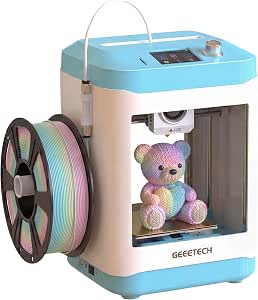 | Best for Guided First Prints | Product type: Mini 3D printer | Dimensions: 10.1 × 15.9 × 10.6 inches | Weight: 8.8 pounds | VIEW LATEST PRICE | See Our Full Breakdown |
| FLASHFORGE Adventurer 5M CoreXY 3D Printer |  | Best for Growing Makers | Printer type: CoreXY 3D printer | Build volume: 220 × 220 × 220 mm | Maximum travel speed: 600 mm/s | VIEW LATEST PRICE | See Our Full Breakdown |
| Magic Jimmy Spark AI Enclosed 3D Printer for Kids |  | Best Enclosed Pick for Kids | Print colors: One filament color at a time | Filament: PLA only | Maximum print speed: 400 mm/s | VIEW LATEST PRICE | See Our Full Breakdown |
| Bambu Lab P1S Combo 3D Printer with AMS |  | Best for Multi-Color Projects | Printer model: P1S Combo | Included system: AMS | Maximum colors: Up to 16 with AMS | VIEW LATEST PRICE | See Our Full Breakdown |
| Entina Tina2C Mini 3D Printer |  | Best for Guided First Projects | Printer type: Mini 3D printer | Setup: Fully assembled with guided setup | Build volume: 3.9 x 3.9 x 3.9 inches | VIEW LATEST PRICE | See Our Full Breakdown |
| Bambu Lab A1 mini 3D Printer with LED Lamp Kit |  | Best for Creative Desk Projects | Product type: 3D printer | Included accessory: LED Lamp Kit | Dimensions: 15.21 x 16.77 x 17.94 inches | VIEW LATEST PRICE | See Our Full Breakdown |
| Fully Assembled Mini 3D Printer Starter Kit with Auto-Leveling |  | Best Ready-to-Print Starter Kit | Print speed: Up to 250 mm/s | Stated precision: 0.01 mm | Dimensions: 10.63 x 10.12 x 15.94 inches | VIEW LATEST PRICE | See Our Full Breakdown |
| HEPHI3D TINA2C Mini 3D Printer with 4-Color PLA Starter Kit |  | Best for Multi-Color Beginner Projects | Printer type: FDM 3D printer | Dimensions: 8.27 x 6.7 x 9.84 inches | Weight: 8.25 pounds | VIEW LATEST PRICE | See Our Full Breakdown |
| TKID Enclosed 3D Printer for Kids and Beginners |  | Best for Guided, App-Based Projects | Model: TCH1.0 | Print speed: 220–250 mm/s standard; up to 400 mm/s maximum | Print precision: ±0.05 mm | VIEW LATEST PRICE | See Our Full Breakdown |
| FLASHFORGE Adventurer 5M 3D Printer |  | Best for Growing Into More Advanced Printing | Model: Adventurer 5M | Build volume: 220 × 220 × 220 mm | Maximum travel speed: 600 mm/s | VIEW LATEST PRICE | See Our Full Breakdown |
| FLASHFORGE Adventurer 5M High-Speed 3D Printer |  | Best for Material and Nozzle Flexibility | Model: Adventurer 5M | Print speed: Up to 600 mm/s | Build volume: 220 × 220 × 220 mm | VIEW LATEST PRICE | See Our Full Breakdown |
| AOSEED AI 3D Printer for Kids with Wi-Fi App Control |  | Best for Young First-Time Users | Print speed: 220–250 mm/s; up to 400 mm/s | Print precision: Up to 0.05 mm | Printing: Single-color | VIEW LATEST PRICE | See Our Full Breakdown |
| Ugee Funbox 3D Printer for Kids |  | Best for a Ready-to-Use Family Setup | Recommended age: 8+ | Print speed: 220–300 mm/s; peak up to 500 mm/s | Print resolution: 0.05 mm | VIEW LATEST PRICE | See Our Full Breakdown |
| 3D printers for kid | Dimensions and weight |
|---|---|
| Geeetech M1 Mini 3D Printer wi | — |
| Geeetech M1 Mini 3D Printer fo | — |
| TEQStone M1 Mini 3D Printer fo | — |
| FLASHFORGE Adventurer 5M CoreX | 15.83 × 14.29 × 17.64 inches; 22 pounds |
| Magic Jimmy Spark AI Enclosed | 13.7 × 13.15 × 15.47 inches; 8.8 pounds |
| Bambu Lab P1S Combo 3D Printer | 15.31 x 18.03 x 15.31 inches; 47.5 pounds |
| Entina Tina2C Mini 3D Printer | 6.5 x 8 x 10 inches; 5.5 pounds |
| Bambu Lab A1 mini 3D Printer w | — |
| Fully Assembled Mini 3D Printe | — |
| HEPHI3D TINA2C Mini 3D Printer | — |
| TKID Enclosed 3D Printer for K | 11.42 × 10.43 × 12.2 inches; 11.68 pounds |
| FLASHFORGE Adventurer 5M 3D Pr | 14.3 × 14.8 × 16.3 inches; 23.8 pounds |
| FLASHFORGE Adventurer 5M High- | 14.2 × 14.8 × 16.2 inches; 22 pounds |
| AOSEED AI 3D Printer for Kids | 11.42 × 10.63 × 12.2 inches; 8.82 pounds |
| Ugee Funbox 3D Printer for Kid | — |
More Details on Our Top Picks
Geeetech M1 Mini 3D Printer with Auto Leveling
The Geeetech M1 Mini makes the most sense for families who want a ready-assembled printer without giving up useful material options. Its 16-point auto leveling reduces manual bed setup, while the direct-drive extruder can handle both PLA and flexible TPU. A heated, removable PEI plate also makes separating finished models and cleaning the surface more manageable for a young beginner with adult help.
Compared with the larger FLASHFORGE Adventurer 5M, the M1 takes up less space and is lighter, but its roughly four-inch build area rules out larger projects. It is also less child-focused than the enclosed Magic Jimmy Spark: this Geeetech model is not described as enclosed, so adult supervision around hot and moving parts matters. The supplied spool-holder profile is intended for a 1 kg spool, which may call for a compatible spool setup.
Pros:- Fully assembled design cuts down on initial setup.
- 16-point auto leveling reduces manual bed calibration.
- Direct-drive extruder supports both PLA and flexible TPU.
- Removable magnetic PEI plate helps with print removal and cleanup.
Cons:- Small print area limits project size.
- The supplied filament-holder profile is intended for 1 kg filament use.
- Its open design calls for adult supervision around hot and moving components.
Best for: Families with limited desk space who want a fully assembled starter printer for small PLA or TPU projects.
Not ideal for: Children who need an enclosed machine or families planning to print models larger than roughly four inches in any dimension.
- Print area:3.94 × 4.33 × 3.94 inches
- Maximum print speed:Up to 250 mm/s
- Extruder:Direct drive with dual-drive metal gears
- Auto leveling:16-point
- Build plate:Heated, flexible, removable magnetic PEI plate
- Display:2.4-inch color LCD
- Supported materials:PLA, TPU
- Item weight:9.8 pounds
- Warranty and support:12-month free repair; lifetime technical support
Our verdict“Choose the Geeetech M1 Mini if a small footprint and PLA/TPU flexibility matter more than an enclosed design or larger prints.”
Geeetech M1 Mini 3D Printer for Beginners
This Geeetech M1 Mini is a straightforward entry point for families who want automated setup paired with simple on-printer controls. It arrives pre-assembled, and one-button filament loading plus a knob-operated interface can make routine tasks less intimidating for a child working with an adult. The heated magnetic plate and 16-point leveling also reduce two common beginner hassles: getting the bed ready and removing a finished print.
Its small build area is the same constraint found on the other Geeetech M1 in this group, and it is far smaller than the FLASHFORGE Adventurer 5M. The trade is a lighter, compact machine rather than room for larger models. Unlike the enclosed Magic Jimmy Spark, this printer is not specified as enclosed, and the listing recommends a holder for stable use with 1 kg spools. Families wanting a child-facing enclosure or a generous work area should look elsewhere.
Pros:- Pre-assembled, with knob operation and one-button filament loading.
- 16-point full-auto leveling simplifies bed setup.
- Heated flexible magnetic plate helps with print release.
- Direct-drive extruder supports PLA and TPU.
Cons:- Compact print area restricts model size.
- A stable holder is recommended for 1 kg spools.
- No enclosure is specified, so children need adult supervision near the hot end and moving parts.
Best for: First-time users who want a pre-assembled printer with simple controls for small, supervised PLA and TPU projects.
Not ideal for: Families seeking an enclosed printer, a larger build area, or a setup that handles 1 kg spools without an added stable holder.
- Print area:3.94 × 4.33 × 3.94 inches
- Print speed:Up to 250 mm/s
- Extruder:Direct drive, dual-drive metal gears, 1:5 gear ratio
- Auto-leveling:16-point full-auto leveling
- Build plate:Heated, flexible magnetic
- Display:2.4-inch color LCD
- Filament compatibility:TPU and PLA; supports 500 g and 1 kg spools
- Dimensions:10.1 × 10.63 × 15.94 inches
- Weight:8.81 pounds
Our verdict“Pick this M1 when easy controls and automated setup are the priority for small beginner projects.”
TEQStone M1 Mini 3D Printer for Kids and Beginners
The TEQStone M1 is a good fit for a child who is ready to try printing but needs a low-friction first project. Its pre-sliced models on an SD card let families start without preparing a design file, while automatic bed leveling and nozzle cleaning reduce setup chores. Filament-break detection is another practical aid: if material runs out mid-print, the machine can pause rather than simply wasting the remaining job.
Like the Geeetech M1 options, it is compact and supports both PLA and TPU through a direct-drive extruder. The TEQStone adds automatic nozzle cleaning and included starter models, but its product information does not state the build volume or layer resolution, making project planning less clear. Compared with the much roomier FLASHFORGE Adventurer 5M, this is the more beginner-oriented small-format choice, not the pick for large builds. Connectivity beyond the included SD-card workflow is also unspecified.
Pros:- Pre-sliced SD-card models offer a simple starting point.
- 16-point automatic leveling and nozzle cleaning reduce setup tasks.
- Direct-drive extruder supports PLA and flexible TPU.
- Filament-break detection can pause a job when material runs out.
Cons:- The product data does not specify build volume or layer resolution.
- Connectivity options beyond the included SD card are not detailed.
- Compact format is less suited to larger projects than the FLASHFORGE Adventurer 5M.
Best for: Families seeking a guided first-print experience with included models and automatic maintenance features.
Not ideal for: Buyers who need a clearly specified build volume, detailed resolution information, or confirmed connectivity beyond SD-card printing.
- Product type:Mini 3D printer
- Dimensions:10.1 × 15.9 × 10.6 inches
- Weight:8.8 pounds
- Filament compatibility:PLA, TPU
- Extruder:Direct drive
- Maximum printing speed:250 mm/s
- Bed leveling:16-point automatic
- Build plate:PEI spring steel
- Additional features:Automatic nozzle cleaning, filament-break detection, pre-sliced models on SD card
Our verdict“Choose the TEQStone M1 for guided starter prints and helpful automation, provided its unspecified build volume fits your plans.”
FLASHFORGE Adventurer 5M CoreXY 3D Printer
The FLASHFORGE Adventurer 5M suits families whose young maker is ready to move beyond tiny starter models. Its 220 × 220 × 220 mm build volume is a major step up from the Geeetech and TEQStone M1 minis, giving children room for larger toys, organizers, and multi-part projects. Automatic bed leveling takes some calibration work off the adult, while the dual-sided PEI platform and quick nozzle changes make routine print preparation and removal more convenient.
Speed is another advantage, with travel speeds up to 600 mm/s, but that capability may be more than a new child needs; project setup and supervision still matter. At 22 pounds and nearly 18 inches tall, it takes substantially more space than the 8.8-pound mini printers. Unlike the enclosed Magic Jimmy Spark, the Adventurer 5M is not described as enclosed, so I would favor it for a shared maker space with adult oversight, not unsupervised access by younger children.
Pros:- 220 × 220 × 220 mm build volume accommodates larger models than the mini printers.
- Automatic bed leveling reduces manual calibration.
- Dual-sided PEI platform and quick nozzle changes simplify print preparation.
- App-based remote monitoring and status alerts support adult oversight.
Cons:- Much larger and heavier than the Geeetech and TEQStone mini printers.
- The open design calls for adult supervision around hot and moving parts.
- Nozzle sizes beyond the included 0.4 mm nozzle are optional.
Best for: Families with an older child or supervised young maker who wants larger projects and room to develop beyond mini-printer limits.
Not ideal for: Young children needing an enclosed machine, or households without space for a 22-pound printer with a roughly 16 × 14 × 18-inch footprint.
- Printer type:CoreXY 3D printer
- Build volume:220 × 220 × 220 mm
- Maximum travel speed:600 mm/s
- Acceleration:20,000 mm/s²
- Maximum extruder temperature:280°C
- Nozzle flow rate:32 mm³/s
- Bed leveling:Automatic
- Platform:Dual-sided PEI
- Dimensions and weight:15.83 × 14.29 × 17.64 inches; 22 pounds
Our verdict“Choose the Adventurer 5M for a supervised young maker who needs a larger build area and can use a dedicated printer space.”
Magic Jimmy Spark AI Enclosed 3D Printer for Kids
The Magic Jimmy Spark is the most child-centered option here: it arrives fully assembled, has an enclosed design, and pairs WiFi app access with a library of more than 12,000 models and AI design tools. That combination can make choosing a first project easier for families who would rather guide a child through an app than begin with desktop design software. Its built-in camera also records print time-lapses, giving kids a way to revisit how a model took shape.
Compared with the open Geeetech M1 and TEQStone M1, the enclosure is a meaningful fit for homes where keeping small hands away from hot and moving parts is a priority. The tradeoff is less material flexibility: it prints PLA only, one color at a time, while both M1 minis list TPU support. It also offers no stated build volume, so I would not choose it for a child whose main goal is planning larger projects. The fast advertised speed does not replace adult guidance.
Pros:- Enclosed design helps keep children away from hot components and moving parts.
- Fully assembled and ready to use without tools.
- App provides access to more than 12,000 models and AI design tools.
- Built-in camera records print time-lapses.
Cons:- Limited to PLA filament.
- Prints one filament color at a time.
- Build volume is not specified in the supplied product data.
Best for: Families who want an enclosed, app-led printer with a large model library for a child’s early projects.
Not ideal for: Makers who want TPU, multi-color printing, or a specified larger build area for planned projects.
- Print colors:One filament color at a time
- Filament:PLA only
- Maximum print speed:400 mm/s
- Model library:12,000+ models
- Connectivity:WiFi
- Camera:Built-in; records print time-lapses
- Build plate:Magnetic
- Assembly:Fully assembled
- Dimensions and weight:13.7 × 13.15 × 15.47 inches; 8.8 pounds
Our verdict“Pick the Magic Jimmy Spark for a child-friendly enclosed and app-guided experience, not for material variety or multicolor projects.”
Bambu Lab P1S Combo 3D Printer with AMS
For families ready to move beyond simple single-color models, the Bambu Lab P1S Combo offers the broadest creative range in this group. Its included AMS enables multi-color and multi-material printing, with support for up to 16 colors, while the fully enclosed design accommodates a wider set of filaments than the compact starter machines here. Automatic bed leveling and a setup designed to take about 15 minutes help reduce initial fuss, but the printer’s speed and material range may be more than a young beginner needs. Compared with the HEPHI3D TINA2C, it is a much larger, heavier machine with more ambitious printing options; the HEPHI3D is easier to fit into a small learning space and includes starter filament. The P1S also requires the AMS for color printing, and its size and advanced capabilities make adult guidance a sensible part of the plan.
Pros:- Included AMS supports multi-color and multi-material projects, with up to 16 colors.
- Fully enclosed build supports a wider selection of filaments than the mini printers in this roundup.
- Automatic bed leveling and a setup designed to take about 15 minutes reduce initial setup work.
- High stated speed can shorten waits for suitable projects.
Cons:- The printer is large and heavy compared with compact options such as the Entina Tina2C Mini.
- Multi-color printing depends on the AMS.
- Carbon- and glass-fiber-reinforced polymers are not recommended.
Best for: Families with an adult involved who want children to explore multi-color prints and a wider range of filament types.
Not ideal for: First-time young makers who need a small, simple printer or families without room for a 47.5-pound enclosed machine.
- Printer model:P1S Combo
- Included system:AMS
- Maximum colors:Up to 16 with AMS
- Maximum print speed:500 mm/s
- Design:Fully enclosed
- Bed leveling:Automatic
- Supported filaments:PLA, PETG, TPU, PVA, PET, ABS, ASA; capable of PA and PC
- Dimensions and weight:15.31 x 18.03 x 15.31 inches; 47.5 pounds
Our verdict“Choose the P1S Combo for a family ready to take on ambitious multi-color projects, not for a child who needs the smallest, simplest starter.”
Entina Tina2C Mini 3D Printer
The Entina Tina2C Mini is a strong fit for kids who benefit from a clear path from choosing a model to starting a print. It arrives fully assembled, pairs guided setup with Poloprint Cloud’s model library and DIY projects, and offers app control or TF-card printing. Automatic bed leveling and power-loss recovery address two common sources of frustration: getting the bed ready and losing progress after an interruption. Its 3.9-inch cubic build area is the main compromise; larger creations will need another printer, such as the more capable but much heavier Bambu Lab P1S Combo. The Tina2C is far easier to place in a home learning area, though its Wi-Fi works on 2.4GHz networks only. This is a practical beginner choice when a small footprint and guided activities matter more than project size.
Pros:- Fully assembled with guided setup and automatic bed leveling.
- Poloprint Cloud offers ready-to-print models, DIY projects, and AI-assisted design tools.
- Flexible magnetic bed and quick-swap nozzle simplify print removal and routine maintenance.
- Power-loss recovery can resume an interrupted print.
Cons:- The 3.9-inch cubic build volume limits the size of projects.
- Wi-Fi connectivity is specified for 2.4GHz networks.
- Its small format is less suited to families who want to grow into larger prints.
Best for: Families seeking a compact, ready-to-use printer with app-guided projects for a child’s first 3D printing activities.
Not ideal for: Young makers planning larger prints or households that rely on Wi-Fi networks that do not support 2.4GHz connections.
- Printer type:Mini 3D printer
- Setup:Fully assembled with guided setup
- Build volume:3.9 x 3.9 x 3.9 inches
- Connectivity:2.4GHz Wi-Fi and TF card
- App:Poloprint Cloud
- Software compatibility:Cura and Simplify3D
- Build and maintenance features:Automatic bed leveling, flexible magnetic build plate, quick-swap nozzle, power-loss recovery
- Dimensions and weight:6.5 x 8 x 10 inches; 5.5 pounds
Our verdict“Pick the Tina2C Mini for guided, small-scale projects and easy placement; choose the Bambu Lab P1S Combo if print size and material range matter more.”
Bambu Lab A1 mini 3D Printer with LED Lamp Kit
The Bambu Lab A1 mini with LED Lamp Kit gives kids a more purposeful project than a stream of small printed trinkets: they can make decorative lights as well as other models from MakerWorld. Automatic calibration and the Bambu Handy app help make setup and model selection more approachable, while the stated noise level of 48 dB or less suits a shared home workspace. Unlike the Entina Tina2C Mini, this package highlights a specific functional craft rather than a broad set of app-based DIY activities. The tradeoff is that the supplied information does not specify build volume or broader filament compatibility, so I would not choose it on assumptions about project scale or materials. Its listed dimensions also call for a dedicated spot, despite the mini name.
Pros:- Included LED Lamp Kit supports functional decorative projects.
- Automatic calibration and beginner-oriented setup reduce setup demands.
- MakerWorld and the Bambu Handy app provide a route to ready-made models.
- Stated noise level of 48 dB or less suits home and studio use.
Cons:- The provided product data does not specify broader material compatibility.
- The listed dimensions may require a dedicated workspace.
- The available specifications do not give a build volume for judging project size.
Best for: Families who want a beginner-friendly printer for decorative lamp projects and other MakerWorld designs in a relatively quiet home workspace.
Not ideal for: Buyers who need clearly stated build volume or filament compatibility before choosing projects, or who lack room for a dedicated printer workspace.
- Product type:3D printer
- Included accessory:LED Lamp Kit
- Dimensions:15.21 x 16.77 x 17.94 inches
- Weight:12.1 pounds
- Model number:PF002-M-EU
- Noise level:≤48 dB
- Calibration:Automatic
- Connectivity and software:MakerWorld model library and Bambu Handy app
Our verdict“Choose the A1 mini when lamp-making and app-based model access are the draw, but compare its missing size and material details against the better-specified Entina Tina2C Mini.”
Fully Assembled Mini 3D Printer Starter Kit with Auto-Leveling
This starter kit focuses on getting a first print underway without asking families to source every basic accessory separately. It arrives assembled with test PLA filament and an SD card, while one-touch filament loading and one-button auto-leveling simplify the steps a beginner is most likely to need help with. The PEI heated bed is designed to aid model removal, and the stated maximum speed is 250 mm/s. Compared with the HEPHI3D TINA2C, this printer’s appeal is its included test supplies and straightforward controls rather than a large ready-to-print model library or four-color filament bundle. The included filament is only a test roll, and a 1 kg spool needs a compatible holder that must be printed. That makes it less self-sufficient for ongoing use than the initial setup suggests.
Pros:- Arrives fully assembled with test PLA filament and an SD card.
- One-button auto-leveling and one-touch filament loading simplify startup.
- PEI heated bed is designed to help with model removal.
- Automatic nozzle cleaning reduces one routine maintenance task.
Cons:- The included filament is only a test roll.
- A compatible holder must be printed to use a 1 kg filament spool.
- The listed data does not specify a model library or app-based project guidance.
Best for: Families who want an assembled printer with basic test supplies and simple loading and leveling controls for a child’s first prints.
Not ideal for: Buyers who want a substantial filament supply or plan to use a standard 1 kg spool without first printing a compatible holder.
- Print speed:Up to 250 mm/s
- Stated precision:0.01 mm
- Dimensions:10.63 x 10.12 x 15.94 inches
- Weight:6.61 pounds
- Included items:Test PLA filament, SD card, and accessories
- Leveling and loading:One-button auto-leveling and one-touch filament loading
- Build plate:PEI heated bed
- Support:30-day return/replacement policy, 12-month free repair service, lifetime technical support
Our verdict“Choose this kit for a straightforward first-print setup with basic supplies, but favor the HEPHI3D TINA2C if included multi-color filament and a ready-made model library matter more.”
HEPHI3D TINA2C Mini 3D Printer with 4-Color PLA Starter Kit
The HEPHI3D TINA2C makes a persuasive case for a child whose first excitement is choosing colors, not just learning the printer controls: it includes four colors of PLA, tools, a TF card, and a magnetic build plate. Factory-preset auto leveling and app or Wi-Fi control help reduce setup work, while the listed library of more than 3,500 ready-to-print models gives beginners a starting point before they try custom designs in Wiibuilder or Cura. Compared with the Fully Assembled Mini Starter Kit, this bundle offers a more varied filament selection and a larger model library, while that kit emphasizes test supplies and one-touch loading. The TINA2C remains a compact machine, so bigger projects will not fit, and custom design work requires a phone, tablet, or computer.
Pros:- Includes four colors of PLA, plus tools and a TF card.
- Factory-preset auto leveling and fully assembled construction reduce setup work.
- App and Wi-Fi control connect users to more than 3,500 ready-to-print models.
- Supports custom projects through Wiibuilder or Cura.
Cons:- Compact build limits the size of printable projects.
- App-based and PC-based design features require a phone, tablet, or computer.
- The provided specifications do not state a build volume.
Best for: Families who want a compact beginner printer with several filament colors and ready-to-print models for guided creative projects.
Not ideal for: Children hoping to print large objects or families who do not have a phone, tablet, or computer for app and PC-based design features.
- Printer type:FDM 3D printer
- Dimensions:8.27 x 6.7 x 9.84 inches
- Weight:8.25 pounds
- Assembly:Fully assembled
- Leveling:Factory-preset auto leveling
- Connectivity:App, Wi-Fi, USB Type-C, and TF card
- Model library:More than 3,500 ready-to-print models
- Included:Four-color PLA filament, tools, magnetic build plate, TF card, and user manual
Our verdict“Choose the HEPHI3D TINA2C for a color-rich beginner bundle and model-library access, while the Fully Assembled Mini Starter Kit is a better fit for buyers focused on one-touch loading and test supplies.”
TKID Enclosed 3D Printer for Kids and Beginners
The TKID is a strong fit for families who want a child to move from choosing a model to starting a print with little manual setup. Leveling-free setup and app-guided filament loading remove two common early hurdles, while a library of more than 20,000 models gives kids plenty to browse before they try the AI design tools. Its enclosure and live camera with remote pause and cancel also give parents more ways to supervise than a basic printer offers. Compared with the AOSEED AI 3D Printer, TKID includes two PLA spools rather than one, but both emphasize app-led, single-color family printing. The tradeoff is missing detail: the listing does not state the build volume or supported filaments beyond the included PLA, making project-size planning harder.
Pros:- Leveling-free setup and app-guided filament loading lower the learning curve.
- More than 20,000 ready-to-print models plus AI design tools offer varied starting points.
- Live camera and remote pause or cancel support parent supervision.
- Includes two PLA spools and three sticker themes.
Cons:- Build volume is not provided, so buyers cannot readily judge the size of printable projects.
- Supported filament types beyond the included PLA are not specified.
Best for: Families seeking an enclosed, app-guided first printer with a large ready-made model library and enough included PLA for several early projects.
Not ideal for: Buyers who need a stated build volume or want confirmed compatibility with specialty filaments before choosing projects.
- Model:TCH1.0
- Print speed:220–250 mm/s standard; up to 400 mm/s maximum
- Print precision:±0.05 mm
- Model library:More than 20,000 ready-to-print models
- Connectivity and control:XMAKER app with live camera, remote pause, and cancel
- Design and setup:Enclosed; leveling-free setup
- Included filament:2 PLA spools
- Dimensions and weight:11.42 × 10.43 × 12.2 inches; 11.68 pounds
Our verdict“Choose the TKID if app-guided projects and parental monitoring matter more than having a clearly stated build volume or broad material details.”
FLASHFORGE Adventurer 5M 3D Printer
The Adventurer 5M is the more capable, workshop-style choice here, suited to older kids who want room to learn printer settings rather than rely mainly on a children’s app. Its 220 × 220 × 220 mm build volume, automatic leveling, direct-drive extruder, and interchangeable nozzles give projects and experimentation more range than the enclosed AOSEED AI 3D Printer. The dual-sided PEI platform is designed to make finished models easier to remove, a useful practical benefit when a young maker is eager to start the next print. It is not as child-centered as the TKID or Ugee Funbox: the listing does not describe an enclosure or guided project library. Also, 600 mm/s is maximum travel speed, not a stated print speed, and camera monitoring requires a separate kit.
Pros:- 220 × 220 × 220 mm build volume accommodates a range of hobby projects.
- One-click automatic leveling simplifies first-layer setup.
- Direct-drive extruder and quick-swap nozzle options support different printing needs.
- Dual-sided PEI platform is designed to ease model removal.
Cons:- Camera monitoring requires the separately added 5M Camera Kit.
- The listed 600 mm/s figure is maximum travel speed, not a stated print speed.
- Compared with enclosed kid-focused picks such as the Ugee Funbox, it offers fewer stated child-specific safety and guided-project features.
Best for: Older children or family makers who want a larger build area, automatic leveling, and interchangeable nozzles, with an adult available to help learn the machine.
Not ideal for: Families prioritizing an enclosed child-focused design, built-in camera monitoring, or guided app projects out of the box.
- Model:Adventurer 5M
- Build volume:220 × 220 × 220 mm
- Maximum travel speed:600 mm/s
- Acceleration:20,000 mm/s²
- Hot-end flow rate:32 mm³/s
- Maximum hot-end temperature:280°C
- Nozzle sizes:0.25, 0.4, 0.6, and 0.8 mm
- Build platform and leveling:Dual-sided PEI; one-click automatic leveling
- Dimensions and weight:14.3 × 14.8 × 16.3 inches; 23.8 pounds
Our verdict“Pick the Adventurer 5M for a supervised young maker who values a larger, more adjustable printer over an enclosed, child-oriented app experience.”
FLASHFORGE Adventurer 5M High-Speed 3D Printer
This Adventurer 5M suits a family that wants to explore different materials and nozzle sizes as a child’s interest develops. It lists support for PLA and several other materials, including PETG and ABS, alongside four nozzle sizes; that flexibility stands apart from the TKID and AOSEED, whose supplied details focus on PLA-based kid-friendly use. Automatic leveling and a dual-sided PEI platform make everyday setup and model removal more approachable, while its CoreXY design is built for fast movement. The tradeoff is that the child-facing experience is less developed than the Ugee Funbox: remote visual monitoring needs an optional camera, and the listed peak speed may depend on settings and material. This is a better fit for supervised learning than independent first-time use.
Pros:- Lists a broad range of supported filaments, including PLA, PETG, and ABS variants.
- Four nozzle sizes let users adapt the printer for different project needs.
- Automatic leveling reduces first-layer setup work.
- Dual-sided PEI platform is designed to help with model removal.
Cons:- Remote visual monitoring requires an optional camera kit.
- Maximum speed may depend on suitable settings and materials.
- The supplied description does not highlight the child-focused guided projects or enclosed safety features offered by the Ugee Funbox.
Best for: Families with an adult helper who want to experiment with multiple filament types and nozzle sizes as a young maker advances.
Not ideal for: Younger children seeking a ready-to-use enclosed printer with included camera monitoring, guided projects, and a simple app-first workflow.
- Model:Adventurer 5M
- Print speed:Up to 600 mm/s
- Build volume:220 × 220 × 220 mm
- Acceleration:20,000 mm/s²
- Nozzle flow rate and temperature:32 mm³/s; up to 280°C
- Nozzle options:0.25, 0.4, 0.6, and 0.8 mm
- Supported filaments:PLA, PETG, ABS, ASA, PLA+, ABS Pro, PETG Pro, HS PLA, PLA-CF, ASA-CF, PETG-CF
- Build platform and leveling:Dual-sided PEI; automatic leveling
- Dimensions and weight:14.2 × 14.8 × 16.2 inches; 22 pounds
Our verdict“Choose this Adventurer 5M when material and nozzle experimentation matter more than a fully child-oriented, camera-ready setup.”
AOSEED AI 3D Printer for Kids with Wi-Fi App Control
AOSEED makes the most sense for a child who wants to create a design and start printing through a guided app rather than begin with printer adjustments. Its enclosed, pinch-resistant design, leveling-free magnetic plate, one-tap printing, and built-in camera put home use and straightforward oversight at the center. AI tools for custom models and cartoon figures give kids a creative route beyond browsing existing files. Compared with the TKID, AOSEED lists a lighter machine and a built-in camera with time-lapse, while TKID includes two PLA spools and describes a much larger model library. AOSEED includes only one PLA roll and prints single-color designs; some creations may need separately printed pieces assembled afterward. That limits projects for children expecting multicolor output from one print.
Pros:- Enclosed, pinch-resistant design is intended for home use.
- One-tap app printing and AI-assisted model creation lower the entry barrier.
- Built-in camera supports live monitoring and time-lapse recording.
- Includes PLA filament, tools, and a magnetic build plate.
Cons:- Prints single-color designs only.
- Some projects may require assembly from separately printed parts.
- Includes one roll of PLA, compared with the two spools supplied with the TKID.
Best for: Families introducing a child to 3D printing who want one-tap app control, built-in monitoring, and AI-assisted design in an enclosed machine.
Not ideal for: Children who want multicolor prints from a single job, or families seeking a clearly stated build volume and a larger amount of included filament.
- Print speed:220–250 mm/s; up to 400 mm/s
- Print precision:Up to 0.05 mm
- Printing:Single-color
- Connectivity and control:Wi-Fi; app and voice control
- Compatibility:iOS, Android, and Windows
- Build plate:Magnetic, leveling-free
- Features:Enclosed pinch-resistant design, built-in camera, time-lapse recording, filament runout detection, quick-release nozzle
- Included:1 roll of PLA filament, tools, magnetic build plate, DIY stickers
- Dimensions and weight:11.42 × 10.63 × 12.2 inches; 8.82 pounds
Our verdict“Choose AOSEED for an app-led, monitored first printer, but skip it if single-color output would limit the projects your child wants to make.”
Ugee Funbox 3D Printer for Kids
The Ugee Funbox is the clearest choice for families who want a child-oriented printer that arrives ready for guided projects, rather than a machine that needs an adult to configure before the fun starts. It is pre-assembled and pre-calibrated, with an enclosed anti-pinch design, cool-touch exterior, built-in camera, and filtration. Its app adds AI creation tools and guided projects, making the experience more structured than the more adjustable but less child-focused FLASHFORGE Adventurer 5M. Ugee also states an age recommendation of 8+, noise below 46 dB, and H12 HEPA plus activated carbon filters. The main compromise is flexibility: the listing does not state a build volume or filament range, and the printer is designed around the UFun app. Families wanting to compare project dimensions or use other materials have less information to work with.
Pros:- Arrives assembled and pre-calibrated, with setup described as tool-free.
- Enclosed design includes an anti-pinch door and cool-touch exterior.
- App provides AI creation tools and guided projects.
- Built-in camera and H12 HEPA plus activated carbon filtration support monitored home use.
Cons:- Designed for use with the UFun app.
- Build volume is not specified.
- Supported filament types are not stated beyond the included PLA.
Best for: Families with children aged 8 and up who want an enclosed, assembled printer with guided app projects, camera monitoring, and filtration.
Not ideal for: Families who want a stated build volume, confirmed compatibility with materials beyond PLA, or an app-independent workflow.
- Recommended age:8+
- Print speed:220–300 mm/s; peak up to 500 mm/s
- Print resolution:0.05 mm
- Noise level:Below 46 dB
- Connectivity:Wi-Fi 6
- Compatible app platforms:iOS, Android, and Windows
- Filtration:H12 HEPA and activated carbon filters
- Safety certifications:UL GREENGUARD, CPSIA, EN71
- Camera and included material:Built-in HD camera with live streaming and time-lapse; PLA filament
Our verdict“Pick the Ugee Funbox for a child-focused, ready-to-use experience, and choose the Adventurer 5M instead if material flexibility and a stated build volume matter more.”
How We Picked
I ranked these 15 options around the needs of a child-and-adult household, rather than treating speed or feature count as the whole story. I weighed the stated ease-of-use features, setup demands, enclosure or other kid-focused design elements, likely learning curve, and the practical value of included accessories. I also considered whether the machine appears suited to a first printer or to a family ready for more involved projects.
The order favors a balanced fit: useful capability without making the first printing experience unnecessarily demanding. Compact beginner models rank well for approachable use, while faster, more feature-rich printers make more sense for families willing to provide space and hands-on support. Where product names suggest near-duplicates or different bundles, I treat the precise model and included equipment as purchase details to verify rather than assuming the listings are interchangeable.
Factors to Consider When Choosing Best 3D Printers For Kids
Choosing among kid-oriented printers starts with the child’s age, the adult’s willingness to help, and the kinds of projects the family expects to make. A printer that is easy to start may be a better gift than a faster machine with more settings. These broader checks can help you avoid buying around a headline feature that does not suit your household.
Match Independence to the Child’s Age
A child may be able to choose a model and start a print without being ready to clear a nozzle or troubleshoot a failed job. Think about which steps an adult will handle, including loading filament, removing prints, and responding to errors. App controls can make starting a project feel accessible, but they do not remove the need for supervision. For a younger maker, prioritize a straightforward workflow and a clear adult role over a long feature list. Older children who want to learn the mechanics may enjoy a machine with more settings, provided an adult can coach them through early mistakes. The common mistake is buying for a child’s interest in design while overlooking the practical tasks around the printer.
Treat Safety as a Household Setup Question
An enclosed printer can reduce direct access to moving parts and hot components during a print, but it does not make the machine a toy or remove heat and ventilation concerns. Decide where the printer will sit before choosing a model: a stable surface away from play areas is usually more useful than a printer that only fits in a child’s bedroom. Check the manufacturer’s guidance for operation, materials, ventilation, and adult supervision. Keep filament and tools stored where younger children cannot handle them unsupervised. Open-frame designs can suit a supervised maker space, while an enclosure may be a better fit for shared family areas. Do not treat an enclosure as a substitute for adult oversight.
Choose Print Size Around Real Projects
A larger build area is valuable only if the family plans to make objects that need it. Small figures, name tags, and simple classroom projects may fit the compact Tina2C or M1 Mini class, while bigger prints can make a larger-format machine more worthwhile. Larger jobs also use more filament and take longer, so capacity can bring extra waiting and more chances for a print to fail. Consider the space needed around the printer as well as the stated build area. Families often overestimate how quickly a child will move from small projects to large ones. Starting with a manageable size can keep early prints more satisfying and reduce material waste.
Look Beyond Speed to the First Successful Print
High-speed printing can shorten waits, but speed alone does not tell you how easy a printer is to set up or maintain. A child’s early experience depends on details such as leveling assistance, clear software, and how readily the family can identify a problem. Check whether the product listing describes the setup steps and what is included, instead of assuming every model is ready to print out of the box. Faster or more advanced printers can make sense for a family with prior experience or an adult willing to learn the workflow. For a first machine, a simpler path to a reliable small print may matter more than the fastest advertised setting. Leave time for learning rather than planning a project around a best-case print speed.
Plan for Filament, Color, and Ongoing Help
Starter filament can help a child begin sooner, but a small included supply should not be mistaken for a lasting materials plan. Multicolor systems and kits can broaden what children make, yet they may also add setup steps, material use, or more to manage during a project. Before buying, check which filament types the printer supports and whether replacement spools are easy for your household to source and store. Think about whether the child wants to design objects, print existing models, or experiment with color; those goals call for different priorities. A family that values simple projects may prefer one color and fewer variables at the start. If color is the main draw, confirm exactly what the advertised bundle includes rather than relying on the product name.
Frequently Asked Questions
Should I choose an enclosed 3D printer for a child?
An enclosure can help limit a child’s direct access to moving parts and hot components, which may suit a shared family workspace. It does not remove the need for an adult to supervise printing, handle hot parts, and follow the maker’s ventilation and material guidance. Compare enclosed kid-focused models such as the Magic Jimmy Spark, TKID, AOSEED, and Ugee Funbox by their actual instructions and features, not just the word “enclosed.” Also check that the printer’s footprint works in a stable location away from casual play. If you cannot provide an appropriate supervised space, the best choice may be to wait rather than rely on the enclosure alone.
Is a mini printer enough for a child’s first projects?
For small figures, simple toys, labels, and practice designs, a compact printer can be a sensible starting point. Models such as the Entina Tina2C and Geeetech M1 Mini options are positioned for smaller-scale use, while a mini machine will limit the size of projects that fit in one print. That limitation can be useful at first: smaller jobs typically use less filament and provide a more manageable way to learn the process. If your child already wants to print larger functional objects, a mini build area may become frustrating quickly. Look at example project dimensions before choosing, rather than assuming a child-focused label means every desired design will fit.
Do kids need a multicolor 3D printer?
Multicolor printing is a creative bonus, not a requirement for learning 3D printing. The Bambu Lab P1S Combo with AMS and the HEPHI3D TINA2C 4-color kit are the clear options here for families drawn to color, but additional color handling can add steps and material use. A single-color printer can still produce detailed projects that children paint or decorate afterward. Ask whether color is central to the child’s planned designs or simply sounds appealing at purchase time. If it is a major goal, verify the bundle contents and the process for switching or managing filament. If the priority is learning basic modeling and printing, a simpler setup may be the easier first choice.
Should I buy a fast printer or a beginner-focused model?
Choose based on the household’s experience and support, not speed claims alone. Faster options such as the FLASHFORGE Adventurer 5M models can appeal when an adult is comfortable learning the machine and the family expects frequent printing. Beginner-oriented compact models may be a better fit when the first goal is a manageable introduction and smaller projects. A faster printer can still require setup, supervision, and troubleshooting, so it is not automatically easier for a child. Check the product’s setup guidance and the tasks an adult must handle before treating speed as a benefit for your family. For a first printer, a successful, understandable workflow may matter more than reducing print time.
How should I compare product listings with similar names?
Compare the exact model name, included accessories, and stated features rather than assuming similar listings describe the same machine. This roundup includes two Geeetech M1 Mini listings and several FLASHFORGE Adventurer 5M versions, so details such as auto-leveling, bundles, and included extras may distinguish them. Read the full listing and manufacturer information to confirm what comes in the box and which version is being sold. Do the same for starter kits: a product name that mentions filament or a lamp does not tell you the quantity or compatibility. If the differences are unclear, check with the seller or manufacturer before making a choice. This helps prevent paying for an assumption about an accessory or feature that is not included.
Conclusion
For the best overall balance, I would start with the FLASHFORGE Adventurer 5M for families prepared to manage a more capable, faster printer. For a best value-style beginner fit, compare the compact Entina Tina2C and Geeetech M1 Mini listings, choosing by the exact setup features and bundle rather than their similar role. The Magic Jimmy Spark is my pick for families prioritizing an enclosed, kid-oriented design, while the Bambu Lab P1S Combo is the premium direction for buyers who want a more advanced machine and multicolor capability. For a specific color-focused need, consider the HEPHI3D TINA2C 4-color kit; for app-led kid-focused printing, compare the AOSEED AI and Ugee Funbox. Whichever you choose, match the printer to the adult support, workspace, and project size your household can realistically provide.