TL;DR

Turn the school run and nap time into listening time
- Thousands of audiobooks, podcasts and originals
- Listen on your phone, tablet or Echo — also offline
- Cancel anytime
Wi-Fi baby monitors let you view your baby from anywhere with an internet connection, offering remote access and smart features. However, they depend on your Wi-Fi stability and security practices. Knowing their strengths and limits helps you make safer, smarter choices.
Imagine checking on your baby from your office, a vacation, or even a different city. Wi-Fi baby monitors make that possible, streaming video and audio through your home network to your smartphone or tablet. But that convenience comes with hidden pitfalls—security risks, connection hiccups, and privacy questions.
In this guide, you’ll learn what makes these monitors tick, how to keep your baby safe and your data secure, and what features are worth your money. Whether you’re a tech-savvy parent or just starting to explore smart baby gear, understanding the ins and outs helps you make smarter choices and avoid common mistakes.
Prioritize security features like encryption, two-factor authentication, and regular updates when choosing a Wi-Fi baby monitor.
Don’t rely solely on internet-dependent features; consider models with local viewing options for reliability during outages.
Understand that higher resolution or fancy features don’t guarantee better performance—focus on security, ease of use, and real-world clarity.
Secure your home Wi-Fi network and change default passwords to protect your family’s privacy.
Set realistic expectations: Wi-Fi monitors are helpful tools but never replace vigilant supervision or safe sleep practices.
How Wi-Fi Baby Monitors Keep You Connected—And What That Means for You
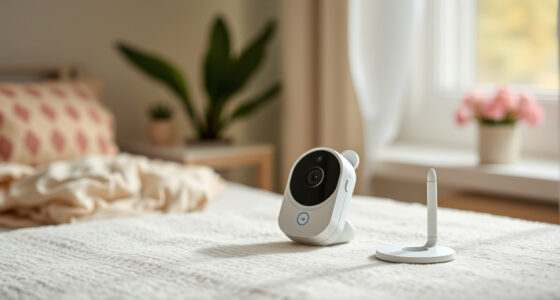
Wi-Fi baby monitors stream live video and sound over your internet connection, usually through a smartphone app. This means you can peek into your baby’s crib from anywhere—whether you’re at work, running errands, or on vacation. Some models also include a dedicated screen, acting like a portable TV for your nursery.
But with this freedom comes a dependence on your home Wi-Fi, internet speeds, and the monitor’s software. A strong Wi-Fi signal doesn’t automatically mean smooth streaming. Dropouts, lag, or blurry video happen when the network is congested or unstable. Imagine trying to watch a high-definition video, only to get a frozen or pixelated feed because your router is overwhelmed during peak hours.
Many monitors also feature alerts—sound detection, motion, or even sleep analytics—that send notifications straight to your phone. If your internet dips or the cloud server has issues, those alerts could be delayed or lost. Understanding how these components work together helps you troubleshoot and set realistic expectations.
Products Worth Considering

Nanit Smart Baby Video Monitor with Wall Mount

Owlet Dream Duo Gen 1 Smart Baby Monitor with Dream Sock Plus and Cam 2

Owlet Dream Duo 2 Smart Baby Monitor System with Camera and Sock
As an affiliate, we earn on qualifying purchases.
The Big Security and Privacy Risks of Wi-Fi Baby Monitors
Wi-Fi baby monitors open a window into your home that hackers could potentially exploit. Since these devices connect to the internet, they can be targets for cyberattacks if not properly secured. There are documented cases where hackers have gained access, watched babies, or even spoken through the monitors, turning a nursery into a security risk.
To minimize this threat, look for models that support end-to-end encryption and two-factor authentication. Always change default passwords, keep firmware updated, and disable cloud sharing if you don’t use it. Think of it like locking your front door—your Wi-Fi is the lock, and your monitor is the key.
However, note that no device is hack-proof. The best you can do is create a layered defense—use a strong, unique password, keep your router secure, and turn off features you don’t need. Remember, if your home Wi-Fi is compromised, so is your monitor’s security.
Choosing the Right Wi-Fi Baby Monitor: What Features Really Matter
Not all Wi-Fi baby monitors are created equal. When shopping, focus on features that impact safety, security, and convenience. Here’s a quick comparison of key aspects:
| Feature | Why it matters |
|---|---|
| Video quality | Clear, sharp images help you see your baby’s face and surroundings, especially in low light or through crib rails. |
| Night vision | Infrared LEDs provide black-and-white images in darkness without disturbing sleep. |
| Encryption & security | Protects your video feed from hackers and unauthorized access. |
| Cloud storage & recordings | Allows you to review past footage; but often requires a subscription. |
| Two-way audio | Communicate with your baby or soothe with your voice remotely. |
| Notifications | Alerts for crying, movement, or room temperature help you respond promptly. |
| Ease of setup & app usability | Intuitive apps and quick setup save time and frustration. |
Remember, a higher resolution doesn’t always mean better in practice. Bandwidth limits can cause pixelation, and features like pan-and-tilt can be more useful than a fancy 4K camera.
How to Keep Your Baby Safe When Using Wi-Fi Monitors
Connecting to Wi-Fi is convenient, but it introduces risks. Here are five step-by-step actions to keep your little one protected:
- Secure your Wi-Fi network: Use a strong password and WPA3 encryption if available.
- Change default passwords: Never leave the factory-set password on your monitor or router.
- Enable two-factor authentication: Add an extra layer of security to your app account.
- Update firmware regularly: Keep your monitor’s software current to patch vulnerabilities.
- Limit access: Create separate user accounts and revoke access when caregivers change.
Imagine a scenario where a parent notices an unfamiliar device accessing their monitor. Regularly reviewing connected devices and permissions can prevent breaches before they happen.
What to Expect—and Not Expect—from Wi-Fi Baby Monitors
Wi-Fi monitors are fantastic tools but aren’t magic. They won’t replace vigilant supervision or safe sleep practices. Video quality may suffer in darkness or through crib slats, and internet outages can cut off your view. Room temperature readings, if taken near vents or windows, might be misleading.
Alerts for crying or movement are helpful but can be delayed or produce false alarms—so don’t rely solely on notifications. Think of these monitors as helpful assistants, not babysitters. They extend your awareness but don’t eliminate the need for attentive care.
And remember, features like continuous recording or health estimates are only as good as their technical design and regulatory approval. Always treat wellness features as informational, not diagnostic or medical devices.
What You Should Do Before You Buy and After You Set Up
Pre-purchase, research the manufacturer’s security policies, update support, and user reviews. Look for models that support local viewing without relying on the cloud, especially if privacy is a concern.
After setup, change default passwords, enable two-factor authentication, and review shared access. Regularly check for firmware updates and eliminate old user accounts. Think of it as giving your monitor a health check and a security tune-up.
By staying proactive, you reduce risks and ensure the device remains a helpful, safe part of your family’s routine.
Frequently Asked Questions
Can a Wi-Fi baby monitor be hacked?
Yes, any device connected to the internet carries some risk. Strong passwords, regular updates, encryption, and restricted sharing greatly reduce that danger. Think of it like locking your doors—necessary, but not foolproof.
Is a Wi-Fi monitor better than a non-Wi-Fi monitor?
Wi-Fi models offer remote access and smart features, making them more versatile. Non-Wi-Fi monitors are typically simpler, more private, and don’t depend on internet quality. Choosing depends on your priorities—convenience or privacy.
Will it work if the internet goes down?
It depends on the monitor. Cloud-dependent models may lose video and alerts during outages, but those with local viewing options or dedicated parent units often continue working normally. Check the specs before buying if reliability is a concern.
Does it need a subscription?
Basic live viewing is usually free, but advanced features like recordings, sleep analytics, or clips often require a paid plan. Consider whether those extras are worth the ongoing cost.
Can more than one caregiver access the camera?
Most models support multiple user accounts, allowing you to share access securely. Avoid sharing passwords; instead, create individual accounts with permission controls for better security.
Conclusion
Your baby’s safety depends on more than just a camera—it’s about how you set up, secure, and interpret what you see. A Wi-Fi monitor, used wisely, offers peace of mind and convenience. But don’t forget: nothing beats attentive care and a secure environment.
Think of your monitor as a helpful eye, not a replacement for your presence. With smart setup and vigilant security, you can enjoy the benefits without risking your family’s privacy or safety. Trust your instincts, stay informed, and keep that tiny face in your line of sight—no app or camera can replace your watchful eye.