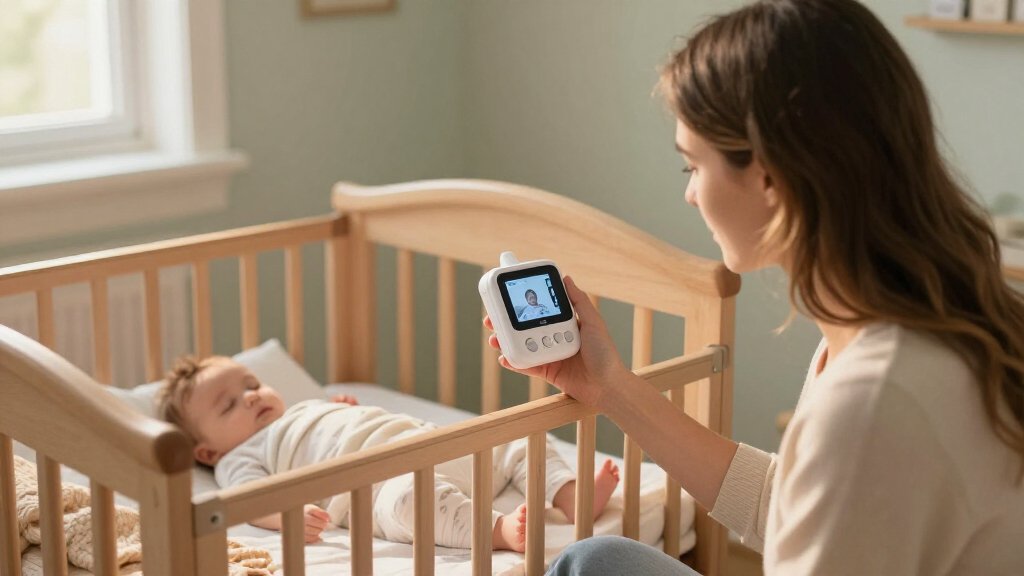

Among these baby monitors with camera, the iFamily monitor is my best overall pick for families who want a large screen, remote camera movement, and long battery life. The HelloBaby HB6550-2 stands out for watching two camera views, while the Monai Pro 4K is the smart Wi-Fi option for parents who want app-based access. The main choice is between a private, no-Wi-Fi connection and the flexibility of a connected camera, plus tradeoffs in screen size, camera coverage, and portability. Smaller displays can be easier to carry, while larger screens make details easier to see. Read on for the full comparison and help matching a monitor to your home.

Turn the school run and nap time into listening time
- Thousands of audiobooks, podcasts and originals
- Listen on your phone, tablet or Echo — also offline
- Cancel anytime
Complete the kit


Key Takeaways
- iFamily leads for all-around convenience: its 5-inch screen, remote pan-tilt-zoom, and stated 30-hour battery life bring viewing and portability together.
- Two-camera models solve a specific problem: HelloBaby HB6550-2 and GoodBaby Split-Screen are better suited to monitoring more than one child or crib than single-camera picks.
- No-Wi-Fi choices dominate the simpler setup: several HelloBaby, VTech, GoodBaby, and iFamily models keep monitoring off a home network, while Monai Pro and Jartoo add smart connectivity.
- Screen size changes everyday usability: options range from VTimes‘ 2.4-inch display and VTech’s 2.8-inch screen to larger 5-, 5.5-, and 6-inch displays.
- Premium features are useful only when they fit the household: 4K or 2K smart cameras may appeal to app users, but remote camera movement, dual views, or a straightforward local monitor may matter more.
| iFamily Baby Monitor with 5-Inch Screen, Remote Pan-Tilt-Zoom, and 30-Hour Battery | 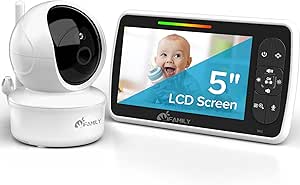 | Best for Flexible Camera Control | Screen: 5 inches | Battery life: Up to 30 hours | Wireless connection: 2.4 GHz FHSS; no Wi-Fi required | VIEW LATEST PRICE | See Our Full Breakdown |
| HelloBaby HB6550-2 5-Inch Dual-Camera Baby Monitor |  | Best for Monitoring Two Rooms | Display: 5-inch IPS screen | Included cameras: 2 pre-paired | Camera capacity: Up to 4 cameras | VIEW LATEST PRICE | See Our Full Breakdown |
| HelloBaby HB6560 6-Inch No-WiFi Video Baby Monitor | 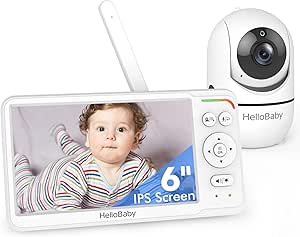 | Best for a Larger Screen | Screen: 6-inch IPS | Battery life: 16–30 hours | Wireless connection: 2.4 GHz FHSS digital encryption; no Wi-Fi required | VIEW LATEST PRICE | See Our Full Breakdown |
| VTech VM819 Video Baby Monitor with 2.8-Inch Screen |  | Best Compact Pick | Display: 2.8-inch LCD | Wireless connection: Encrypted 2.4 GHz FHSS | Video battery life: Up to 19 hours | VIEW LATEST PRICE | See Our Full Breakdown |
| GoodBaby 5-Inch No-WiFi Video Baby Monitor |  | Best for VOX Battery Saving | Screen: 5-inch LCD | Video resolution: 480p | Wireless connection: 2.4 GHz FHSS; no Wi-Fi required | VIEW LATEST PRICE | See Our Full Breakdown |
| HelloBaby HB6550Plus 6-Inch Non-WiFi Video Baby Monitor |  | Best for a Larger Screen | Display: 6-inch IPS screen | Connection: 2.4GHz FHSS; no Wi-Fi required | Camera movement: 355° pan; 120° tilt | VIEW LATEST PRICE | See Our Full Breakdown |
| 5-Inch HD Video Baby Monitor with Remote Pan-Tilt-Zoom |  | Best for Remote Camera Control | Display: 5-inch, 720p | Connection: 2.4 GHz FHSS; no Wi-Fi | Claimed range: Up to 1,000 ft | VIEW LATEST PRICE | See Our Full Breakdown |
| GoodBaby 5-Inch Split-Screen Baby Monitor with 2 Cameras |  | Best for Two Children | Display: 5-inch HD LCD | Included cameras: 2 | Maximum camera capacity: 4 cameras | VIEW LATEST PRICE | See Our Full Breakdown |
| VTimes Baby Monitor with Camera and Audio, 2.4-Inch LCD Screen |  | Best Compact Pick | Screen: 2.4-inch LCD | Connection: 2.4 GHz FHSS | Wi-Fi required: No | VIEW LATEST PRICE | See Our Full Breakdown |
| HelloBaby 4.3-Inch Video Baby Monitor with Remote Pan-Tilt-Zoom |  | Best for Long ECO Standby | Screen: 4.3-inch IPS | Wireless technology: 2.4 GHz FHSS | Range: Approximately 1,000 ft | VIEW LATEST PRICE | See Our Full Breakdown |
| Monai Pro 4K Smart Wi-Fi Baby Monitor with Camera, Audio, and Crib Mount |  | Best for Smart Monitoring | Camera resolution: 4K, 8 MP | Zoom: 6× optical | Wi-Fi: Dual-band 2.4 GHz and 5 GHz | VIEW LATEST PRICE | See Our Full Breakdown |
| Jartoo Smart Baby Monitor with 2K Camera and 5.5-Inch Screen |  | Best for Screen-and-App Flexibility | Camera resolution: 2K UHD | Display: 5.5-inch IPS | Pan and tilt: 360° pan, 148° tilt | VIEW LATEST PRICE | See Our Full Breakdown |
| HelloBaby HB6550 No-WiFi Baby Monitor with Camera and 5-Inch Screen |  | Best for Wi-Fi-Free Simplicity | Screen size: 5 inches | Pan: 355° horizontal | Tilt: 120° vertical | VIEW LATEST PRICE | See Our Full Breakdown |
| baby monitors with camera | Night vision | Battery life | Audio |
|---|---|---|---|
| iFamily Baby Monitor with 5-In | Infrared; 8 IR LEDs | Up to 30 hours | — |
| HelloBaby HB6550-2 5-Inch Dual | — | Up to 30 hours in ECO mode | — |
| HelloBaby HB6560 6-Inch No-WiF | — | 16–30 hours | Two-way audio |
| VTech VM819 Video Baby Monitor | Automatic infrared | — | — |
| GoodBaby 5-Inch No-WiFi Video | — | Up to 30 hours in VOX mode; up to 10 hours with screen on | — |
| HelloBaby HB6550Plus 6-Inch No | Infrared | 18–33 hours | Two-way audio |
| 5-Inch HD Video Baby Monitor w | Invisible infrared, black-and-white video | Up to 100 hours in VOX mode | Two-way talk; 8 built-in lullabies |
| GoodBaby 5-Inch Split-Screen B | Automatic infrared | Up to 30 hours in VOX mode; up to 10 hours with screen on | Two-way talk; audio scan switches cameras every 15 seconds |
| VTimes Baby Monitor with Camer | Automatic | — | Two-way talk |
| HelloBaby 4.3-Inch Video Baby | Automatic infrared | Up to 30 hours in ECO mode; 16 hours in non-ECO mode | Two-way audio |
| Monai Pro 4K Smart Wi-Fi Baby | 950 nm infrared | — | Two-way |
| Jartoo Smart Baby Monitor with | — | — | Two-way audio, noise monitoring, and ANR |
| HelloBaby HB6550 No-WiFi Baby | Infrared | — | — |
More Details on Our Top Picks
iFamily Baby Monitor with 5-Inch Screen, Remote Pan-Tilt-Zoom, and 30-Hour Battery
The iFamily is a strong fit for parents who want to adjust the nursery view from the parent unit without relying on Wi-Fi or an app. Its remote pan, tilt, and zoom can help follow movement or check different parts of a room, while the 5-inch screen gives more viewing space than the VTech VM819’s 2.8-inch display. A claimed battery life of up to 30 hours may also suit overnight checks between charges. Night vision, two-way audio, and lullabies cover common monitoring needs, and support for up to four cameras leaves room to add coverage later. Its tradeoff is that the stated range can vary with the home’s layout, and the unit is not water resistant. Choose it for adjustable viewing and a simple, private connection; skip it if you need split-screen viewing or app access.
Pros:- Works without Wi-Fi or an app through a 2.4 GHz FHSS connection.
- Remote pan, tilt, and zoom help adjust the nursery view from the parent unit.
- Supports up to four cameras for adding coverage as needs change.
- Includes infrared night vision, two-way audio, and lullabies.
Cons:- The claimed range of up to 960 feet may vary with walls and other environmental conditions.
- The monitor and camera are not water resistant.
- The data does not specify split-screen viewing.
Best for: Parents who want remote camera adjustment, a larger handheld screen, and the option to add cameras without setting up Wi-Fi.
Not ideal for: Caregivers who need split-screen monitoring, app-based access, or equipment that can tolerate water exposure.
- Screen:5 inches
- Battery life:Up to 30 hours
- Wireless connection:2.4 GHz FHSS; no Wi-Fi required
- Camera control:Remote pan, tilt, and zoom
- Viewing angle:110 degrees
- Night vision:Infrared; 8 IR LEDs
- Camera capacity:Up to 4 cameras
- Claimed range:Up to 960 feet
Our verdict“Choose the iFamily if remote camera control and expandable, no-Wi-Fi monitoring matter more than split-screen viewing or app access.”
HelloBaby HB6550-2 5-Inch Dual-Camera Baby Monitor
Two pre-paired cameras make the HB6550-2 the clearest choice here for families watching a nursery and another room from one parent unit. You can switch cameras with one tap or use auto scan, though the 5-inch IPS screen shows one camera at a time rather than a split view. That makes it more flexible across rooms than the single-camera VTech VM819, but less suitable for watching both feeds simultaneously. Remote pan, tilt, and zoom help refine each view, while sound-activated ECO mode can conserve battery when the room is quiet. Its no-Wi-Fi FHSS connection avoids app or internet setup. The advertised range of up to 1,000 feet applies outdoors with the antenna extended, so indoor reach depends on the home. Pick this model for two-room coverage; look elsewhere if simultaneous views are a must.
Pros:- Includes two pre-paired cameras for coverage in two rooms.
- One-tap switching and auto scan make it easier to check each camera.
- Remote pan, tilt, and zoom adjust the view from the parent unit.
- ECO mode is specified for up to 30 hours of battery life.
Cons:- Displays one camera at a time, so it cannot show both room feeds simultaneously.
- The up-to-1,000-foot range is an outdoor figure with the antenna extended.
- ECO-mode battery life depends on using that mode.
Best for: Parents who want to monitor a nursery and a second room using two included cameras and one handheld unit.
Not ideal for: Caregivers who need to see two camera feeds at once or depend on a long, predictable indoor range.
- Display:5-inch IPS screen
- Included cameras:2 pre-paired
- Camera capacity:Up to 4 cameras
- Wireless connection:2.4 GHz FHSS; no Wi-Fi or internet required
- Pan and tilt:355° pan; 120° tilt
- Battery life:Up to 30 hours in ECO mode
- Claimed range:Up to 1,000 feet outdoors with antenna extended
- Additional features:Two-way talk, auto scan, infrared night vision, 8 lullabies, and room temperature monitoring
Our verdict“Choose the HB6550-2 for two-room coverage from a no-Wi-Fi monitor if one-at-a-time camera viewing works for you.”
HelloBaby HB6560 6-Inch No-WiFi Video Baby Monitor
The HB6560 puts screen size first: its 6-inch IPS display offers more room to inspect the camera image than the 5-inch panels on the iFamily and HelloBaby HB6550-2. That can make routine visual checks easier for caregivers who prefer a larger handheld screen. The monitor uses an encrypted 2.4 GHz FHSS connection without Wi-Fi, an app, or an account, and pairs remote pan and tilt with infrared night vision. It also includes two-way audio, temperature alerts, lullabies, and a feeding timer. Split-screen support is listed, but the system supports only up to two cameras; the iFamily and HB6550-2 allow up to four. Compatibility is limited to specified HB6560 models, so this is a less flexible pick if you want to mix monitor versions or expand beyond two cameras.
Pros:- Its 6-inch IPS display is larger than the 5-inch screens on the iFamily and HB6550-2.
- Uses an encrypted FHSS connection without Wi-Fi, an app, or an account.
- Remote pan and tilt work with infrared night vision for day and night checks.
- Includes split-screen support, temperature alerts, lullabies, and a feeding timer.
Cons:- Camera capacity is limited to two, compared with up to four on the iFamily and HB6550-2.
- Compatibility is limited to specified HB6560 models.
- The supplied product data gives a battery-life range of 16–30 hours rather than one fixed duration.
Best for: Caregivers who prefer a larger handheld display and want local monitoring with two-camera capacity and split-screen support.
Not ideal for: Families planning to monitor more than two camera locations or combine the monitor with models outside the specified HB6560 line.
- Screen:6-inch IPS
- Battery life:16–30 hours
- Wireless connection:2.4 GHz FHSS digital encryption; no Wi-Fi required
- Camera movement:355° pan; 120° tilt
- Audio:Two-way audio
- Camera capacity:Up to 2 cameras
- Viewing features:Split-screen support and infrared night vision
- Additional features:Room temperature alerts, 8 lullabies, and feeding timer
Our verdict“Choose the HB6560 if a larger screen and split-screen support matter more than broader camera expansion or cross-model compatibility.”
VTech VM819 Video Baby Monitor with 2.8-Inch Screen
The VTech VM819 is the compact option for caregivers who want video monitoring without carrying a larger parent display. Its 2.8-inch LCD is much smaller than the 5-inch screens on the iFamily and GoodBaby, so it takes up less space but gives less room to inspect the image. Sound-activated viewing can keep the screen off while the room is quiet, and the monitor combines automatic infrared night vision with 2x digital zoom. The encrypted FHSS connection works without Wi-Fi, an app, or cloud access. Two-way talk, a temperature sensor, and soothing sounds round out the basics. This model is better suited to a single camera and straightforward checks: its supplied specs do not list camera expansion, while the HelloBaby HB6550-2 supports up to four cameras.
Pros:- Compact 2.8-inch screen takes up less space than the 5-inch displays on the iFamily and GoodBaby.
- Encrypted FHSS connection requires no Wi-Fi, app, or cloud access.
- Sound-activated viewing can keep the display off while the room is quiet.
- Includes automatic infrared night vision, two-way talk, and a temperature sensor.
Cons:- The 2.8-inch display offers less viewing area than the larger monitors in this roundup.
- Zoom is digital, and the supplied specifications do not list remote pan or tilt.
- Camera expansion is not specified in the provided product data.
Best for: Caregivers who want a compact, no-Wi-Fi monitor for basic video and sound checks in one room.
Not ideal for: Parents who want a large image, remote pan and tilt, or multi-camera monitoring.
- Display:2.8-inch LCD
- Wireless connection:Encrypted 2.4 GHz FHSS
- Video battery life:Up to 19 hours
- Audio-only battery life:Up to 29 hours
- Claimed range:Up to 1,000 feet
- Night vision:Automatic infrared
- Zoom:2x digital
- Additional features:Adjustable sound-activated screen, two-way talk, temperature sensor, two lullabies, and two ambient sounds
Our verdict“Choose the VM819 for a compact, simple video monitor if its small screen and limited camera flexibility fit your setup.”
GoodBaby 5-Inch No-WiFi Video Baby Monitor
The GoodBaby pairs the familiar essentials—remote pan, tilt, and zoom, infrared night vision, two-way audio, and temperature monitoring—with a battery claim that depends heavily on how you use the screen. It is specified for up to 30 hours in VOX mode, but up to 10 hours with the display on, a meaningful difference for parents who keep the video feed visible overnight. Its 5-inch screen is larger than the VTech VM819’s compact display, while its 480p resolution is a stated limit to image detail. The no-Wi-Fi FHSS connection, feeding alarms, and eight lullabies add practical coverage for routine care. Unlike the two-camera HelloBaby HB6550-2, the supplied data describes one camera and does not give an expansion limit. Choose it if VOX use suits your routine; skip it if you expect continuous screen-on operation.
Pros:- VOX mode is specified for up to 30 hours of battery life.
- Remote pan, tilt, and zoom help adjust the camera view from the monitor.
- Works without Wi-Fi and includes two-way audio and room temperature monitoring.
- Offers eight lullabies, feeding alarms, and several camera mounting options.
Cons:- Battery life is specified as up to 10 hours with the screen on, compared with up to 30 hours in VOX mode.
- 480p resolution provides less image detail than higher-resolution video.
- The supplied product data does not specify camera expansion.
Best for: Caregivers who are comfortable using VOX mode and want remote camera control, two-way audio, and feeding alarms in a no-Wi-Fi setup.
Not ideal for: Parents who want the screen on continuously through the night or need stated support for multiple cameras.
- Screen:5-inch LCD
- Video resolution:480p
- Wireless connection:2.4 GHz FHSS; no Wi-Fi required
- Camera movement:355° pan; 120° tilt
- Zoom:2x
- Battery life:Up to 30 hours in VOX mode; up to 10 hours with screen on
- Claimed range:Up to 1,000 feet
- Mounting options:Ceiling, wall, crib, desk, or freestanding
Our verdict“Choose the GoodBaby if VOX battery saving fits your monitoring routine, and look elsewhere if you need a continuously lit screen or multi-camera setup.”
HelloBaby HB6550Plus 6-Inch Non-WiFi Video Baby Monitor
The 6-inch IPS display gives the HB6550Plus more viewing space than the HelloBaby 4.3-Inch Video Baby Monitor, which can make checking a sleeping baby easier without relying on a phone. Its 2.4GHz FHSS connection works without Wi-Fi or an app, while remote pan and tilt help follow movement across the crib. Infrared night vision, two-way audio, and temperature alerts cover the core camera-monitoring needs; the feeding timer and lullabies add useful nursery controls. The tradeoff is its limited expansion: it supports up to two cameras, while the GoodBaby 5-Inch Split-Screen Baby Monitor supports four and includes two. Its stated 18–33-hour battery range also varies, so buyers who keep the screen on should not assume the longest figure.
Pros:- 6-inch IPS screen provides more viewing area than the smaller-screen options in this batch.
- Direct FHSS connection works without Wi-Fi, an app, or cloud services.
- Remote 355° pan and 120° tilt help cover a wider nursery area.
- Includes infrared night vision, two-way audio, temperature alerts, and a feeding timer.
Cons:- Supports only two cameras, fewer than the GoodBaby 5-Inch Split-Screen Baby Monitor.
- The stated 18–33-hour battery life is a broad range and depends on use.
Best for: Parents who want a larger dedicated monitor screen and plan to watch one nursery, with room to add a second camera.
Not ideal for: Families monitoring three or more rooms, or buyers who need a clearly specified battery runtime for continuous screen viewing.
- Display:6-inch IPS screen
- Connection:2.4GHz FHSS; no Wi-Fi required
- Camera movement:355° pan; 120° tilt
- Battery life:18–33 hours
- Night vision:Infrared
- Audio:Two-way audio
- Additional features:Room temperature alerts, 8 lullabies, feeding timer, sound level indicator, audio-only mode
- Camera capacity:Up to 2 cameras
- Mounting:Tabletop or wall mount
Our verdict“Choose the HB6550Plus if a large dedicated screen matters more than multi-room camera capacity.”
5-Inch HD Video Baby Monitor with Remote Pan-Tilt-Zoom
This monitor pairs a 5-inch 720p display with remote pan, tilt, and 4× zoom, giving parents more control over the camera view than the HelloBaby HB6550Plus, whose listed camera movement does not include zoom. Its 2.4 GHz FHSS connection also avoids Wi-Fi, apps, and cloud services. VOX mode is the standout for parents who prefer the screen to wake when sound is detected, and the advertised battery claim reaches up to 100 hours in that mode. That figure, like the claimed 1,000-foot range, depends on conditions and use. The screen is smaller than the HB6550Plus’s 6-inch display, and the system supports only two cameras. It suits a single nursery well, but families needing a multi-camera split view may prefer the GoodBaby 5-Inch Split-Screen Baby Monitor.
Pros:- Remote 355° pan, 95° tilt, and 4× zoom provide flexible camera framing.
- 2.4 GHz FHSS connection works without Wi-Fi, apps, or cloud services.
- VOX mode is advertised to provide up to 100 hours of battery life.
- Includes two-way talk, night vision, and sound, motion, and temperature alerts.
Cons:- Supports only two cameras and lacks the GoodBaby model’s split-screen support for two included cameras.
- The 1,000-foot range and up-to-100-hour VOX runtime are claims that depend on conditions and settings.
Best for: Parents who want to zoom in and reposition a nursery camera remotely while using a Wi-Fi-free monitor.
Not ideal for: Families who need a larger screen, more than two cameras, or a split-screen view of multiple rooms.
- Display:5-inch, 720p
- Connection:2.4 GHz FHSS; no Wi-Fi
- Claimed range:Up to 1,000 ft
- Camera movement:355° pan; 95° tilt; 4× zoom
- Battery life:Up to 100 hours in VOX mode
- Night vision:Invisible infrared, black-and-white video
- Alerts:Sound, motion, and temperature
- Audio:Two-way talk; 8 built-in lullabies
- Camera capacity:Up to 2 cameras
Our verdict“Pick this model if remote zoom and VOX operation matter more than a larger screen or multi-camera viewing.”
GoodBaby 5-Inch Split-Screen Baby Monitor with 2 Cameras
With two cameras included and split-screen viewing on one 5-inch display, this GoodBaby system is the clearest fit here for parents watching two sleeping spaces at once. The HelloBaby HB6550Plus offers a larger screen, but it supports only two cameras total and does not list split-screen viewing; this GoodBaby can expand to four cameras. Remote pan, tilt, and 2× zoom help adjust the view, while audio scan switches between cameras every 15 seconds. That rotating audio focus means parents cannot listen to both rooms at once. Battery life is also mode-dependent: the claim is up to 30 hours in VOX mode, but up to 10 hours with the screen on. For two children in separate rooms, the included camera pair reduces setup friction; for one nursery, the extra camera capacity may go unused.
Pros:- Includes two cameras and displays both feeds in split-screen mode.
- Supports expansion to four cameras, more than the two-camera systems in this batch.
- Remote 355° pan, 120° tilt, and 2× zoom help adjust each camera view.
- VOX mode, infrared night vision, two-way talk, and temperature alerts support routine monitoring.
Cons:- Audio scan switches cameras every 15 seconds, so it does not provide simultaneous audio focus.
- Battery life is listed as up to 10 hours with the screen on, versus up to 30 hours in VOX mode.
Best for: Parents monitoring two babies or two rooms who want both camera feeds visible on one dedicated screen.
Not ideal for: Families watching only one nursery who prefer longer continuous screen-on runtime or simultaneous audio from every camera.
- Display:5-inch HD LCD
- Included cameras:2
- Maximum camera capacity:4 cameras
- Range:Up to 1,000 ft
- Camera movement:355° pan; 120° tilt; 2× zoom
- Battery life:Up to 30 hours in VOX mode; up to 10 hours with screen on
- Audio:Two-way talk; audio scan switches cameras every 15 seconds
- Night vision:Automatic infrared
- Additional features:8 lullabies, room temperature alerts, VOX auto-wake
Our verdict“Choose this bundle when seeing two rooms at once matters more than continuous screen-on battery life.”
VTimes Baby Monitor with Camera and Audio, 2.4-Inch LCD Screen
The VTimes keeps the setup simple: its 2.4-inch screen pairs with a plug-and-play, private 2.4 GHz FHSS connection, so there is no Wi-Fi or app pairing to manage. Sound-activated ECO mode can conserve battery by reducing screen activity until noise is detected, while two-way talk and automatic night vision cover basic camera monitoring. Compared with the HelloBaby 4.3-Inch Video Baby Monitor, this is the more compact option, but the smaller display gives up viewing area and that model provides more detail about battery runtime and camera movement. VTimes lists a range claim of up to 1,000 feet, yet does not specify battery life or video resolution. It is a straightforward choice for portability and basic viewing, not for buyers who want a larger, more fully specified system.
Pros:- Compact 2.4-inch monitor is more portable than the larger-screen options in this batch.
- Private 2.4 GHz FHSS connection works without Wi-Fi or an app.
- Sound-activated ECO mode can reduce screen use between detected sounds.
- Includes two-way talk, automatic night vision, a temperature sensor, and an alarm.
Cons:- The small display offers less viewing area than the 4.3-inch HelloBaby monitor and larger alternatives.
- Battery life and video resolution are not specified.
Best for: Caregivers who want a small, portable monitor with plug-and-play setup and basic video, audio, and ECO features.
Not ideal for: Parents who need a larger screen, documented battery runtime, or detailed camera-control specifications.
- Screen:2.4-inch LCD
- Connection:2.4 GHz FHSS
- Wi-Fi required:No
- Range:Up to 1,000 ft
- Setup:Plug and play
- Audio:Two-way talk
- Night vision:Automatic
- Power-saving feature:Sound-activated ECO mode
- Additional features:Temperature sensor, alarm, lullaby
Our verdict“Choose VTimes for portability and simple setup if a small screen and unspecified battery runtime suit your needs.”
HelloBaby 4.3-Inch Video Baby Monitor with Remote Pan-Tilt-Zoom
This HelloBaby balances a 4.3-inch IPS screen with remote camera movement and a stated up to 30 hours in ECO mode, making it a middle-sized option between the compact VTimes 2.4-inch monitor and the HB6550Plus’s 6-inch display. Its 2.4 GHz FHSS connection needs no Wi-Fi or app, and automatic infrared night vision and two-way audio support everyday nursery checks. The camera pans 350 degrees and tilts 120 degrees, while sound-activated screen mode can help stretch battery life when the room is quiet. That runtime falls to 16 hours in non-ECO mode, so frequent live viewing changes the equation. It lists two video channels, but does not specify a camera capacity here; buyers wanting explicit multi-camera split-screen capability should look at the GoodBaby model instead.
Pros:- 4.3-inch IPS display is larger than VTimes’s 2.4-inch screen while remaining smaller than the 6-inch HB6550Plus.
- ECO mode is listed for up to 30 hours of battery life.
- Remote 350° pan and 120° tilt let caregivers adjust the camera from the monitor.
- Uses FHSS without Wi-Fi and includes two-way audio and automatic infrared night vision.
Cons:- Listed runtime falls to 16 hours in non-ECO mode.
- The approximately 1,000-foot range is an estimate and may vary with conditions.
- The product data lists two video channels but does not specify a camera limit or split-screen view.
Best for: Parents who want a mid-sized dedicated screen and long stated runtime when using sound-activated ECO mode.
Not ideal for: Caregivers who keep video on continuously, or families who need clearly specified multi-camera split-screen viewing.
- Screen:4.3-inch IPS
- Wireless technology:2.4 GHz FHSS
- Range:Approximately 1,000 ft
- Camera movement:350° pan; 120° tilt
- Battery capacity:3500 mAh
- Battery life:Up to 30 hours in ECO mode; 16 hours in non-ECO mode
- Night vision:Automatic infrared
- Audio:Two-way audio
- Video channels:2
Our verdict“Pick this HelloBaby if you want a mid-sized screen and can use ECO mode to extend time between charges.”
Monai Pro 4K Smart Wi-Fi Baby Monitor with Camera, Audio, and Crib Mount
The Monai Pro is the most feature-heavy pick here for parents who want app-based monitoring, detailed video, and alerts that go beyond crying or movement. Its 4K camera and 6× optical zoom can make it easier to check small details from a phone, while encrypted local storage keeps recordings on the device instead of relying only on cloud storage. The app also adds sleep tracking, covered-face and danger-zone alerts, and sharing for up to five family members. Compared with the Jartoo Smart Baby Monitor, Monai offers higher stated camera resolution and more onboard storage, while Jartoo includes a dedicated 5.5-inch screen and local monitoring without Wi-Fi. Monai’s tradeoff is dependence on Wi-Fi and app control; its 65-degree viewing angle is also narrower than a full-room view unless you reposition the rotating mount.
Pros:- 4K camera with 6× optical zoom for checking details
- Encrypted 32 GB built-in storage with support for up to 128 GB Micro SD
- Multiple AI alerts and sleep tracking without a monthly fee
- 350° rotating mount supports crib-side, wall, or standalone placement
Cons:- Requires Wi-Fi and app-based control
- 65-degree viewing angle covers less of a room at once than wider-angle camera setups
- Not water resistant
Best for: Parents who want app-based alerts, sleep tracking, high-resolution video, and encrypted local recordings shared with family
Not ideal for: Families who want a dedicated screen or monitoring that works without Wi-Fi, since control and viewing depend on the app
- Camera resolution:4K, 8 MP
- Zoom:6× optical
- Wi-Fi:Dual-band 2.4 GHz and 5 GHz
- Night vision:950 nm infrared
- Storage:32 GB built-in; supports up to 128 GB Micro SD
- Viewing angle:65 degrees
- Audio:Two-way
- App sharing:Up to 5 family members
Our verdict“Choose the Monai Pro if smart alerts, detailed video, and local recording matter more to you than a dedicated screen or Wi-Fi-free viewing.”
Jartoo Smart Baby Monitor with 2K Camera and 5.5-Inch Screen
The Jartoo Smart Baby Monitor suits parents who want a dedicated display at home but also value remote viewing through an app. Its 5.5-inch IPS screen and 2K camera give it a more self-contained feel than the app-dependent Monai Pro, while its local no-Wi-Fi connection offers a way to monitor without using the home network. Pan, tilt, cry and motion detection, and temperature and humidity monitoring bring several useful checks into one system. Compared with the HelloBaby HB6550, Jartoo adds a larger screen, app-based remote access, and environmental monitoring; HelloBaby keeps things simpler with Wi-Fi-free FHSS operation. Jartoo’s local recording needs an SD card that is not included, and its advertised open-area range can shrink when walls interrupt the signal.
Pros:- 5.5-inch IPS display paired with a 2K camera
- Offers both local no-Wi-Fi monitoring and app-based remote viewing
- Pan, tilt, zoom, and human tracking help cover a moving baby
- Monitors temperature and humidity and includes two-way audio
Cons:- SD card for local recording is sold separately
- Wireless range decreases through walls
- App-based remote viewing requires Wi-Fi
Best for: Parents who want a larger dedicated screen for home use plus app access and room-condition monitoring
Not ideal for: Buyers who want recording ready out of the box or a simple Wi-Fi-free system without app setup
- Camera resolution:2K UHD
- Display:5.5-inch IPS
- Pan and tilt:360° pan, 148° tilt
- Zoom:1–5×
- Connectivity:Wi-Fi and local no-Wi-Fi connection
- Audio:Two-way audio, noise monitoring, and ANR
- Detection:Cry, motion, and human tracking
- Additional monitoring:Temperature and humidity
- Storage:Local storage supported; SD card not included
Our verdict“Pick Jartoo if you want a dedicated screen and the option of app access, and are comfortable supplying an SD card for recordings.”
HelloBaby HB6550 No-WiFi Baby Monitor with Camera and 5-Inch Screen
The HelloBaby HB6550 is a straightforward choice for parents who want a camera and handheld screen without setting up Wi-Fi or an app. Its 2.4 GHz FHSS connection with digital encryption keeps monitoring on a direct local link, and remote pan and tilt let parents check more of the nursery from the receiver. Compared with the Jartoo Smart Baby Monitor, it gives up app-based remote viewing, 2K video, and temperature and humidity tracking, but its simpler connection avoids depending on the home network. The five-inch screen and up-to-four-camera support make it practical for basic nursery monitoring, while 2× digital zoom is more limited than Monai Pro’s 6× optical zoom. Buyers planning to monitor multiple rooms should also account for the need to obtain compatible extra cameras separately.
Pros:- Works without Wi-Fi using 2.4 GHz FHSS and digital encryption
- Remote pan and tilt help scan across the nursery
- Two-way audio, infrared night vision, and lullabies are included
- Supports up to four cameras and offers audio-only mode
Cons:- 2× digital zoom provides less detail than the Monai Pro’s optical zoom
- Compatible extra cameras are needed for multi-room use
- Does not offer app-based remote viewing
Best for: Parents who want a dedicated handheld screen and a direct, Wi-Fi-free connection for one or more rooms
Not ideal for: Families who need app access away from home, higher zoom, or advanced tracking and sleep alerts
- Screen size:5 inches
- Pan:355° horizontal
- Tilt:120° vertical
- Zoom:2× digital
- Connectivity:2.4 GHz FHSS; no Wi-Fi required
- Night vision:Infrared
- Battery average life:30 hours
- Camera expandability:Up to 4 cameras
- Mounting options:Ceiling, wall, crib, desk, or freestanding
Our verdict“Choose the HB6550 if you want simple Wi-Fi-free viewing on a dedicated screen and do not need app access or advanced smart alerts.”

How We Picked
I ranked these monitors by how well their stated features answer common household needs: seeing a clear view, framing the crib, checking more than one child, carrying the parent unit around, and choosing between local monitoring and Wi-Fi access. I gave weight to practical usability signals such as screen size, remote pan-tilt-zoom, split-screen support, and stated battery life. Product names and feature claims alone do not establish real-world image quality, connection reliability, or battery performance, so I treat those as points to verify rather than proven outcomes.
The order reflects distinct buyer roles rather than a single spec contest. iFamily comes first for its balanced screen, camera controls, and battery claim; dual-camera models follow for households that need broader coverage. Larger no-Wi-Fi HelloBaby screens suit buyers who favor a local monitor, while compact VTech and VTimes units trade viewing area for a smaller display. Monai Pro and Jartoo serve families specifically seeking smart-camera features, but their network dependence makes them less universal picks.
| baby monitors with camera | Audio |
|---|---|
| iFamily Baby Monitor with 5-In | — |
| HelloBaby HB6550-2 5-Inch Dual | — |
| HelloBaby HB6560 6-Inch No-WiF | Two-way audio |
| VTech VM819 Video Baby Monitor | — |
| GoodBaby 5-Inch No-WiFi Video | — |
| HelloBaby HB6550Plus 6-Inch No | Two-way audio |
| 5-Inch HD Video Baby Monitor w | Two-way talk; 8 built-in lullabies |
| GoodBaby 5-Inch Split-Screen B | Two-way talk; audio scan switches cameras every 15 seconds |
| VTimes Baby Monitor with Camer | Two-way talk |
| HelloBaby 4.3-Inch Video Baby | Two-way audio |
| Monai Pro 4K Smart Wi-Fi Baby | Two-way |
| Jartoo Smart Baby Monitor with | Two-way audio, noise monitoring, and ANR |
| HelloBaby HB6550 No-WiFi Baby | — |
Factors to Consider When Choosing Baby Monitors With Camera
I would start with the room, the people you need to watch, and how you want to check the feed. Those choices often matter more than chasing the largest resolution number or display.
Choose local monitoring or Wi-Fi access
A no-Wi-Fi monitor pairs a camera with a dedicated parent screen, which can keep everyday viewing simple and separate from phone apps. A Wi-Fi model can be useful when a caregiver wants to check in from another room or away from home, but it depends on network setup and the product’s app support. Before choosing, check whether the camera still works if internet access drops and what steps are required to share access with another caregiver. A dedicated screen may be easier to hand to a grandparent than asking them to install and configure an app. Smart access is most useful when remote viewing is a real routine, rather than a feature that sounds appealing in a product listing.
Match the camera layout to your home
Pan-tilt-zoom can help when a child moves around a crib or when the camera needs to cover more than one part of a room. It cannot fix a poor mounting position, blocked sightlines, or a camera placed too far away. For two children or separate sleep spaces, check whether the system supports two cameras at once or only lets you switch between them. Split-screen viewing gives a simultaneous view, while sequential scanning may leave one feed temporarily out of sight. Think about where each camera will sit and whether you can safely route its power cable before deciding which layout fits.
Pick a screen size you can use at a glance
A larger display can make it easier to check a sleeping baby’s position without leaning close, especially in a dim room. It also makes the parent unit less compact, so consider whether you will carry it between floors or keep it on a bedside table. Small screens take up less space but show less detail at once. Compare the screen size with the controls and interface, since a bigger panel is not automatically easier to operate in the dark. If possible, prioritize readable controls and a stable stand alongside display size.
Treat battery claims as one part of portability
A long stated battery life can reduce charging interruptions when moving around the home, but actual runtime depends on screen brightness, audio settings, and how often the display stays on. Check whether the monitor offers an audio-only or screen-off mode if you plan to keep it running overnight. Consider where the parent unit will charge and whether the camera itself needs continuous power. A portable monitor is less convenient if its charging cable cannot reach the rooms where you use it. Do not assume a battery figure applies to every mode of use.
Know which image claims affect your decision
Resolution labels such as HD, 2K, or 4K describe a camera’s image output, but they do not by themselves tell you how well night viewing, motion, or a small on-screen image will look. Screen resolution, lighting, camera placement, and connection quality also shape what you can see. For a dedicated monitor, a clear, stable live view may matter more than a high-resolution feed viewed on a small panel. For app viewing, check whether the product offers the image quality and remote access you expect on your phone. Favor claims that match your actual viewing setup, and verify details in the manufacturer’s specifications.
Plan for more than one caregiver or child
Families often focus on the camera and overlook how monitoring will work across caregivers, rooms, and changing routines. If another adult needs access, confirm whether the monitor supports additional parent units or app sharing, and whether that requires a separate setup. If you expect another child to use the system later, check camera compatibility and whether additional cameras are sold for the same monitor. A two-camera package can be convenient now, but it may be less flexible if the cameras cannot be repositioned easily. Choose for the next likely stage of use without paying attention to features your household will not use.
Frequently Asked Questions
Should I choose a no-Wi-Fi baby monitor or a Wi-Fi model?
Choose a no-Wi-Fi model if you mainly want a dedicated screen at home and prefer a setup that does not rely on your router. A Wi-Fi model makes more sense if you need to check the camera from outside the home or want phone-based viewing. Check what happens during an internet outage and whether the camera has a local viewing mode. Also review how the app handles caregiver access before relying on it for shared monitoring. In this roundup, the HelloBaby and VTech options focus on no-Wi-Fi use, while Monai Pro and Jartoo are the smart-camera picks.
Do I need a two-camera baby monitor if I have twins?
A two-camera system can be useful when twins sleep in separate cribs or rooms, but the key question is whether you can see both feeds at the same time. Split-screen viewing helps you compare both sleep spaces at a glance; a system that switches between cameras may be enough if you check each view separately. Look at how the monitor handles alerts and audio when two cameras are connected, since a visible second feed does not necessarily mean both audio feeds play at once. Also consider whether the cameras can reach their planned positions from available power outlets. The HelloBaby HB6550-2 and GoodBaby Split-Screen are the two-camera options in this lineup.
Is a larger parent screen more useful than a higher-resolution camera?
For a dedicated parent unit, a larger screen can make a quick visual check easier, while a higher-resolution camera may preserve more image detail on a compatible display. Those benefits are not interchangeable: the viewing experience also depends on the screen itself, lighting, camera distance, and connection. If you watch mainly on the included monitor, give screen size and a stable live view serious weight. If you view through a phone app, camera resolution may matter more, provided the app and network can deliver that feed. Compare the complete viewing setup instead of choosing by the camera resolution label alone.
How many inches should a baby monitor screen be?
There is no single screen size that suits every room or routine. A 5- or 6-inch display gives more viewing area for bedside checks, while a 2.4- or 2.8-inch screen can be easier to carry and store. If you often check the monitor from across a room, a larger display may be more comfortable to read. If you mainly rely on audio and only glance at video occasionally, a compact screen may be enough. The roundup includes options across these sizes, so compare portability with how much visual detail you want at a glance.
What should I verify before buying a monitor with remote pan-tilt-zoom?
Check how the camera is mounted, how far it can move, and whether the controls are available from the parent unit or only through an app. Pan-tilt-zoom can help reframe a growing child or cover a wider sleep area, but it does not guarantee a clear view from every camera position. Confirm whether the camera needs a fixed power connection and whether its movement could point toward a wall or another obstruction. Also consider whether you actually need remote movement: a well-placed stationary camera may be simpler for a single crib. In this lineup, several 5-inch and HelloBaby models list remote pan-tilt-zoom.
Conclusion
My best overall choice is the iFamily monitor for its combination of a 5-inch screen, remote camera control, and stated long battery life. For best value in practical coverage, I would compare the HelloBaby HB6550-2 and GoodBaby Split-Screen if you need two camera views; choose based on whether simultaneous viewing is a priority. The best premium fit for app-focused households is Monai Pro 4K, while Jartoo’s 2K camera and 5.5-inch screen offer another smart option. For beginners who want a straightforward dedicated monitor, the VTech VM819’s smaller screen is a compact starting point; families who want more viewing area can look at HelloBaby’s 5- and 6-inch no-Wi-Fi models. Choose the dual-camera picks for multiple sleep spaces, a compact VTimes or VTech unit for portability, and a Wi-Fi model only if remote app access fits your routine.
Fall Picks
fall essentials
As an affiliate, we earn on qualifying purchases.