TL;DR

Turn the school run and nap time into listening time
- Thousands of audiobooks, podcasts and originals
- Listen on your phone, tablet or Echo — also offline
- Cancel anytime
A baby monitor with night vision uses infrared light and a camera sensor to show a dark room, usually in grayscale. Check the crib view in the actual room, place the camera securely outside the crib and away from cords, and choose Wi-Fi or a dedicated parent unit based on how you need to use it. A monitor supports caregiver checks; it does not replace them or serve as medical equipment.
A nursery can look pitch-black to you and still appear clearly on a screen. A baby monitor with night vision uses infrared light, which a camera can detect even when ordinary room lighting is off. That can help you check whether your baby is asleep without turning on a bright lamp and flooding the room with light.
This guide explains how infrared night vision works, what affects the picture, and how to choose between a dedicated parent unit and a Wi-Fi model. You’ll also get practical placement and privacy tips, plus a clear reminder of what a monitor cannot do. For example, if the crib sits beside a shiny wardrobe, the night image may show glare even when the camera itself works well.
The right choice depends on your room, your routine, and how you want to view the feed. Think of the camera as a window you can glance through, not a substitute for checking on your baby or following safe-sleep guidance.
Infrared LEDs and a camera sensor let many monitors show a dark room in grayscale, often switching on night mode automatically.
Test the crib view after dark; glare from glass, shiny furniture, or objects near the lens can obscure the image.
Dedicated parent units usually work without home Wi-Fi, while remote phone viewing generally depends on an internet connection and app service.
Keep the camera securely outside the crib and keep cords and mounts out of reach.
Treat monitor alerts as prompts to check, not medical guidance or a replacement for caregiver checks; review security updates and CPSC recalls.
How infrared night vision shows you a dark nursery
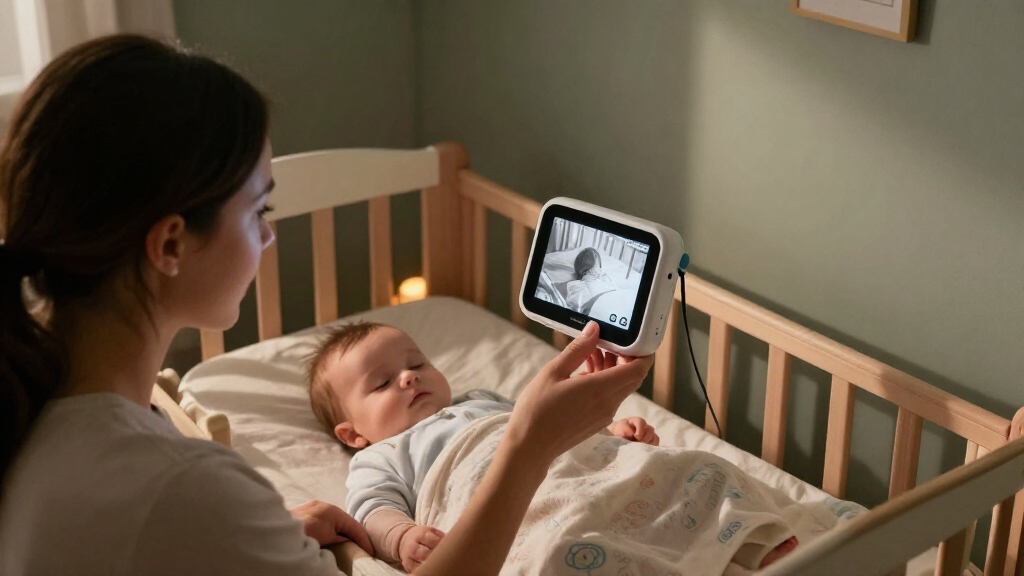
A baby monitor with night vision uses infrared illumination and a camera sensor to show a room when visible lights are off. The camera detects infrared light reflected from objects and turns that information into a usually grayscale image. To you, the nursery may stay dark; on the parent screen, the crib and nearby furniture can still be visible. The image is not a direct measure of your baby’s condition: it shows only what the camera can see from its particular angle and distance.
Most models have small infrared LEDs around the lens and switch modes automatically as the room dims. This is different from a visible night light, which adds a soft glow that you can see. Infrared light is generally invisible or barely visible to people, although a few devices may show a faint red glimmer from their LEDs. Automatic switching is convenient because it avoids a manual change when the room gets dark, but it also means the transition and image quality should be checked in your own nursery rather than assumed from a daytime demonstration.
Imagine checking the monitor at 2 a.m. You may see the pale outline of a blanket and the darker bars of the crib, while the rest of the room fades into gray. It’s a little like a black-and-white photograph developed from a room’s hidden light. How clear is that image? That depends on the camera sensor, resolution, lens, distance, and anything between the camera and crib. If the camera is too far away, details become harder to distinguish; if an object blocks the infrared light, the screen may show a shadow that looks like a gap or blur.
Some baby monitors with higher-resolution video offer a sharper view, but a bigger number on a product page does not guarantee an easy-to-read picture in your nursery. Resolution describes how much image detail a camera can capture; it cannot fix a poor angle, reflections, or weak illumination. Look for a view that lets caregivers see the crib area clearly in darkness. Check the actual product’s night-mode specifications and instructions before buying, and weigh a sharper image against practical needs such as screen size, connection reliability, and cost.
Products Worth Considering

Nanit Smart Baby Video Monitor with Wall Mount

Owlet Dream Sock Smart Baby Monitor

Chicco Bravo 3-in-1 Quick-Fold Stroller with Child and Parent Tray
As an affiliate, we earn on qualifying purchases.
Check the night image in your actual nursery
Night vision works best when the camera has a clear, unobstructed view of the crib and its own infrared light can reach the area. Picture quality varies with the sensor, lens, distance, room layout, and objects in front of the camera. A camera that looks crisp in a bright showroom may produce a washed-out image when a pale wall or shiny surface reflects infrared light. That matters because a bright patch can conceal the part of the crib you meant to observe, even though the camera appears to be functioning normally.
Try the view after dark, with the room arranged as it will be during sleep. If the crib is at the far end of the room, check whether the camera can show the whole sleep space without relying on a digital zoom that makes the picture grainy. Zoom can make a small area appear larger, but it does not add captured detail, so it may make judging what you see more difficult. A plush toy placed near the lens, a curtain edge, or a shelf can cast a large blur across the screen because it is close to the camera’s field of view.
Glass often causes trouble. Infrared light may bounce off a window and back toward the camera, creating a bright reflection that hides the room behind it. For instance, a camera sitting on a windowsill might show a ghostly white oval instead of the crib. Moving it away from the glass can solve the problem. The same principle applies to glossy furniture: changing the camera angle may improve the image more than buying a model with a higher stated resolution.
Before settling on a position, inspect the image for glare, shadows, and blind spots. Wipe smudges from the lens, angle the camera away from reflective furniture, and check whether night mode switches on reliably as the room darkens. Repeat the check from the screen or phone you will actually use, since a clear camera image can still be difficult to interpret on a small display. The useful question isn’t whether the screen looks impressive; it’s whether you can make out the view you need from your usual chair or bedside.
Choose Wi-Fi or a dedicated parent unit for your routine
A dedicated parent-unit monitor commonly sends video over a direct radio connection and does not require home Wi-Fi. A Wi-Fi model can send the camera feed to a phone app and may offer viewing away from home, but it relies on your network, account, app, and the maker’s services. These options trade convenience in different places: a dedicated unit can work independently of internet service, while remote phone viewing depends on several connected services being available. Your best fit depends on where and how you plan to check the feed.
If you want a handheld screen that works while you move around the house, a dedicated unit may be straightforward. It can still lose signal through walls or suffer interference, so test the range from the kitchen, backyard, or upstairs room where you actually spend time. A Wi-Fi monitor may suit you if you regularly check in from outside the home, but remote viewing needs a working internet connection and app access. Consider what happens during a router outage or phone battery failure: if you rely on one path to see the feed, that failure may leave you without the view you expected.
For example, a caregiver folding laundry in the basement may value a parent unit with a strong signal and long battery life. Another caregiver who travels and wants to check the room remotely might prefer an app-based camera. Some models offer both a parent screen and phone access, though features and subscription costs vary. A hybrid model can provide another way to view the feed, but it also adds setup and account details to maintain, so extra access is most useful when it solves a real need in your routine.
Compare the details that shape daily use: range, battery life, signal stability, alerts, and setup. Sound or motion alerts can be handy, but they may miss a sound or send a false notification. Sensitivity settings involve a tradeoff: a more sensitive alert may notify you sooner but can also create more interruptions, while a less sensitive setting may reduce alerts but overlook quieter activity. Treat alerts as prompts to look and listen, not as a guarantee that the monitor will catch every event.
Protect your privacy without making setup complicated
Connected baby cameras need the same care as other internet-connected devices: use a unique password, turn on available account protections, and install supported security updates. Review the maker’s privacy and data-retention policies so you understand whether video is stored locally, in the cloud, or both. Storage affects who may be able to access recordings and how long they remain available, so it is useful to understand this before enabling recording. For a non-Wi-Fi monitor, the radio link still matters, so follow the manufacturer’s pairing and security instructions.
A connected camera can be convenient, but each extra feature can add another setting to manage. If you use an app, change any default password before relying on it and secure your home router with its own strong password. Two-factor authentication, when offered, adds a second check at sign-in. These steps reduce the chance that someone can access the account with a guessed or reused password, while updates address software issues the maker has identified. They work best as routine maintenance rather than a one-time setup task.
Consider a common evening scenario: you hand your phone to a relative so they can watch the baby while you take a shower. With an app-based system, check who has access to the account and remove access when it’s no longer needed. Shared access can make caregiving easier, but lingering invitations or shared credentials make it harder to know who can view the feed. A dedicated local monitor can reduce exposure to internet-based account risks, though it does not remove every wireless security concern.
Be selective about cloud recording and smart alerts. Local recording may keep clips on a card or hub; cloud storage may let you review them remotely but can involve a subscription. Compare the convenience of reviewing footage or accessing it away from home with the added storage terms, cost, and account dependence. Read current product details, because app features and terms can change. Choose the simplest setup that fits your routine, then keep its software and account settings up to date.
Place the camera safely and keep caregiver checks in the routine
Mount or place the camera securely outside the crib and out of your baby’s reach, with cords and mounts well away from the sleep space. Follow the product’s placement instructions and safe-sleep guidance. This placement protects against the device or cord becoming a hazard as your baby grows and begins to reach or move more. A monitor can help you observe and hear your baby, but it does not prevent sleep-related injuries or replace caregiver checks.
For example, a camera attached to a nearby shelf may seem convenient until a loose cable hangs over the crib rail. Choose a stable position where the device cannot fall into the crib and cords cannot be pulled or reached. Check the mount again if you move furniture or adjust the camera angle. A position that gives the best image is only useful if it stays secure and keeps the device and cable away from the sleep space.
Some models add temperature readings, two-way audio, pan-and-tilt controls, or AI-based sound and movement notifications. Those extras can be useful in a particular home, but they may misread events, miss them, or require a subscription. Pan and tilt can help cover a larger room, for example, but changing the view does not guarantee that every part of the crib is visible at once. An alert is a nudge to check the room, not a diagnosis or a promise that the baby is safe.
Consumer monitors are not medical equipment and should not be treated as tools to diagnose health conditions or prevent sudden infant death. An alert or reading can give a caregiver a reason to look in, but it cannot establish that a baby is well or replace clinical advice. If you have questions about your baby’s sleep, health, or monitoring needs, ask your pediatrician. Follow age-appropriate use guidance for any child product, check the U.S. Consumer Product Safety Commission’s recall information for the specific model, and follow the manufacturer’s instructions.
Use this five-step check before you rely on the monitor
A quick setup check can show whether your monitor fits your room and routine before the first long night. Test the dark-room view, connection, and camera placement in the nursery rather than assuming the product will behave like it did in the store. Think of it like checking a flashlight in the hallway where you’ll actually use it. The point is to find problems while you can still change the camera position, connection, or viewing plan calmly.
- Read the model details. Confirm how night mode works, whether it needs Wi-Fi, and whether app access or storage costs extra. This helps you know which functions depend on internet service or a paid plan.
- Place it securely. Keep the camera outside the crib, beyond your baby’s reach, and away from cords or loose mounts. A clear picture does not make an unsafe position acceptable.
- Test it after dark. Check the crib view for blur, glare, blocked areas, and automatic switching to infrared mode. If an area is hard to see, adjust the angle and test again before deciding the camera meets your needs.
- Walk your usual route. Test the signal and battery from the rooms where you expect to use the parent unit or phone. This reveals whether walls, distance, or battery life will interrupt the routine.
- Review privacy and recalls. Set a unique password for connected models, enable available protections, and check the CPSC recall information for the product. This gives you a way to address account access and model-specific safety notices.
Suppose the picture is sharp beside the crib but drops out in the kitchen. That tells you to adjust the monitor’s position, choose another connection type, or plan where you’ll keep the parent unit. If a Wi-Fi app works at home but fails away from home, confirm both phone and camera have internet access. These checks help distinguish a camera-view problem from a connection problem, so you can respond to the cause instead of simply relying on an unreliable feed.
Repeat the check when you change the camera angle or move furniture. A fresh test takes only a few minutes and can catch a new blind spot or signal problem. Your aim is a dependable view that supports your routine, with direct checks and safe-sleep habits still doing the important work.
Frequently Asked Questions
How does baby monitor night vision work?
Most models use infrared LEDs to illuminate the room with light the camera can detect, then display the reflected image in grayscale. Many switch to this mode automatically when the room gets dark. The result depends on the camera, distance, and whether anything blocks or reflects the infrared light.
Can my baby see the infrared light?
Infrared light is generally outside normal human vision, though some monitor LEDs may show a faint red glow. Check the product specifications if that detail matters to you. Follow the manufacturer’s placement and distance instructions and keep the camera securely outside the crib.
Will night vision work in a completely dark room?
It can if the monitor has its own infrared illumination and a clear view of the area. Distance, obstructions, and the camera sensor affect what you see. Test the actual crib view with the nursery lights off before relying on it.
Why does the night image look blurry or washed out?
A smudged lens, nearby object, reflective surface, or window can blur or wash out the picture. Infrared light may bounce off glass back toward the camera and hide the view. Clean the lens and try a different angle or position away from shiny surfaces.
Do I need Wi-Fi for a baby monitor?
No. Dedicated parent-unit monitors commonly use a direct radio connection and can work without home Wi-Fi. Wi-Fi is generally needed for models that use an internet-connected phone app, especially when you want to view the feed away from home.
Does a baby monitor replace checking on my baby?
No. A monitor helps you observe and hear your baby, but it does not replace safe-sleep guidance, caregiver checks, or medical advice. Consumer monitors are not medical equipment and cannot reliably diagnose a health problem.
Conclusion
Choose a monitor that gives you a clear, dependable view in your own nursery, then test it after dark and secure its placement. Keep cords away from the crib, review privacy settings, and check current CPSC recall information for the model.
Let the screen be a small window into the quiet room—not the whole of your care. A calm glance can help, but your safe-sleep routine and direct checks remain the steady light in the nursery.