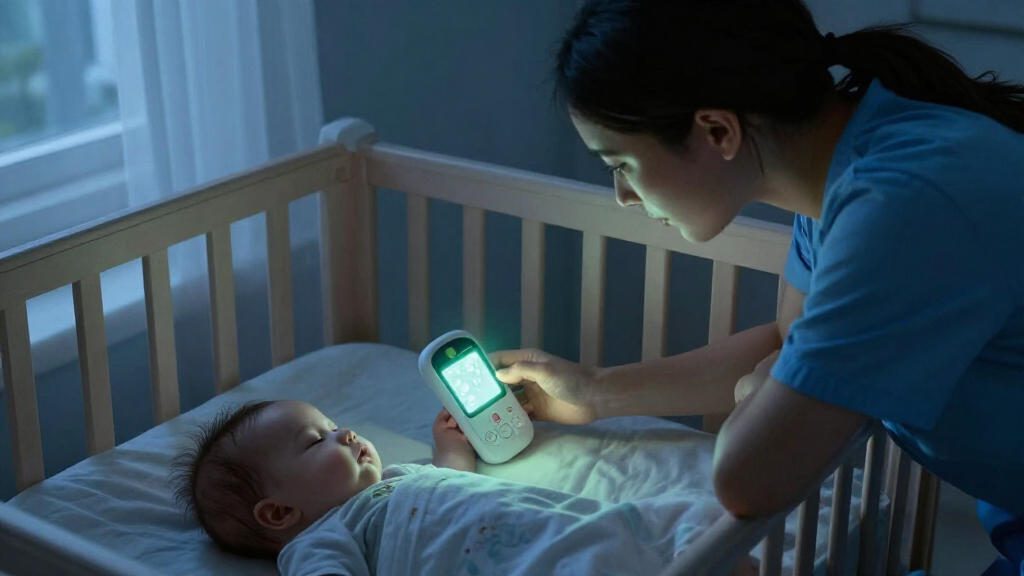
When shopping for a baby monitor with night vision, the real choice is often how you want to watch: through an app on a phone or on a dedicated parent unit. Both types can show a dark nursery using infrared night vision, but they differ in how they connect, where you can view the feed, and what happens when your home internet or phone is unavailable.

Turn the school run and nap time into listening time
- Thousands of audiobooks, podcasts and originals
- Listen on your phone, tablet or Echo — also offline
- Cancel anytime
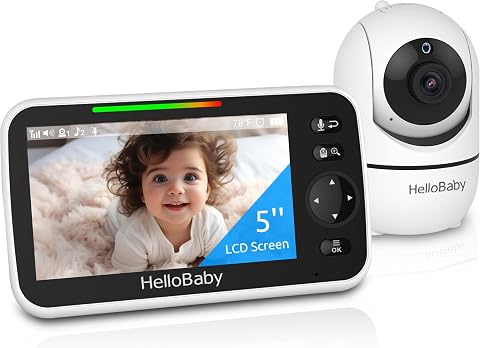
HelloBaby HB6550 No-WiFi Baby Monitor with 5-Inch Screen
- ✔ Screen: 5 inches
- ✔ Camera movement: 355° pan, 120° tilt
- ✔ Zoom: 2× digital

HelloBaby HB6560 6-Inch No-WiFi Video Baby Monitor
- ✔ Display: 6-inch IPS screen
- ✔ Camera movement: 355° pan, 120° tilt
- ✔ Night vision: Infrared

GoodBaby 5-Inch No-WiFi Baby Monitor with Camera and Audio
- ✔ Display: 5-inch IPS LCD
- ✔ Video resolution: 480p
- ✔ Camera movement: 355° pan, 120° tilt
A Wi-Fi monitor suits parents who want remote access, app alerts, or a view they can check from different places. A dedicated monitor is a stronger fit for caregivers who want a ready-to-use screen and a connection that does not depend on home internet. Night vision itself is common to both; the bigger decision is whether flexibility is worth extra setup and network dependence, or whether a simpler, self-contained system better matches daily use.
At a Glance
| Criteria | Wi-Fi baby monitor with night vision | Dedicated baby monitor with night vision | Winner |
|---|---|---|---|
| Night vision | Usually infrared black-and-white video; quality varies by camera | Usually infrared black-and-white video; quality varies by model | Tie |
| Remote viewing | Often available away from home through an app and internet | Typically limited to the paired parent unit and its local range | A |
| Connection dependence | Depends on Wi-Fi for app access; outages can interrupt viewing | Often works without home internet using its own radio connection | B |
| Privacy and security | Requires careful account, password, and device security | Avoids an internet account, though wireless security still matters | B |
| Setup and daily use | App setup and network configuration; uses a phone screen | Usually pairs with a dedicated screen for quick checks | B |
| Alerts and smart features | Often supports motion, sound, or room alerts and integrations | Commonly includes sound or motion alerts; smart integrations vary | A |
| Cost and value | Can cost more; extra features are useful if remote access matters | Many straightforward models cost less and include a parent unit | Depends |
HelloBaby HB6550 No-WiFi Baby Monitor with 5-Inch Screen
The HelloBaby HB6550 earns our top spot by pairing infrared night vision with the most flexible camera setup in this group. Its camera pans 355 degrees and tilts 120 degrees, so we can check across a room from the parent unit instead of relying on a fixed view. The 2× digital zoom can help us inspect the image more closely, though digital zoom enlarges the picture rather than adding optical detail.For families thinking beyond one crib, the HB6550 can expand to up to four cameras, more than the HB6560’s two-camera limit and the GoodBaby listing’s included single camera. It also combines two-way audio, temperature alerts, lullabies, and a sound-level indicator with a private FHSS connection that does not require Wi-Fi. Its five-inch screen is smaller than the HB6560’s, and the provided details do not specify the same VOX battery breakdown as GoodBaby. This is our most balanced pick for night checks and future flexibility, but less compelling if a larger display is the priority.
Pros:
- Infrared night vision with remote 355° pan and 120° tilt
- Supports up to four cameras
- No-Wi-Fi encrypted FHSS connection
- Includes two-way audio, temperature alerts, lullabies, and sound-level indicator
Cons:
- Five-inch display is smaller than the HB6560’s six-inch screen
- 2× zoom is digital, not optical
- Not water resistant
Best for: Families who want infrared night vision, remote camera control, and room to add cameras over time.
Not ideal for: Buyers who prioritize the largest screen or want optical zoom or water resistance.
Bottom line: The HB6550 is our strongest all-around choice when night viewing and multi-camera flexibility matter more than having the biggest screen.
“The HB6550 is our strongest all-around choice when night viewing and multi-camera flexibility matter more than having the biggest screen.”
HelloBaby HB6560 6-Inch No-WiFi Video Baby Monitor
When a larger picture matters during late-night checks, the HelloBaby HB6560 has the advantage: its six-inch IPS display is the biggest in this lineup. That extra screen area may make it easier to scan the infrared night-vision image from across a room, without needing to pick up the monitor and move closer. Like the HB6550, it offers 355-degree pan and 120-degree tilt, two-way audio, temperature alerts, and a no-Wi-Fi encrypted FHSS connection.The HB6560 also includes VOX/ECO mode, lullabies, and a sound-level indicator, giving it useful ways to monitor audio while limiting screen use. Its stated battery life is 16–30 hours, but the listing does not break that range down by mode as GoodBaby does. The clearest compromise versus the HB6550 is expansion: this model supports up to two cameras rather than four. It also lists compatibility only with specified HB6560 models and includes a nonstandard battery, so we should check fit before buying a replacement or adding a camera.
Pros:
- Largest display in this comparison at six inches
- Infrared night vision and remote pan and tilt
- Encrypted FHSS connection without Wi-Fi or an app
- VOX/ECO mode, two-way audio, temperature alerts, and lullabies
Cons:
- Expands to up to two cameras, fewer than the HB6550
- Compatibility is limited to specified HelloBaby HB6560 models
- Not water resistant
Best for: Caregivers who want a larger built-in display for viewing infrared night vision and do not expect to need more than two cameras.
Not ideal for: Households planning a four-camera setup or buyers who want broad compatibility with other monitor models.
Bottom line: Choose the HB6560 for its larger night-viewing screen if two-camera capacity and model-specific compatibility suit your setup.
“Choose the HB6560 for its larger night-viewing screen if two-camera capacity and model-specific compatibility suit your setup.”
GoodBaby 5-Inch No-WiFi Baby Monitor with Camera and Audio
The GoodBaby SM663 is the most feature-specific alternative here: it pairs infrared night vision with VOX alerts and a feeding timer. VOX mode can keep the screen from staying on continuously and alert us when sound is detected, which is useful when we want overnight audio monitoring without watching the display. The manufacturer states up to 30 hours in VOX mode, while screen-on use is listed at up to 10 hours—a meaningful distinction for caregivers who plan to leave the picture on.Its five-inch IPS display and camera movement match the core setup of the HB6550, with 355-degree pan, 120-degree tilt, and 2× zoom. It also includes two-way audio, eight lullabies, and temperature alerts, all over encrypted FHSS without Wi-Fi or an app. The feeding timer is a practical extra the HelloBaby models do not list. The tradeoff is the stated 480p video resolution, and its single included camera gives less expansion flexibility than the HB6550. Choose it for VOX and reminders; look to the HB6560 if screen size is the priority.
Pros:
- Infrared night vision with remote pan, tilt, and 2× zoom
- VOX mode with up to 30 hours of stated battery life
- Feeding timer, two-way audio, eight lullabies, and temperature alerts
- Encrypted FHSS connection requires no Wi-Fi or app
Cons:
- Video resolution is listed as 480p
- Battery life is listed at up to 10 hours with the screen on
- Listing includes one camera
Best for: Caregivers who want VOX alerts and a feeding timer alongside infrared night vision and a no-Wi-Fi connection.
Not ideal for: Buyers who want the longest stated screen-on runtime, higher listed video resolution, or multi-camera expansion.
Bottom line: The GoodBaby makes the most sense when VOX monitoring and feeding reminders outweigh its 480p resolution and shorter stated screen-on battery life.
“The GoodBaby makes the most sense when VOX monitoring and feeding reminders outweigh its 480p resolution and shorter stated screen-on battery life.”
As an Amazon Associate we earn from qualifying purchases.
Key Differences
Infrared night vision is a shared capability, not a reliable way to distinguish these categories. Both types can show a baby in a dark room, often in monochrome. Actual clarity depends on the camera, lens, placement, and room conditions, so compare specific models if image detail is a priority. A dedicated screen may make routine checks convenient, while a Wi-Fi app can make the image easier to access when your phone is already with you.
The more meaningful split is connection and access. Wi-Fi models can offer viewing beyond the home, but that feature relies on the camera, internet connection, app, and account working together. Dedicated monitors generally keep the viewing path simpler: camera to parent unit within range, often without home internet. That can be reassuring during an outage, though it does not give the same away-from-home access.
For most households that only need to watch from nearby rooms, a dedicated monitor is the practical starting point. Pay more for Wi-Fi when remote viewing or app-based alerts solve a regular need. Neither type is automatically more secure or more reliable in every home; check the specific model’s connection method, security updates, range, and alert controls.
Detailed Comparison
Night vision (minor difference)
Both categories commonly use infrared LEDs to show a dark nursery without visible room lighting. The feed is often black-and-white, and sharpness varies more by camera and placement than by whether the monitor uses Wi-Fi. This is a minor category-level gap: compare sample image quality and night-vision range for the exact models if detail matters.
Remote viewing (Wi-Fi baby monitor with night vision wins — major)
A Wi-Fi monitor usually lets an authorized user open the camera feed in an app while away from home, provided the camera and phone have internet access. A dedicated monitor generally works only through its paired parent unit within the system’s range. This is a major difference for parents who travel, work away, or share access with a caregiver; for home-only monitoring, the extra reach may go unused.
Connection dependence (Dedicated baby monitor with night vision wins — moderate)
A dedicated monitor often communicates directly with its parent unit, so home internet is not part of ordinary viewing. A Wi-Fi model depends on a working wireless network for app access, and some functions may stop during an outage. This is a moderate practical advantage for B in homes with unreliable internet or caregivers who prefer fewer dependencies. Check whether a specific Wi-Fi model offers a local mode.
Privacy and security (Dedicated baby monitor with night vision wins — moderate)
Wi-Fi access can make sharing convenient, but it adds an account and internet-connected device that need strong unique passwords, controlled access, and current software. A dedicated monitor avoids cloud accounts in many cases, though wireless signals and device design still matter. B has a moderate simplicity advantage for households seeking fewer connected services; neither category guarantees privacy, so review security details for the model.
Setup and daily use (Dedicated baby monitor with night vision wins — moderate)
Wi-Fi monitors generally require app installation, account setup, and network pairing. Once configured, the phone can serve as the screen. A dedicated system typically pairs with an included parent unit and is ready for quick viewing without opening an app. B wins by a moderate margin for caregivers who value a dedicated screen, while A may feel simpler to anyone who wants one less device to carry.
Alerts and smart features (Wi-Fi baby monitor with night vision wins — moderate)
Wi-Fi models more often offer app notifications, remote alerts, or integrations with other smart-home features. Dedicated monitors can still provide sound and motion alerts, but the options vary by model and may be limited to the parent unit. A has a moderate edge for users who will act on phone alerts or need shared access; extra notifications add little value if a caregiver is already beside the parent screen.
Cost and value (moderate difference)
Many dedicated systems bundle a camera and parent unit at a straightforward price. Wi-Fi models can charge more for app access, cloud services, or added smart features, though pricing varies widely. There is no universal winner: B is often better value for home-only viewing, while A can justify its higher cost when remote access is used regularly. Check ongoing fees as well as the purchase price.
Wi-Fi baby monitor with night vision: Pros and Cons
Pros:
- Remote viewing through an app is often available outside the home.
- Uses a phone many caregivers already carry.
- May offer flexible alerts, access sharing, and smart features.
Cons:
- App viewing depends on internet and network setup.
- Requires attention to account access and software security.
- Some models add subscription costs for certain features.
Dedicated baby monitor with night vision: Pros and Cons
Pros:
- Often works without home internet through a paired parent unit.
- A dedicated screen supports quick checks without opening an app.
- Straightforward models can offer good value for home use.
Cons:
- Viewing is generally limited to the parent unit’s local range.
- Caregivers need to keep track of and charge a separate screen.
- Smart alerts and remote sharing may be limited or unavailable.
Who Should Choose What
Choose Wi-Fi baby monitor with night vision if:
- You need to check the nursery while away from home.
- You want phone notifications or app access for more than one caregiver.
- Your home Wi-Fi is dependable and you are comfortable managing connected-device security.
Choose Dedicated baby monitor with night vision if:
- You mainly monitor from elsewhere in the home.
- You want a dedicated screen and a system that can work without home internet.
- You prefer a simpler setup and want to avoid paying for app features you will rarely use.
Skip both if: Neither fits if your primary need is clear night vision but the available models do not meet your image-quality, range, or alert requirements; compare specific camera specifications and sample footage before buying.
Value for Money
Paying more for Wi-Fi is worthwhile when remote viewing or app alerts will change how you use the monitor. For a parent who regularly checks in from work, a caregiver who needs access while away, or a household that values phone notifications, that flexibility can justify the added cost. Check for subscriptions, since a low purchase price may not include every feature.
If the monitor will stay within the home and a caregiver can carry a parent unit, a dedicated system is usually the better value. Its separate screen is part of the package, and the family is not paying extra for remote access it seldom uses. Compare the full model package, including the parent unit, battery life, range, and any recurring charges, rather than choosing by the night-vision label alone.
Final Verdict
For most families who want to watch a baby from nearby rooms, choose a dedicated monitor with night vision. It offers a straightforward screen and often keeps ordinary viewing independent of home internet. Choose Wi-Fi if checking in from outside the house or receiving app alerts is a regular need; that access is the main reason to pay more and accept the extra network and account setup.
The deciding factor is where you need to view the feed. If the answer is “around the home,” B is the clearer fit. If it includes “away from home,” A earns its higher price. In either case, compare the specific camera’s night image and the system’s range, since category alone does not guarantee a clearer view.
Frequently Asked Questions
Do Wi-Fi monitors have better night vision?
Not by category alone. Both types commonly use infrared night vision. Image clarity depends on the individual camera, lens, placement, and room conditions, so compare model specifications or sample footage.
Can a Wi-Fi baby monitor work without internet?
Some models offer local viewing or a separate parent unit, but many app-based features rely on internet access. Check the product details for what still works during a Wi-Fi or internet outage.
Is a dedicated baby monitor more private?
It can involve fewer internet accounts and cloud features, which simplifies privacy management. Wireless security still varies by model, so review how the system connects and how the maker handles updates.
Is it worth paying extra for a Wi-Fi monitor?
Yes if you regularly need remote viewing, shared app access, or phone alerts. For monitoring only from nearby rooms, a dedicated system is often better value.