

When I compare the best active play systems for kids, I look beyond motion controls: the size of the included game library, whether ongoing access depends on a subscription, and how easily a family can set it up all change the experience. The Nex Playground is my family-multiplayer pick for its four-player support and recognizable games, while the Owlzoom Motion Gaming Console is the clearest choice for families who want more than 20 built-in games without an app, Wi-Fi setup, or subscription. For a compact system with privacy features, I favor the Blackview PlayPop 8 options, particularly the version that includes a power adapter.

Turn the school run and nap time into listening time
- Thousands of audiobooks, podcasts and originals
- Listen on your phone, tablet or Echo — also offline
- Cancel anytime
The central tradeoff is more games versus fewer ongoing requirements: several systems include only five games and reserve broader catalogs for optional passes, while Owlzoom offers a larger stated offline library but less detail about future game additions. All five connect to a TV or similar screen and need indoor space for movement, so I also weigh the existing screen setup, child age, and room to play. My ranking reflects what each product clearly offers, not claims about unverified performance.
Complete the kit


Key Takeaways
- Choose Owlzoom if a subscription-free library matters most: it lists more than 20 offline games and is rated for ages 3 and up.
- Choose Nex Playground for a family-focused option with up to four players and five named included games; its larger catalog requires a separate Play Pass.
- Choose Blackview PlayPop 8 with adapter if you want a physical camera shutter, local motion processing, and an included 15 W power adapter.
- The other PlayPop 8 listings are not identical: one specifies 4K decoding and a two-year warranty but requires a separate suitable charger.
- Plan for a screen, power, and play space with every pick; none is a standalone outdoor activity system.
| Nex Playground Active Play System for Kids and Families | 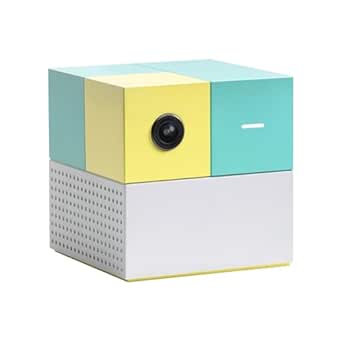 | Best for family multiplayer | Players: Up to 4 | Included games: 5: Fruit Ninja, Starri, Whac-a-Mole, Go Keeper, and Party Fowl | Control: Body-motion tracking; no controller required | VIEW LATEST PRICE | See Our Full Breakdown |
| Owlzoom Motion Gaming Console for Kids with 20+ Built-In Games |  | Best for subscription-free play | Games included: 20+ built-in motion games | Age range: 3 years and up | Connection: HDMI | VIEW LATEST PRICE | See Our Full Breakdown |
| Blackview PlayPop 8 Motion Gaming Console for Kids and Families |  | Best PlayPop 8 bundle | Players: 1–4 | Included games: 5 preinstalled games | Storage: 128 GB | VIEW LATEST PRICE | See Our Full Breakdown |
| PlayPop 8 Active Play System for Kids and Families |  | Best for younger school-age family play | Players: 1–4 | Age recommendation: 6 and up | Included games: 5: Whack-a-Mole, Ace of Thunder, Chef Frenzy, Rhythm Dance, Basketball Master | VIEW LATEST PRICE | See Our Full Breakdown |
| Blackview PlayPop 8 Active Play System for Kids and Families |  | Best for camera and tracking detail | Players: 2–4 in supported games | Camera: 12 MP, 176-degree wide-angle | Motion tracking: 17-point AI body tracking | VIEW LATEST PRICE | See Our Full Breakdown |
| active play systems for kid | Players | Included games | Connection | Storage |
|---|---|---|---|---|
| Nex Playground Active Play Sys | Up to 4 | 5: Fruit Ninja, Starri, Whac-a-Mole, Go Keeper, and Party Fowl | HDMI to TV or projector | 64 GB |
| Owlzoom Motion Gaming Console | — | — | HDMI | — |
| Blackview PlayPop 8 Motion Gam | 1–4 | 5 preinstalled games | HDMI | 128 GB |
| PlayPop 8 Active Play System f | 1–4 | 5: Whack-a-Mole, Ace of Thunder, Chef Frenzy, Rhythm Dance, Basketball Master | — | 128 GB |
| Blackview PlayPop 8 Active Pla | 2–4 in supported games | 5 preinstalled games | — | — |
More Details on Our Top Picks
Nex Playground Active Play System for Kids and Families
I rank the Nex Playground first for households that want a clearly family-oriented motion system and expect several people to join in. It supports up to four players, connects to a TV or projector over HDMI, and includes five named games: Fruit Ninja, Starri, Whac-a-Mole, Go Keeper, and Party Fowl. That named starting lineup gives shoppers more to judge than a bare game count, though it remains a small included selection.
Compared with Owlzoom, Nex is less compelling for buyers who want a broad library without paying for ongoing access: Owlzoom lists more than 20 built-in offline games, while Nex requires a separately purchased Play Pass for its larger catalog and monthly additions. Nex’s advantage is its explicit multiplayer framing and recognizable included titles, not a subscription-free breadth claim. Against the PlayPop 8 systems, its supplied details do not call out a physical camera shutter, local processing, or 128 GB storage, so privacy and storage-minded buyers may prefer a Blackview listing.
The system is a compact indoor, screen-connected console, not a standalone toy: families need an HDMI-capable display, corded power, and enough room to move. I also would not treat “up to four” as a promise that every listed game supports four players. For a family seeking shared active play with an easy-to-understand set of included games, Nex is the most balanced match here; for subscription-free variety, Owlzoom is the sharper choice.
Pros:- Supports up to four players using body movement rather than handheld controllers.
- Includes five named games, making the starter selection easier to evaluate.
- Connects to a TV or projector through HDMI and has a compact design.
- Suited to shared indoor family play for ages 5 and up.
Cons:- The broader catalog and monthly new games require a separately purchased Play Pass.
- Requires a compatible screen, corded power, and indoor space for movement.
- The supplied details do not specify a physical camera shutter or local motion processing.
Best for: Families with an HDMI TV or projector who want a shared motion-play system for up to four players and value a clearly named starter set of games.
Not ideal for: Buyers who want a large included game library without a separate pass, or households that need explicit camera privacy and local-processing details.
- Players:Up to 4
- Included games:5: Fruit Ninja, Starri, Whac-a-Mole, Go Keeper, and Party Fowl
- Control:Body-motion tracking; no controller required
- Connection:HDMI to TV or projector
- Age range:5 and up
- Storage:64 GB
- Power:Corded electric
- Expanded library:Optional Play Pass
Our verdict“I recommend Nex Playground for families prioritizing four-player motion play and a recognizable starter lineup over a large subscription-free library.”
Owlzoom Motion Gaming Console for Kids with 20+ Built-In Games
Owlzoom earns a distinct place in this lineup because it lists more than 20 built-in motion games that work offline, without an app, Wi-Fi setup, ads, or a subscription. That makes it the most straightforward match for families who want to plug in a system and use the games already included rather than decide whether to pay for an expanded catalog. Its age guidance starts at 3, younger than the stated recommendations for Nex and the PlayPop 8 listing that specifies ages 6 and up.
That simplicity comes with a tradeoff: the product information does not say how future games are added. I would choose it for the library described today, not on an assumption that the selection will keep growing. By comparison, Nex Playground and PlayPop 8 explicitly offer access to larger catalogs through optional passes, which may better suit families who want an ongoing stream of additional titles. Their extra access can bring more choices, but it also introduces a recurring-purchase decision that Owlzoom’s stated offline setup avoids.
Owlzoom connects to a TV through HDMI, and the package lists an HDMI cable and USB Type-C power cable. Its motion games invite children to jump, reach, stretch, and wave, but families still need an unobstructed indoor play area. The listing describes a 1080p output, rather than the 4K video decoding stated for one PlayPop 8 version; that difference matters more to buyers comparing media specifications than to those focused on body-movement games. I rank Owlzoom second because its included-game policy is unusually clear, while its player-count details and future library path are less fully specified than Nex’s multiplayer positioning.
Pros:- Includes more than 20 motion games that are described as playable offline.
- Does not require an app, Wi-Fi setup, or subscription for the included games.
- Includes an HDMI cable and USB Type-C power cable.
- Listed for ages 3 and up, younger than the stated guidance for several alternatives.
Cons:- Requires a TV with an HDMI input and a suitable indoor play area.
- The product information does not specify how future games can be added.
- The supplied details do not state a multiplayer capacity.
Best for: Families seeking a screen-connected motion system with a large stated built-in game selection, offline play, and no required app or subscription.
Not ideal for: Buyers who need a stated four-player capacity, want a documented path for adding future games, or expect 4K decoding.
- Games included:20+ built-in motion games
- Age range:3 years and up
- Connection:HDMI
- Resolution:1080p
- Internet or app:Included games work offline; no app or Wi-Fi setup required
- Included accessories:HDMI cable, camera body, USB Type-C power cable, user manual, quick guide
- Warranty:One-year limited warranty
Our verdict“I would pick Owlzoom when a substantial stated offline library matters more than a documented four-player limit or an upgrade path.”
Blackview PlayPop 8 Motion Gaming Console for Kids and Families
This Blackview PlayPop 8 listing is my preferred PlayPop bundle because its supplied details include a 15 W Type-C power adapter, HDMI cable, and remote control. That is a useful distinction from the other Blackview listing, which says a suitable charger is required but does not list one among the included components. For a family comparing near-identical system names, the box contents can affect how much setup is needed on arrival.
Like the other PlayPop 8 options, this compact cube uses camera-based motion control and supports up to four players, with five preinstalled games and optional GamePass access for additional titles. Its listed physical camera shutter and local motion processing give privacy-conscious households specific features to weigh. Compared with Nex Playground, PlayPop emphasizes these privacy details and lists 128 GB of storage, while Nex names its five included games and highlights four-player family play. Compared with Owlzoom, PlayPop has a smaller included-game count and makes a larger catalog optional, so it is a weaker match for families who want the most games without a pass.
The 4K decoding specification and compact dimensions add flexibility for households that also care about video playback, but they do not increase the number of included games. I would not treat “supports several game categories” as proof that every title has the same player count; the listing says player support varies. Its corded, HDMI-connected indoor design also needs floor space and a suitable display. This is the most complete PlayPop 8 package on paper, but shoppers still need to decide whether five preinstalled games are enough before paying for optional access.
Pros:- Lists a 15 W Type-C power adapter, HDMI cable, and remote control as included accessories.
- Supports up to four players and uses motion controls without handheld game controllers.
- Includes a physical camera shutter and locally processed motion recognition.
- Offers 128 GB storage, 4K video decoding, and a two-year warranty.
Cons:- Only five games are preinstalled; additional premium titles use optional GamePass.
- Requires an HDMI display and corded power, with indoor use specified.
- Player counts and game availability vary by title.
Best for: Families choosing a PlayPop 8 who want the listed power adapter in the box, a physical camera shutter, local processing, and a two-year warranty.
Not ideal for: Buyers who want 20-plus included games without a subscription, or anyone seeking an outdoor or screen-free play system.
- Players:1–4
- Included games:5 preinstalled games
- Storage:128 GB
- Connection:HDMI
- Video decoding:H.265, VP9, and AV1; supports 4K playback
- Privacy:Physical camera shutter; motion recognition processed locally
- Included accessories:HDMI cable, 15 W Type-C power adapter, remote control
- Warranty:2 years
Our verdict“I recommend this PlayPop 8 version over the other PlayPop listings when the included adapter and stated privacy features matter most.”
PlayPop 8 Active Play System for Kids and Families
This PlayPop 8 listing is the most age-specific of the two Blackview options: it describes indoor play for children ages 6 and up, connects by HDMI, and says its motion data is processed locally without cloud storage or uploads. It supports one to four players and lists five games by name—Whack-a-Mole, Ace of Thunder, Chef Frenzy, Rhythm Dance, and Basketball Master—so parents can review the starter selection before choosing it.
Its main difference from the other PlayPop 8 listings is not a dramatically different play concept, but what its supplied information emphasizes. Unlike the B0HDZ2MS4H bundle, the details here do not list a power adapter or physical camera shutter. Unlike the B0HKRYKYX4 version, they do not specify 4K decoding, a 176-degree camera, or 17-point tracking. I would not assume those features are absent from the product itself, but shoppers comparing listings should verify the exact package and hardware rather than transfer specifications from one PlayPop listing to another.
Compared with Owlzoom, the five included games and optional subscription are a less compelling setup for families who want a large offline selection without ongoing access decisions. Compared with Nex, PlayPop’s local-processing privacy statement is more explicit in the supplied details, while Nex offers its own named starter games and family multiplayer framing. This pick makes sense for a household that values the specified local data handling and wants a compact system for shared play. Its reliance on an HDMI screen and corded power means it is still an indoor console, not a substitute for outdoor activity.
Pros:- Supports one to four players through camera-based motion control.
- Lists five included games by name and supports optional additional game access.
- States that motion data is processed locally without cloud storage or uploads.
- Compact design connects to a TV, monitor, or projector through HDMI.
Cons:- The broader game library requires an optional subscription.
- Requires an HDMI display and corded power for indoor play.
- The supplied details do not list a physical camera shutter or included power adapter.
Best for: Families with children ages 6 and up who want a compact, shared motion system and value an explicit statement that movement data stays local.
Not ideal for: Buyers who want a large subscription-free game library, need a power adapter confirmed in the box, or require a listed physical camera cover.
- Players:1–4
- Age recommendation:6 and up
- Included games:5: Whack-a-Mole, Ace of Thunder, Chef Frenzy, Rhythm Dance, Basketball Master
- Control:Camera-based motion control
- Connections:HDMI and USB 3.0 Type-C
- Storage:128 GB
- Privacy:Motion data processed locally; no cloud storage or uploads
- Setup:Connects to a TV, monitor, or projector; corded power
Our verdict“I would choose this PlayPop 8 listing for its clear local-processing statement and age guidance, after checking the exact adapter and privacy hardware included.”
Blackview PlayPop 8 Active Play System for Kids and Families
This PlayPop 8 listing is the most technically specific about its motion camera: it states a 12 MP, 176-degree wide-angle camera and 17-point AI body tracking. Those details may appeal to shoppers comparing how a system frames players in a room, especially when more than one person may be moving at once. It also lists 4K video decoding, 128 GB storage, a built-in speaker, a physical camera cover, and a two-year warranty.
In practical buying terms, however, this is not the PlayPop bundle I would choose if I want the clearest out-of-box power setup. Its listing says that an additional 15 W or higher charger is required, while the B0HDZ2MS4H PlayPop listing explicitly includes a 15 W Type-C adapter. The two versions both list five preinstalled games and optional access to a larger catalog, so the sharper camera specifications do not solve the core library tradeoff. Owlzoom remains the stronger choice for buyers who prioritize a larger stated built-in collection without a subscription; Nex may be easier to compare if a named five-game starter set and family multiplayer positioning are the main priorities.
The physical camera cover and local on-device processing are meaningful privacy features, but the buyer still needs to check what is included and provide a compatible HDMI display and charger. The source details say up to four players in supported games, not that every title supports that count. I place this version fifth not because its listed hardware is weaker, but because its separate charger requirement and five-game starting point make it a more conditional recommendation than the adapter-included PlayPop 8. It is best for buyers who specifically value the stated camera and tracking specifications.
Pros:- Lists a 12 MP, 176-degree camera and 17-point AI body tracking.
- Supports up to four players in supported games without handheld controllers.
- Includes a physical camera cover and processes motion data on-device.
- Offers 128 GB storage, 4K decoding, a built-in speaker, and a two-year warranty.
Cons:- Requires a separate 15 W or higher charger.
- Includes five games, with broader access tied to an optional paid GamePass.
- Player counts and game availability vary by title.
Best for: Shoppers who want the PlayPop 8’s stated wide-angle camera and 17-point tracking, plus a physical camera cover and two-year warranty.
Not ideal for: Buyers seeking a ready-to-power bundle, a broad included game library, or a system that does not require an HDMI display.
- Players:2–4 in supported games
- Camera:12 MP, 176-degree wide-angle
- Motion tracking:17-point AI body tracking
- Included games:5 preinstalled games
- Game library:36 games across 6 categories; optional paid GamePass
- Video decoding:4K; H.265, VP9, and AV1
- Privacy:Physical camera cover; on-device processing
- Power requirement:Additional 15 W or higher charger required
- Warranty:2 years
Our verdict“I would choose this version for its unusually detailed camera specifications, but prefer the adapter-included PlayPop 8 for a simpler purchase setup.”

How We Picked
I ranked these systems by how well their stated features support active play for children and families, rather than by broad claims about entertainment value. My main comparison points were the number and access model of included games, support for multiple players, age guidance, connection and power needs, privacy details, and the practical differences between the two PlayPop 8 listings. A system that lets children move without a handheld controller can make group play easier to start, but it still needs a suitable display and clear indoor floor space.
I gave particular weight to what comes ready to play. Owlzoom stands apart because it lists 20-plus built-in games and says those games work offline without an app or subscription. Nex and the PlayPop 8 models each list five included games, with expanded catalogs tied to optional paid access. That distinction matters to families who want to avoid recurring commitments, although a larger stated library does not tell me how varied or engaging every game is.
I also separated products whose names are similar but whose supplied details differ. The Blackview listing with ASIN B0HDZ2MS4H lists a 15 W power adapter in the box, a physical shutter, local processing, and a two-year warranty. The other Blackview listing with ASIN B0HKRYKYX4 describes 4K decoding, a 176-degree camera, 17-point tracking, and a two-year warranty, but says an additional 15 W or higher charger is required. The PlayPop 8 listing with ASIN B0HDTHTVXP emphasizes local processing and five named games, while its supplied details do not list a camera shutter. I treat these as distinct listings, not interchangeable bundles.
Finally, I considered setup friction and fit: HDMI compatibility, corded power, age recommendations, and stated player counts. I did not assume that unspecified details—such as whether every game supports four players or how Owlzoom might receive future games—are guaranteed. The rankings favor the clearest fit for a particular household, and the drawbacks are part of each recommendation, not fine print to overlook.
| active play systems for kid | Connection | Privacy |
|---|---|---|
| Nex Playground Active Play Sys | HDMI to TV or projector | — |
| Owlzoom Motion Gaming Console | HDMI | — |
| Blackview PlayPop 8 Motion Gam | HDMI | Physical camera shutter; motion recognition processed locally |
| PlayPop 8 Active Play System f | — | Motion data processed locally; no cloud storage or uploads |
| Blackview PlayPop 8 Active Pla | — | Physical camera cover; on-device processing |
Factors to Consider When Choosing Best Active Play Systems For Kids
Active play systems turn body movement into game input, but the products here still depend on a screen and power. I would match the library and setup to the household before comparing camera specifications: a system with lots of included games may suit a family that avoids subscriptions, while a five-game starter set can work if its particular games are a good fit and optional catalog access is acceptable.
Start with the game-access model
The clearest difference is what is available without a separate pass. Owlzoom lists more than 20 built-in offline games and says there is no app, Wi-Fi setup, or subscription requirement for that collection. Nex Playground and all three PlayPop 8 listings start with five games; each points buyers toward an optional pass or GamePass for broader access. A larger paid catalog may suit families who want ongoing additions, but it should not be confused with the included selection.
Compare the actual named games when the listing supplies them. Nex and the B0HDTHTVXP PlayPop listing identify their five included titles, while other PlayPop descriptions give the count but fewer specifics. Owlzoom offers the largest stated included count, but the supplied information does not explain how future titles are added. I would choose based on the games and access terms described now, not assumed future updates.
Match player support to the way your family plays
Multiplayer capacity is not the same as a guarantee for every game. Nex is described as supporting up to four players, and the PlayPop 8 versions also state support for as many as four, with the more detailed camera listing qualifying this as supported games. The B0HDTHTVXP listing gives a one-to-four-player range. Owlzoom’s supplied details do not state a player count, so I would not buy it on the assumption that four children can play together.
If group play is a priority, check the player count for the specific game as well as the overall console description. Families with one child may care more about a broad solo selection, age fit, and simple setup. A shared system can encourage movement together, but it still needs enough clear floor area for players to reach, step, and wave without bumping into furniture.
Check age guidance and the play space
The listings give different age recommendations: Owlzoom says 3 and up, Nex says 5 and up, and one PlayPop 8 listing says 6 and up. Those are useful starting points, not a substitute for checking whether a child can follow a game’s prompts and move safely in the available room. The other PlayPop descriptions do not provide the same age guidance in the supplied information, so I would confirm the intended age range for the exact listing.
Every option here is designed for indoor play and needs a TV, monitor, or projector connection. Measure the space between the camera position and the play area, remove trip hazards, and consider whether other people will cross through the room. These systems are not screen-free or outdoor equipment; their active-play value depends on pairing the display with room for safe movement.
Compare connection, power, and what comes in the box
All five systems rely on HDMI and corded power, so check the available ports and where cables can run before choosing. Owlzoom lists an HDMI cable and USB Type-C power cable. The B0HDZ2MS4H PlayPop listing specifies a 15 W Type-C adapter, HDMI cable, and remote. The B0HKRYKYX4 PlayPop listing says an additional 15 W or higher charger is required, making it a less complete power bundle as described.
The B0HDTHTVXP PlayPop details describe HDMI and Type-C connections but do not list a power adapter among the supplied accessories. Nex’s listed connection is HDMI, with corded electric power. Because similarly named products can have different included accessories, I would use the exact ASIN and package details when checking compatibility rather than relying on another PlayPop 8 listing.
Treat privacy claims and hardware details as separate questions
For families thinking about cameras in a play space, the PlayPop listings provide the most specific privacy features: the B0HDZ2MS4H version lists a physical shutter and local motion processing, while B0HKRYKYX4 lists a physical camera cover and on-device processing. B0HDTHTVXP says motion data is processed locally without cloud storage or uploads, but its supplied details do not mention a physical shutter. Nex and Owlzoom descriptions provide less privacy information here, so shoppers who need a specific camera control should confirm it for their chosen model.
Do not let video specifications stand in for game performance claims. One PlayPop listing states 4K video decoding and specific camera-tracking figures, while Owlzoom states 1080p. Those numbers describe listed capabilities, but the main decision for an active-play buyer is still whether the included games, player support, setup, and privacy details fit the household.
Choose between similar PlayPop 8 listings carefully
The three PlayPop 8 entries share a compact form, motion controls, five preinstalled games, HDMI-connected indoor use, and optional access to more titles. Their supplied details are not identical. B0HDZ2MS4H lists an adapter in the box alongside a shutter, local processing, 4K decoding, 128 GB storage, and a two-year warranty. B0HKRYKYX4 adds specific camera and tracking figures but requires a separate 15 W or higher charger. B0HDTHTVXP names its five games and explicitly describes local processing without cloud storage or uploads, but does not list the same adapter or shutter details.
I would compare those package details against the exact product page before ordering. The differences affect the setup and what can be confirmed about privacy or tracking, even though the product names look similar. If game variety without a subscription is the main goal, none of the PlayPop listings outranks Owlzoom on the stated included count.
Frequently Asked Questions
Do these active play systems need a TV?
Yes. These systems are designed to connect to a TV, monitor, or projector, generally through HDMI. Before choosing one, check that the display has a compatible input and that the power cable can reach the console safely. They are not standalone handheld toys, and the room also needs enough clear space for children to move.
Which system includes the most games without a subscription?
Owlzoom lists more than 20 built-in motion games and says they work offline without an app, Wi-Fi setup, ads, or a subscription. The Nex Playground and PlayPop 8 listings each describe five included games, with broader catalogs available through optional passes. The Owlzoom listing does not explain how future games can be added, so I would judge it by the built-in collection described.
Which options support more than one player?
Nex Playground is listed for up to four players, and the PlayPop 8 listings describe support for as many as four, although player counts can vary by game. The B0HDZ2MS4H PlayPop listing gives a one-to-four range, while B0HKRYKYX4 specifies two to four players in supported games. Owlzoom’s supplied information does not state a player count, so check the exact game and product details if group play is essential.
Are the three PlayPop 8 listings the same package?
No. The B0HDZ2MS4H listing includes a 15 W Type-C adapter and remote, and also specifies a physical shutter, local processing, and a two-year warranty. B0HKRYKYX4 provides detailed camera and tracking figures but says an additional 15 W or higher charger is required. B0HDTHTVXP names five games and describes local processing without cloud storage or uploads, but its supplied details do not list the same adapter or shutter. I would compare the exact listing and included accessories before buying.
How much indoor space do children need?
The product details do not provide a universal minimum room size, and the space needed will depend on the game, number of players, and camera placement. I would clear the area of furniture edges, loose objects, and walk-through traffic so children can move without collision risks. Since all five picks are indoor systems connected to a screen, a suitable display and a safe play zone matter as much as the console’s compact size.
Conclusion
For families who want shared play with named starter games, I would choose Nex Playground, while keeping its optional Play Pass requirement in mind. For buyers who want the strongest stated subscription-free library, Owlzoom is the clearest pick. If privacy hardware and an adapter included in the package matter more, I would select the B0HDZ2MS4H PlayPop 8; choose B0HKRYKYX4 instead only if its listed camera and tracking specifications are the deciding factors and you are prepared to supply a suitable charger. The B0HDTHTVXP PlayPop 8 suits families who value its local-processing statement and named five-game set, after checking the exact box contents.
Before making the final choice, I would confirm the age guidance, player support for specific games, HDMI compatibility, power accessories, and optional subscription terms. The right active play system is the one whose included games and setup fit your household—not simply the one with the longest specification list.