
TL;DR

Turn the school run and nap time into listening time
- Thousands of audiobooks, podcasts and originals
- Listen on your phone, tablet or Echo — also offline
- Cancel anytime
Building an AI workstation used to save money, but component shortages and price hikes have flipped that script. Now, prebuilt systems often match or beat DIY on price and come with validated thermal performance, warranties, and support, saving time and reducing risk. The choice depends on your budget, expertise, and need for control.
Imagine turning on your AI machine, ready to crunch data, without worrying about thermal throttling or driver conflicts. Sounds like a dream, right? That’s the promise of a prebuilt AI workstation. But is it always the smarter choice? Or does building your own still hold value? In 2026, with surging component prices and supply issues, that answer is more nuanced than ever.
Whether you’re a hobbyist chasing the thrill of custom tuning or a professional needing rock-solid support, this guide strips down the build vs buy debate into what truly matters now: cost, time, control, and risk. Let’s explore what makes sense in this new landscape, so you can make a smarter choice for your AI projects.
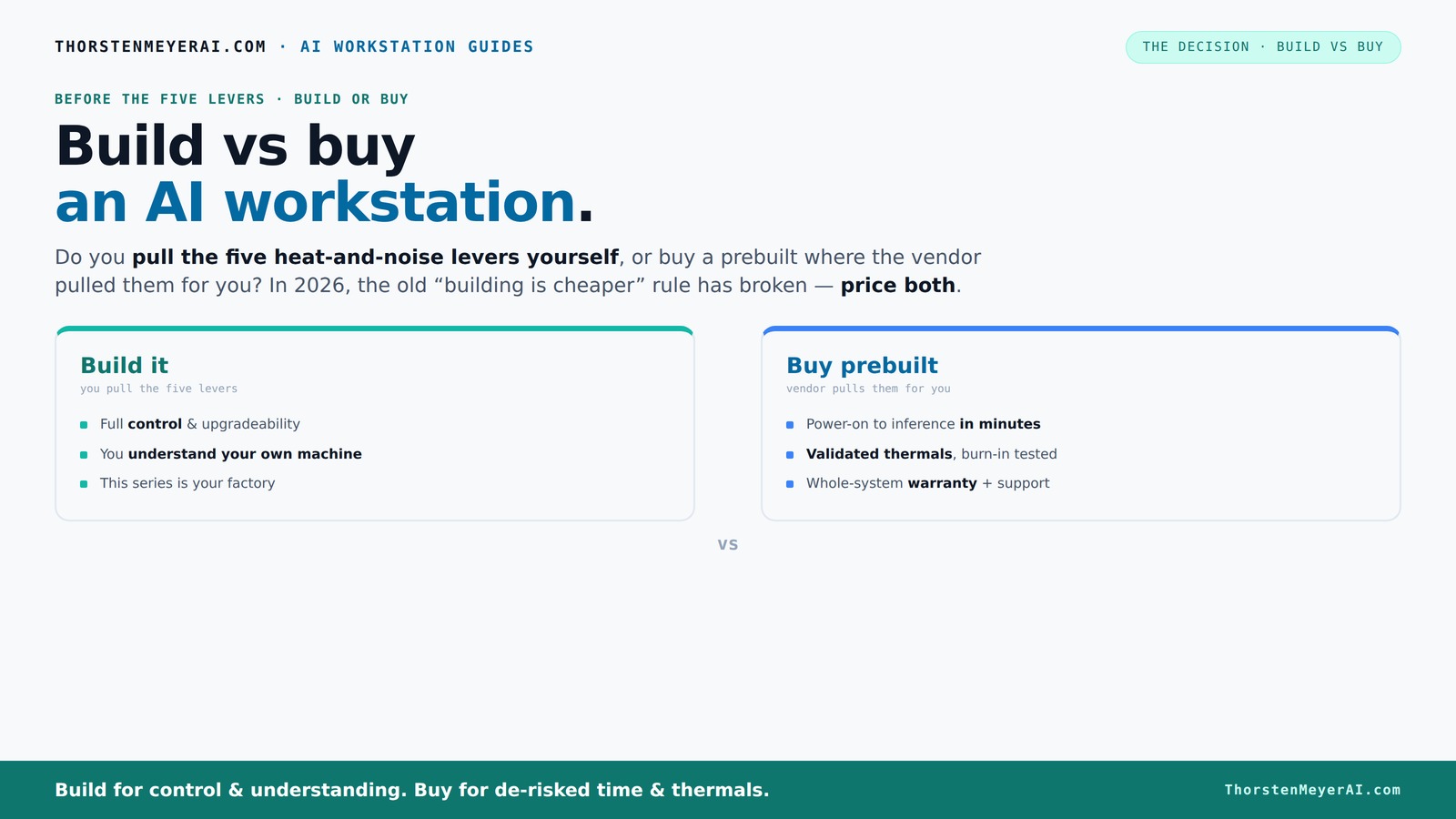
Build vs buy
an AI workstation.
The real question behind this whole series: do you pull the five heat-and-noise levers yourself, or buy a prebuilt where the vendor pulled them for you? And in 2026, the old “building is cheaper” rule has broken. Match your situation in Part 3.
Key Takeaways
- Component shortages and inflation mean prebuilts can cost the same or less than DIY builds in 2026.
- Prebuilts offer validated thermal performance, warranties, and support—saving time and reducing risk.
- DIY gives maximum control, upgradeability, and learning opportunities, ideal for hobbyists or those with time.
- Your choice depends on workload, budget, expertise, and whether immediate deployment or long-term flexibility matters more.
- Always verify power, cooling, and upgrade paths before buying or building—small details matter in high-performance AI setups.
As an affiliate, we earn on qualifying purchases.
Why 2026 Changes the Game: Building isn’t always cheaper anymore
Forget the old rule that building your own always saves money. In 2026, component shortages and price spikes have flipped that script. DDR5 RAM, GPUs, and SSDs are up 30-50% since last year. A DIY rig that cost $1,000 now easily hits $1,250 or more before even adding an OS.
Meanwhile, big vendors—like Lambda and Puget Systems—bought components in bulk before prices soared. They can now offer systems at prices that are hard to beat, sometimes even cheaper than piecing it together yourself.
This shift means you need to *price both options* today, not assume DIY is cheaper. It’s a real tradeoff between the time and control of building versus the cost and support of buying.
The Five Levers: Who pulls them determines your heat, noise, and stability
Making an AI workstation run cool and quiet is about five key levers: undervolt the GPU, match coolers, optimize airflow, tune fans, and position the machine well. Do you want to pull these levers yourself or have a vendor handle them? That’s the real question.
Buy a prebuilt → the vendor fine-tunes these for you, validating thermals and noise before shipping. Companies like BIZON and Lambda run rigorous tests, ensuring the system won’t throttle or overheat under heavy loads. They also offer water cooling and custom airflow solutions, often with a warranty.
Build it yourself → you control every detail, choosing quiet GPUs, undervolting, and designing airflow. This gives you maximum control but requires expertise and effort. Plus, you’ll need to troubleshoot if thermal issues pop up later. Your workshop, your rules.
When a prebuilt makes sense: Speed, support, and reliability
If you need to hit the ground running, a prebuilt is your best bet. It arrives with the OS, drivers, and AI stack—CUDA, TensorFlow—already installed. Just power on and start training. For busy professionals, that time savings can be worth hundreds of dollars. Learn more at lovemama.net.
Plus, prebuilt systems undergo stress testing—24 to 48 hours under load—so you avoid surprises. They come with warranties, support lines, and quick repairs. If something breaks, you call one number and get help. That’s a huge advantage over troubleshooting individual parts.
Especially for multi-GPU setups, where power delivery and cooling get tricky, vendors like Lambda validate every system for sustained workload. That peace of mind can justify the premium over DIY.
When building your own makes sense: Control, customization, and learning
Building an AI workstation is about control. You pick every component—GPU VRAM size, power supply, cooling, case. Want a quiet, energy-efficient setup? DIY lets you tune it precisely. Need a specific motherboard or extra PCIe slots? Your build, your rules.
If you enjoy the process or want to learn how hardware works, building is the best way. Plus, over time, you can upgrade specific parts—adding another GPU, swapping out RAM—without replacing the whole machine.
For example, if you’re a student or hobbyist with time and curiosity, you can get a high-performance rig for less money, especially if you already own some tools or a good workspace. Check out detailed guides on undervolting GPUs or optimizing airflow to get the most out of your build.
Cost Breakdown: What’s really costing you in 2026?
Price isn't just the sticker on the box. When building, consider parts, assembly time, shipping, and troubleshooting. For example, a GPU might cost $1,200 now, but if you spend five hours assembling and debugging, that’s a hidden cost. Check out lovemama.net for more parenting and tech tips.
Prebuilts include assembly, testing, and warranty—adding value that’s often worth the premium. Corsair notes that a DIY build might be cheaper on parts alone, but the added support and time savings from a prebuilt can tip the scales.
Don’t forget power costs, depreciation, and potential downtime. If your AI tasks run 24/7, thermal stability and cooling become more than just noise—they’re a cost factor.
Upgrade paths: Future-proofing your investment
Thinking ahead? Prebuilt systems often come with limited upgrade options—especially for GPUs—because of case size, PSU wattage, or motherboard slots. If you plan to add a second GPU later, check that the chassis and power supply are future-proof.
DIY builds give you flexibility to upgrade individual components over time. You can swap out the GPU, add more RAM, or switch to better cooling. But be aware: some prebuilt vendors now design systems with upgradeability in mind, blurring the lines.
For example, a high-end DIY setup might have a 1000W PSU and a spacious case with multiple PCIe slots, making future expansions straightforward. Vendors like Lambda also release modular upgrades for their systems, which makes planning easier.
Cloud or local: When owning makes sense
Sometimes, cloud compute beats owning a workstation—especially if your workload is sporadic or project-based. But if you’re running large models daily, owning a local system can save money over time.
Deep learning vendors argue that a local 1-GPU workstation can pay for itself in 6-12 months compared to cloud rentals, considering electricity, time, and cloud fees. Plus, owning gives you immediate access without network delays.
Still, cloud is flexible—no maintenance, no hardware upgrades, and easy scaling. The choice depends on your workload, budget, and how much downtime you can tolerate.
Prebuilt checklist: What to verify before buying
- GPU model and VRAM: Does it match your workload needs?
- Power supply: Is it rated for future upgrades?
- Chassis airflow & cooling: Are fans and case designed for heat?
- Warranty & support: Is there on-site support or extended warranty?
- Component compatibility: motherboard slots, PCIe lanes, and RAM capacity.
For example, if you plan to add a second GPU later, check that the PSU can handle the extra wattage and that the case has enough space and cooling options. The devil is in the details.
Common mistakes to dodge: Save time and money
Underpowered PSU? That’s a fire hazard. Poor cooling? Expect thermal throttling. Mismatched motherboard slots? Bottlenecks everywhere. And overpaying for specs that don’t actually improve AI performance?
Always verify GPU VRAM, power needs, and airflow. Don’t ignore noise levels if you’re working in a shared space. And avoid rushing into a purchase without checking reviews on thermal performance and support.
For example, a 2,000W PSU might be overkill for now but future-proof your upgrade path. An undercooled case can turn your high-end GPU into a thermal throttle machine.
Frequently Asked Questions
Is it cheaper to build or buy an AI workstation in 2026?
Due to component shortages and price hikes, prebuilts often match or beat DIY costs now. Always compare specific configurations, as the market shifts frequently.What does a prebuilt AI workstation include besides hardware?
Most prebuilts come with the OS, drivers, and AI frameworks like CUDA or TensorFlow preinstalled. They also include support and warranty services, reducing setup time.Can I upgrade a prebuilt workstation later?
It depends on the case and power supply, but many high-end prebuilts are designed with future upgrades in mind, allowing you to add GPUs or RAM later.How much technical skill do I need to build my own AI workstation?
Building requires comfort with hardware, BIOS settings, and troubleshooting. If you enjoy tinkering and learning, it can be rewarding; otherwise, a prebuilt saves time.When does cloud compute make more sense than owning hardware?
If your workload is sporadic or short-term, cloud services can be more cost-effective. Owning a workstation makes sense for continuous, heavy-duty AI training.Conclusion
In a landscape where component costs fluctuate wildly, the best choice isn’t always the cheapest or the most customizable. It’s the one that balances your workload, your budget, and your patience for troubleshooting.
In 2026, a well-chosen prebuilt can be just as cost-effective and reliable as a DIY system—sometimes more so. Think about what matters most: quick deployment, support, or control—and make that your guide. Your next AI project deserves a machine that’s ready when you are, with no surprises waiting in the wings.
Fall Picks
fall essentials
As an affiliate, we earn on qualifying purchases.